在資料庫應用開發中,TDBGrid 是最常用的資料感知控件。雖然原生功能強大,但在實務上常需依據資料內容動態變色——例如將高薪員工以紅字標示、特定欄位以底色區隔——以強化使用者介面的可讀性。本文將系統說明三種層次的著色技巧:靜態欄位著色、動態列著色、以及特定儲存格著色。
使用 Delphi 內建的 Database Form Wizard,連結 DBDemo 範例資料庫中的 employee.db,選取除 Except 外所有欄位,快速產生一個含 TDBGrid 的測試表單。
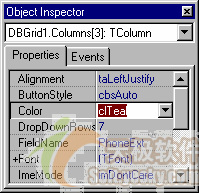
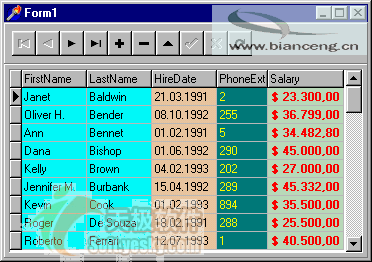
最直觀的方式是透過 Columns 編輯器,為特定欄位直接設定顏色:
TDBGridColumns 屬性開啟編輯視窗Color(背景色)或 Font.Color(字體色)此法簡單快速,適合固定不變的欄位樣式需求。
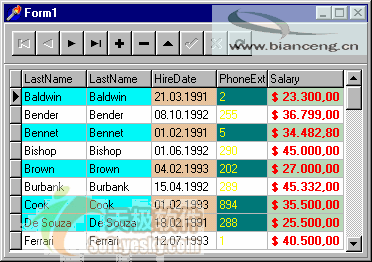
當需根據資料值動態決定列顏色,且保留儲存格編輯功能(不使用 dgRowSelect),請撰寫 OnDrawColumnCell 事件處理程序。
procedure TForm1.DBGrid1DrawColumnCell(Sender: TObject; const Rect: TRect;
  DataCol: Integer; Column: TColumn; State: TGridDrawState);
begin
  if Table1.FieldByName('Salary').AsCurrency > 36000 then
    DBGrid1.Canvas.Font.Color := clMaroon;  // 栗色字體
  DBGrid1.DefaultDrawColumnCell(Rect, DataCol, Column, State);
end;
procedure TForm1.DBGrid1DrawColumnCell(Sender: TObject; const Rect: TRect;
  DataCol: Integer; Column: TColumn; State: TGridDrawState);
begin
  if Table1.FieldByName('Salary').AsCurrency > 36000 then
    DBGrid1.Canvas.Brush.Color := clWhite;  // 白色背景
  DBGrid1.DefaultDrawColumnCell(Rect, DataCol, Column, State);
end;
procedure TForm1.DBGrid1DrawColumnCell(Sender: TObject; const Rect: TRect;
  DataCol: Integer; Column: TColumn; State: TGridDrawState);
begin
  if Table1.FieldByName('Salary').AsCurrency > 40000 then begin
    DBGrid1.Canvas.Font.Color := clWhite;
    DBGrid1.Canvas.Brush.Color := clBlack;
  end;
  if DataCol = 4 then
    DBGrid1.DefaultDrawColumnCell(Rect, DataCol, Column, State);
end;
此範例示範:薪資超過 4 萬的列以黑底白字顯示,並僅對第 4 欄(DataCol = 4)套用預設繪圖,避免影響其他欄位。
DefaultDrawColumnCell 完成實際繪製,否則儲存格將空白Canvas 屬性後,該筆記錄的所有欄位都會受影響;若需針對單一欄位,請搭配 DataCol 或 Column.FieldName 判斷else 區塊重設 Canvas.Font.Color := clWindowText; Canvas.Brush.Color := clWindow;本文所有程式碼均在 Delphi 7 + Windows XP 及 Delphi 6 + Windows 2000 環境下編譯通過。善用 OnDrawColumnCell,即可讓 TDBGrid 呈現豐富的視覺化效果,提升使用者體驗。