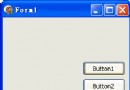
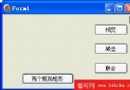
花一小時寫了第一個 Delphi for PHP 程式:瀏覽器顯示簡單加法題,使用者輸入答案,系統判斷正誤並可繼續下一題。功能簡單,主要為熟悉環境,過程中查閱 PHP 說明,發現 CodeGear 的 PHP 說明做得不錯。
// Includes
require_once("vcl/vcl.inc.php");
use_unit("forms.inc.php");
use_unit("extctrls.inc.php");
use_unit("stdctrls.inc.php");

// Class definition
class Unit3 extends Page
{
  public $txtAnswer = null;
  public $btnB = null;
  public $btnA = null;
  public $btnRun = null;
  public $lblMsg = null;
  public $Button4 = null;
  public $Button2 = null;

  function btnRunClick($sender, $params)
  {
    $a = rand(1, 9);
    $b = rand(1, 9);
    $this->btnA->Caption = $a;
    $this->btnB->Caption = $b;
    $this->lblMsg->Caption = " ";
    $this->txtAnswer->Text = " ";
  }

  function txtAnswerSubmit($sender, $params)
  {
    global $a, $b, $c0, $c1;
    $a = $this->btnA->Caption;
    $b = $this->btnB->Caption;
    $c0 = $a + $b;
    $c1 = $this->txtAnswer->Text;
    if ($c0 == $c1) {
      $this->lblMsg->Caption = "Right";
    } else {
      $this->lblMsg->Caption = "Wrong";
    }
  }
}

global $application;
global $Unit3;

// Creates the form
$Unit3 = new Unit3($application);
// Read from resource file
$Unit3->loadResource(__FILE__);
// Shows the form
$Unit3->show();
?>
$this->lblMsg 這類物件寫法初上手不適應,看幾個範例後明白,其實與 Delphi 物件導向體系幾乎相同,只差語法。程式碼提示極快,若無提示通常是寫錯了。$this 很囉嗦,不知有無簡化方法。; 結尾,if 內語句亦然,與 Pascal 不同。inc.php 副檔名,無法修改伺服器 PHP 設定,只好自架 Apache 測試。Delphi for PHP 除錯用的就是 Apache,應是設定問題。繼續慢慢研究中。