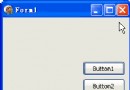
DelphiX 動畫系統基於三大核心組件:
unit Unit1;

interface

uses
  Windows, Messages, SysUtils, Variants, Classes, Graphics, Controls, Forms,
  Dialogs, DXDraws, StdCtrls, DXClass;

type
  TForm1 = class(TForm)
    DXDraw1: TDXDraw;
    DXImageList1: TDXImageList;
    DXTimer1: TDXTimer;
    Button1: TButton;
    Button2: TButton;
    procedure FormCreate(Sender: TObject);
    procedure DXTimer1Timer(Sender: TObject; LagCount: Integer);
    procedure Button1Click(Sender: TObject);
    procedure Button2Click(Sender: TObject);
  private
    { Private declarations }
  public
    { Public declarations }
  end;

var
  Form1: TForm1;

implementation

{$R *.dfm}

// 精靈記錄:位置 + 速度
type
  TSpriteRec = record
    X, Y: Integer;      // 當前位置
    VelX, VelY: Integer; // 速度向量 (像素/幀)
  end;

var
  Sprites: array of TSpriteRec;  // 動態陣列
  PicItem: TPictureCollectionItem;

procedure TForm1.FormCreate(Sender: TObject);
const
  ImgPath1 = 'C:\Temp\DelphiX.bmp';
begin
  // 1. 設定 DXDraw 填滿客戶區
  DXDraw1.Align := alClient;

  // 2. 設定 DXTimer 最高頻率
  DXTimer1.Interval := 0;  // 0 = 盡可能快 (垂直同步限制)
  DXTimer1.Enabled := True;

  // 3. 載入圖片資源
  DXImageList1.DXDraw := DXDraw1;
  DXImageList1.Items.Add;
  PicItem := DXImageList1.Items[DXImageList1.Items.Count - 1];
  PicItem.Picture.LoadFromFile(ImgPath1);

  // 4. 初始化 1 個精靈
  SetLength(Sprites, 1);
  Sprites[0].X := Random(DXDraw1.Width - PicItem.Width);
  Sprites[0].Y := Random(DXDraw1.Height - PicItem.Height);
  Sprites[0].VelX := 1;
  Sprites[0].VelY := 1;

  // 5. 按鈕設定
  Button1.Caption := '- 減少精靈';
  Button2.Caption := '+ 增加精靈';

  Randomize;
end;

// 減少精靈
procedure TForm1.Button1Click(Sender: TObject);
begin
  if Length(Sprites) > 1 then
    SetLength(Sprites, Length(Sprites) - 1);
end;

// 增加精靈
procedure TForm1.Button2Click(Sender: TObject);
var
  NewIdx: Integer;
begin
  NewIdx := Length(Sprites);
  SetLength(Sprites, NewIdx + 1);
  Sprites[NewIdx].X := Random(DXDraw1.Width - PicItem.Width);
  Sprites[NewIdx].Y := Random(DXDraw1.Height - PicItem.Height);
  Sprites[NewIdx].VelX := Random(3) + 1;  // 1-3
  Sprites[NewIdx].VelY := Random(3) + 1;
  // 隨機方向
  if Random(2) = 0 then Sprites[NewIdx].VelX := -Sprites[NewIdx].VelX;
  if Random(2) = 0 then Sprites[NewIdx].VelY := -Sprites[NewIdx].VelY;
end;

// 遊戲主迴圈:每幀執行一次
procedure TForm1.DXTimer1Timer(Sender: TObject; LagCount: Integer);
var
  i: Integer;
  S: ^TSpriteRec;
  LagFactor: Integer;
begin
  // 1. 清除後台緩衝區 (黑色背景)
  DXDraw1.Surface.Fill(0);

  // 2. 幀率補償因子:正常幀 LagCount=0 → Factor=1;掉1幀 LagCount=1 → Factor=2
  LagFactor := LagCount + 1;

  // 3. 遍歷所有精靈:更新位置 + 邊界檢測 + 繪製
  for i := 0 to High(Sprites) do
  begin
    S := @Sprites[i];

    // 邊界檢測與反彈 (乘以 LagFactor 保持速度一致)
    if S.X > DXDraw1.Width - PicItem.Width then
    begin
      S.X := DXDraw1.Width - PicItem.Width;
      S.VelX := -Abs(S.VelX);
    end
    else if S.X < 0 then
    begin
      S.X := 0;
      S.VelX := Abs(S.VelX);
    end;

    if S.Y > DXDraw1.Height - PicItem.Height then
    begin
      S.Y := DXDraw1.Height - PicItem.Height;
      S.VelY := -Abs(S.VelY);
    end
    else if S.Y < 0 then
    begin
      S.Y := 0;
      S.VelY := Abs(S.VelY);
    end;

    // 更新位置 (乘以 LagFactor)
    Inc(S.X, S.VelX * LagFactor);
    Inc(S.Y, S.VelY * LagFactor);

    // 繪製精靈
    PicItem.Draw(DXDraw1.Surface, S.X, S.Y, 0);
  end;

  // 4. 可選:顯示幀率與精靈數量
  with DXDraw1.Surface.Canvas do
  begin
    Brush.Style := bsClear;
    Font.Color := clWhite;
    Font.Size := 14;
    TextOut(10, 10, Format('FPS: %.1f | Sprites: %d | Lag: %d',
      [DXTimer1.FrameRate, Length(Sprites), LagCount]));
    Release;
  end;

  // 5. 翻轉前後緩衝區顯示
  DXDraw1.Flip;
end;

end.
object Form1: TForm1
  Left = 0
  Top = 0
  Caption = 'DelphiX 簡單動畫 - 多精靈彈跳'
  ClientHeight = 400
  ClientWidth = 600
  Color = clBtnFace
  Font.Charset = DEFAULT_CHARSET
  Font.Color = clWindowText
  Font.Height = -11
  Font.Name = 'Tahoma'
  Font.Style = []
  OldCreateOrder = False
  OnCreate = FormCreate
  PixelsPerInch = 96
  TextHeight = 13
  object DXDraw1: TDXDraw
    Left = 0
    Top = 0
    Width = 600
    Width = 400
    Align = alClient
    AutoInitialize = True
    AutoSize = True
    Color = clBlack
    Display.FixedBitCount = False
    Display.FixedRatio = True
    Display.FixedSize = True
    Options = [doAllowReboot, doWaitVBlank, doCenter, do3D, doDirectX7Mode, doHardware, doSelectDriver]
    SurfaceHeight = 400
    SurfaceWidth = 600
    TabOrder = 0
    Traces = <>
  end
  object Button1: TButton
    Left = 10
    Top = 360
    Width = 120
    Height = 30
    Anchors = [akLeft, akBottom]
    Caption = 'Button1'
    TabOrder = 1
    OnClick = Button1Click
  end
  object Button2: TButton
    Left = 140
    Top = 360
    Width = 120
    Height = 30
    Anchors = [akLeft, akBottom]
    Caption = 'Button2'
    TabOrder = 2
    OnClick = Button2Click
  end
  object DXImageList1: TDXImageList
    Left = 40
    Top = 40
  end
  object DXTimer1: TDXTimer
    ActiveOnly = True
    Enabled = True
    Interval = 0
    OnTimer = DXTimer1Timer
    Left = 8
    Top = 152
  end
end
doWaitVBlank 選項防止畫面撕裂// LagCount 含義:
// 0 = 正常,本幀按時觸發
// 1 = 掉了 1 幀,本幀需處理 2 幀邏輯
// 2 = 掉了 2 幀,本幀需處理 3 幀邏輯
// ...
// 公式:實際位移 = 基礎速度 * (LagCount + 1)
// 範例:
// 基礎速度 = 2 像素/幀
// 正常情況:每幀移動 2 像素
// 掉 1 幀 (LagCount=1):本幀移動 2 * 2 = 4 像素
// 結果:視覺上速度保持不變,只是畫面跳幀
DXDraw1.Surface.Fill(0) - 清除後台表面 (背景色)DXDraw1.SurfaceDXDraw1.Flip - 交換 Surface 與 Primary 指標 (極快,僅指標交換)SetLength(Sprites, N) 調整陣列大小High(Sprites) 獲取最大索引^TSpriteRec 避免記錄複製開銷
type
  TSprite = class
  private
    FX, FY: Single;      // 用浮點數存儲位置,支援亞像素精度
    FVelX, FVelY: Single;
    FImage: TPictureCollectionItem;
    FWidth, FHeight: Integer;
    FActive: Boolean;
  public
    constructor Create(AImage: TPictureCollectionItem; X, Y: Single);
    procedure Update(DeltaTime: Single; ScreenW, ScreenH: Integer);
    procedure Draw(Dest: TDirectDrawSurface);
    property Active: Boolean read FActive write FActive;
    property X: Single read FX write FX;
    property Y: Single read FY write FY;
  end;

constructor TSprite.Create(AImage: TPictureCollectionItem; X, Y: Single);
begin
  inherited Create;
  FImage := AImage;
  FX := X; FY := Y;
  FVelX := RandomRange(-3, 3);
  FVelY := RandomRange(-3, 3);
  if FVelX = 0 then FVelX := 1;
  if FVelY = 0 then FVelY := 1;
  FWidth := AImage.Width;
  FHeight := AImage.Height;
  FActive := True;
end;

procedure TSprite.Update(DeltaTime: Single; ScreenW, ScreenH: Integer);
begin
  if not FActive then Exit;

  FX := FX + FVelX * DeltaTime * 60; // DeltaTime 以秒為單位,60 為基準幀率
  FY := FY + FVelY * DeltaTime * 60;

  // 邊界反彈
  if FX > ScreenW - FWidth then
  begin
    FX := ScreenW - FWidth;
    FVelX := -Abs(FVelX);
  end
  else if FX < 0 then
  begin
    FX := 0;
    FVelX := Abs(FVelX);
  end;

  if FY > ScreenH - FHeight then
  begin
    FY := ScreenH - FHeight;
    FVelY := -Abs(FVelY);
  end
  else if FY < 0 then
  begin
    FY := 0;
    FVelY := Abs(FVelY);
  end;
end;

procedure TSprite.Draw(Dest: TDirectDrawSurface);
begin
  if not FActive then Exit;
  FImage.Draw(Dest, Round(FX), Round(FY), 0);
end;
var
  LastTime: Int64 = 0;
  Freq: Int64 = 0;

procedure TForm1.FormCreate(Sender: TObject);
begin
  // ... 原有初始化 ...
  QueryPerformanceFrequency(Freq);
  QueryPerformanceCounter(LastTime);
end;

procedure TForm1.DXTimer1Timer(Sender: TObject; LagCount: Integer);
var
  CurrentTime: Int64;
  DeltaTime: Single;
  i: Integer;
begin
  // 計算精確時間差
  QueryPerformanceCounter(CurrentTime);
  DeltaTime := (CurrentTime - LastTime) / Freq; // 秒
  LastTime := CurrentTime;

  // 限制最大 DeltaTime (防止拖動視窗導致巨大跳躍)
  if DeltaTime > 0.1 then DeltaTime := 0.1;

  DXDraw1.Surface.Fill(0);

  for i := 0 to High(Sprites) do
  begin
    Sprites[i].Update(DeltaTime, DXDraw1.Width, DXDraw1.Height);
    Sprites[i].Draw(DXDraw1.Surface);
  end;

  // 顯示資訊
  with DXDraw1.Surface.Canvas do
  begin
    Brush.Style := bsClear;
    Font.Color := clWhite;
    Font.Size := 14;
    TextOut(10, 10, Format('FPS: %.1f | DT: %.3fms | Sprites: %d',
      [DXTimer1.FrameRate, DeltaTime * 1000, Length(Sprites)]));
    Release;
  end;

  DXDraw1.Flip;
end;
| 優化項目 | 說明 | 效果 |
|---|---|---|
| doHardware + doDirectX7Mode | 啟用顯卡硬體加速 | 繪製速度提升 10-100x |
| doWaitVBlank | 垂直同步防撕裂 | 畫面流暢無撕裂 |
| Interval := 0 | 最高頻率觸發 | 最大化幀率 |
| 預分配陣列容量 | SetLength 避免頻繁重新分配 | 減少 GC 壓力 |
| 問題 | 原因 | 解決 |
|---|---|---|
| 動畫卡頓/閃爍 | 未啟用雙緩衝或 VSync | 確認 Flip 機制;啟用 doWaitVBlank |
| 精靈穿牆/卡邊界 | 位置更新順序錯誤 | 先檢測邊界反彈,再更新位置 |
| 速度隨電腦效能變化 | 未使用 LagCount/DeltaTime 補償 | 套用 LagFactor 或 DeltaTime |
| 記憶體持續增長 | 動態陣列未釋放/物件洩漏 | FormDestroy 釋放;使用 FastMM4 檢測 |
| 圖片載入失敗 | 路徑錯誤/格式不支援 | 使用絕對路徑;確認 BMP/JPG/DXG 格式 |
這個「首個簡單動畫」範例包含了 DelphiX 遊戲開發的所有核心要素:TDXDraw 雙緩衝、TDXImageList 資源管理、TDXTimer 幀率補償主迴圈、精靈位置/速度更新、邊界碰撞反彈、動態實體管理。理解 LagCount 補償機制、Flip 雙緩衝原理、Interval:=0 高頻模式,是構建流暢 2D 遊戲/動畫的基石。建議以此為基礎,逐步擴展為精靈類體系、場景管理、碰撞檢測、粒子系統等完整遊戲引擎架構。