DelphiX 提供 8 種波浪變形繪圖方法,可在 X 或 Y 軸產生正弦波動畫效果,支援多種混合模式:
| 方法 | 軸向 | 混合模式 | 說明 |
|---|---|---|---|
| DrawWaveX | X 軸 | 一般 | 水平波浪 |
| DrawWaveXAdd | X 軸 | 加色 | Additive blending |
| DrawWaveXAlpha | X 軸 | Alpha | 透明度混合 |
| DrawWaveXSub | X 軸 | 減色 | Subtractive blending |
| DrawWaveY | Y 軸 | 一般 | 垂直波浪 |
| DrawWaveYAdd | Y 軸 | 加色 | |
| DrawWaveYAlpha | Y 軸 | Alpha | |
| DrawWaveYSub | Y 軸 | 減色 |
procedure DrawWaveX(
  Dest: TDirectDrawSurface;  // 目標繪圖表面
  X, Y: Integer;             // 左上角座標
  SrcWidth, SrcHeight: Integer; // 來源圖片寬高
  Pattern: Integer;          // 圖案索引 (通常 0)
  Amp: Integer;              // 振幅 (像素)
  WaveLen: Integer;          // 波長 (像素)
  Phase: Integer             // 相位位移 (動畫用)
);unit Unit1;
interface
uses Windows, Messages, SysUtils, Variants, Classes, Graphics, Controls, Forms,
Dialogs, DXDraws, StdCtrls, DXClass;
type
TForm1 = class(TForm)
DXDraw1: TDXDraw;
DXImageList1: TDXImageList;
DXTimer1: TDXTimer;
Edit1: TEdit;
CheckBox1: TCheckBox;
procedure FormCreate(Sender: TObject);
procedure DXTimer1Timer(Sender: TObject; LagCount: Integer);
procedure Edit1Change(Sender: TObject);
procedure CheckBox1Click(Sender: TObject);
end;
var Form1: TForm1;
implementation {$R *.dfm}
const
// 正弦波查表,32 個採樣點
WaveTable: array[0..31] of Smallint = (
-8,-7,-6,-5,-4,-3,-2,-1, 0, 1, 2, 3, 4, 5, 6, 7,
8, 7, 6, 5, 4, 3, 2,-1, 0,-1,-2,-3,-4,-5,-6,-7
);
var
PicItem: TPictureCollectionItem;
Amp, Len: Integer; // Amp 當相位索引,Len 為波長 (由 Edit1 控制)
procedure TForm1.FormCreate(Sender: TObject);
const ImgPath = 'C:\Temp\DelphiX.bmp';
begin
DXImageList1.DXDraw := DXDraw1;
PicItem := TPictureCollectionItem(DXImageList1.Items.Add);
PicItem.Picture.LoadFromFile(ImgPath);
DXDraw1.Align := alClient;
DXTimer1.Interval := 30; // ~33 FPS
Edit1.Text := '60'; // 預設波長 60
Edit1Change(nil);
CheckBox1.Checked := True;
CheckBox1.Caption := 'DrawWaveX';
end;
procedure TForm1.CheckBox1Click(Sender: TObject);
const Captions: array[Boolean] of string = ('DrawWaveY', 'DrawWaveX');
begin
CheckBox1.Caption := Captions[CheckBox1.Checked];
end;
procedure TForm1.Edit1Change(Sender: TObject);
begin
Len := StrToIntDef(Edit1.Text, 0);
end;
procedure TForm1.DXTimer1Timer(Sender: TObject; LagCount: Integer);
begin
DXDraw1.Surface.Fill(0); // 清黑
if CheckBox1.Checked then
PicItem.DrawWaveX(DXDraw1.Surface,
(DXDraw1.Width - PicItem.Width) div 2,
(DXDraw1.Height - PicItem.Height) div 2,
PicItem.Width, PicItem.Height,
0, WaveTable[Amp and 31], Len, 0)
else
PicItem.DrawWaveY(DXDraw1.Surface,
(DXDraw1.Width - PicItem.Width) div 2,
(DXDraw1.Height - PicItem.Height) div 2,
PicItem.Width, PicItem.Height,
0, WaveTable[Amp and 31], Len, 0);
DXDraw1.Flip;
Inc(Amp); // 相位推進
end;
end.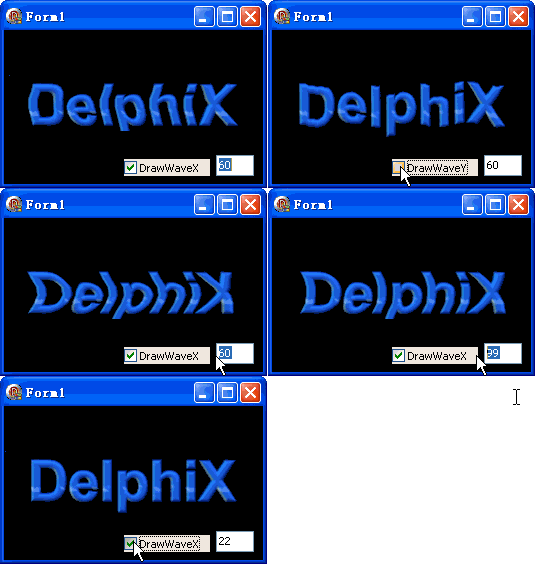
勾選框切換 X/Y 軸波浪,編輯框即時調整波長,畫面流暢無撕裂。
object DXDraw1: TDXDraw
  Align = alClient
  Options = [doAllowReboot, doWaitVBlank, doCenter, do3D, doDirectX7Mode, doHardware, doSelectDriver]
end
object DXTimer1: TDXTimer
  Interval = 30
  ActiveOnly = True
  Enabled = True
endDXDraw1.Surface.Fill(0) 清除背景比重繪整張圖更快。DXTimer1.Interval := 0 可跑滿螢幕重繪率,但會佔滿 CPU。