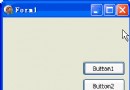
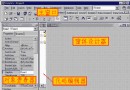
WaitableTimer (等待定時器) 是 Windows 核心同步物件之一,結合**高精度定時**與**線程同步**能力。本文系統整理其建立與設定 API、關鍵參數語意 (手動/自動重置、起始時間、週期、APC 回調、系統喚醒),並提供兩個基礎同步範例:單次觸發喚醒多線程、週期觸發單線程。
function CreateWaitableTimer(
  lpTimerAttributes: PSecurityAttributes;  // 安全屬性,通常 nil
  bManualReset: BOOL;                      // True=手動重置(喚醒所有), False=自動重置(喚醒單一)
  lpTimerName: PWideChar                   // 具名支援跨進程
): THandle; stdcall;

function SetWaitableTimer(
  hTimer: THandle;                         // CreateWaitableTimer 返回句柄
  var lpDueTime: TLargeInteger;            // 起始時間 (Int64): 0=立即, <0=相對, >0=絕對 UTC FILETIME
  lPeriod: Longint;                        // 週期 (毫秒): 0=單次, >0=週期觸發
  pfnCompletionRoutine: TFNTimerAPCRoutine;// APC 回調函數指標 (可 nil)
  lpArgToCompletionRoutine: Pointer;       // 傳遞給 APC 回調的用戶指標
  fResume: BOOL                            // True=系統休眠/待機時也喚醒執行
): BOOL; stdcall;
True:定時器觸發後保持**有信號狀態**,直到手動 CancelWaitableTimer,所有等待線程**全部**被喚醒。False:定時器觸發後**自動重置為無信號**,僅喚醒**一個**等待線程 (類似 Semaphore)。SleepEx 實現非阻塞高精度回調 (詳見後續教學)。True 時甚至能喚醒休眠/待機系統執行任務 (極強權限)。unit Unit1;
interface uses Windows, Messages, SysUtils, Variants, Classes, Graphics, Controls, Forms, Dialogs, StdCtrls;
type TForm1 = class(TForm)
Button1: TButton;
procedure Button1Click(Sender: TObject);
procedure FormDestroy(Sender: TObject);
end;
var Form1: TForm1;
implementation {$R *.dfm}
var f: Integer; hWaitableTimer: THandle;
function MyThreadFun(p: Pointer): DWORD; stdcall;
var i, y: Integer;
begin
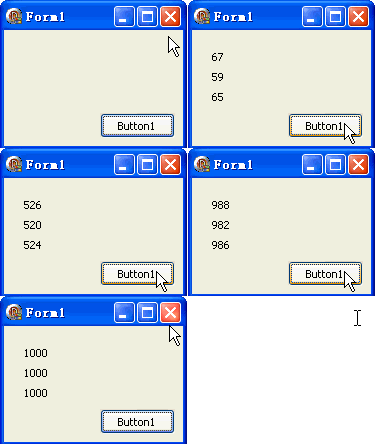
Inc(f); y := 20 * f;
{ 等待定時器觸發 }
if WaitForSingleObject(hWaitableTimer, INFINITE) = WAIT_OBJECT_0 then
for i := 0 to 1000 do
begin
Form1.Canvas.Lock; Form1.Canvas.TextOut(20, y, IntToStr(i)); Form1.Canvas.Unlock;
Sleep(1);
end;
Result := 0;
end;
procedure TForm1.Button1Click(Sender: TObject);
var ThreadID: DWORD; DueTime: Int64;
begin
hWaitableTimer := CreateWaitableTimer(nil, True, nil); // 手動重置:喚醒所有
DueTime := 0; // 立即觸發
SetWaitableTimer(hWaitableTimer, DueTime, 0, nil, nil, False); // 單次觸發
Repaint; f := 0;
CreateThread(nil, 0, @MyThreadFun, nil, 0, ThreadID);
CreateThread(nil, 0, @MyThreadFun, nil, 0, ThreadID);
CreateThread(nil, 0, @MyThreadFun, nil, 0, ThreadID);
end;
procedure TForm1.FormDestroy(Sender: TObject);
begin
CloseHandle(hWaitableTimer);
end;
end.
function MyThreadFun(p: Pointer): DWORD; stdcall;
var i, y: Integer;
begin
  Inc(f); y := 20 * f;
  { 將等待放入迴圈,每次週期觸發執行一次繪製 }
  for i := 0 to 1000 do
  begin
    if WaitForSingleObject(hWaitableTimer, INFINITE) = WAIT_OBJECT_0 then
    begin
      Form1.Canvas.Lock; Form1.Canvas.TextOut(20, y, IntToStr(i)); Form1.Canvas.Unlock;
    end;
  end;
  Result := 0;
end;

procedure TForm1.Button1Click(Sender: TObject);
var ThreadID: DWORD; DueTime: Int64;
begin
  hWaitableTimer := CreateWaitableTimer(nil, False, nil);  // 自動重置:單一喚醒
  DueTime := 0;
  SetWaitableTimer(hWaitableTimer, DueTime, 500, nil, nil, False);  // 每 500ms 觸發
  Repaint; f := 0;
  CreateThread(nil, 0, @MyThreadFun, nil, 0, ThreadID);
  CreateThread(nil, 0, @MyThreadFun, nil, 0, ThreadID);
  CreateThread(nil, 0, @MyThreadFun, nil, 0, ThreadID);
end;
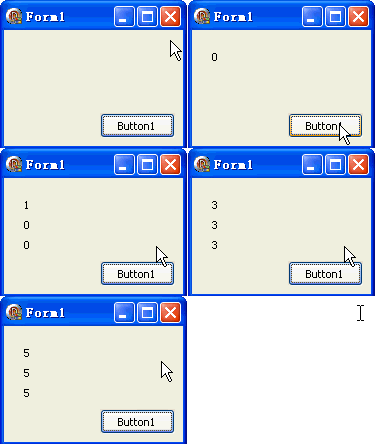
object Form1: TForm1
  object Button1: TButton OnClick = Button1Click
end
| 物件 | 核心能力 | 定時功能 | 喚醒模式 |
|---|---|---|---|
| Event | 訊號通知 | 無 | 手動/自動重置 |
| Mutex | 互斥存取 | 無 | 擁有權轉移 |
| Semaphore | 計數同步 | 無 | 計數遞減/釋放 |
| WaitableTimer | 定時 + 同步 | 高精度 (100ns) | 手動/自動重置 + 週期 |
Event / Mutex / CriticalSection (更輕量)。WaitableTimer (唯一原生選擇)。WaitableTimer + APC 回調 (非阻塞)。CreateWaitableTimer。DueTime 三模式詳解 (相對/絕對/零值)。SleepEx 可喚醒等待。CancelWaitableTimer 動態控制。WaitableTimer 是 Windows 同步物件中功能最豐富、精度最高的定時同步原語,掌握其參數組合可解決大多數定時協調難題。