WaitableTimer 核心優勢在於**非同步程序呼叫 (APC)** 機制:定時器到期時將回調函數排入線程 APC 隊列,線程處於可喚醒等待狀態 (SleepEx, WaitForSingleObjectEx 等) 時立即執行,實現高精度、低延遲的定時任務。本文深入解析 APC 回調的時間參數合成與指標參數傳遞實戰。
procedure TimerAPCProc(
  lpArgToCompletionRoutine: Pointer;  // SetWaitableTimer 第 5 參數傳入
  dwTimerLowValue: DWORD;             // 觸發時間低 32 位 (UTC FILETIME)
  dwTimerHighValue: DWORD             // 觸發時間高 32 位 (UTC FILETIME)
); stdcall;
var
  UTCFileTime, LocalFileTime: TFileTime;
  SystemTime: TSystemTime;
  DateTime: TDateTime;
begin
  { 1. 合成 UTC FILETIME }
  UTCFileTime.dwLowDateTime  := dwTimerLowValue;
  UTCFileTime.dwHighDateTime := dwTimerHighValue;

  { 2. UTC -> 本地時間 }
  FileTimeToLocalFileTime(UTCFileTime, LocalFileTime);

  { 3. FILETIME -> SYSTEMTIME }
  FileTimeToSystemTime(LocalFileTime, SystemTime);

  { 4. SYSTEMTIME -> TDateTime }
  DateTime := SystemTimeToDateTime(SystemTime);

  { 使用 DateTime... }
end;
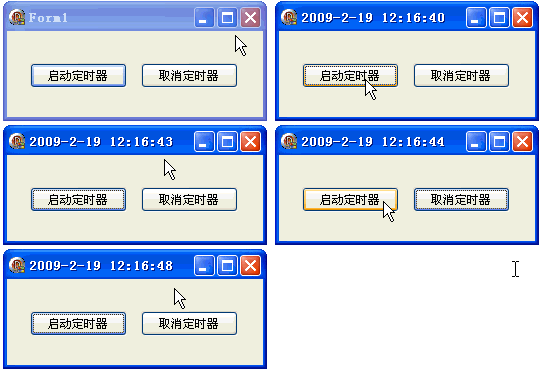
unit Unit1;

interface
uses Windows, Messages, SysUtils, Variants, Classes, Graphics, Controls, Forms, Dialogs, StdCtrls;
type TForm1 = class(TForm)
  Button1, Button2: TButton;
  procedure Button1Click(Sender: TObject);
  procedure Button2Click(Sender: TObject);
  procedure FormDestroy(Sender: TObject);
end;
var Form1: TForm1;
implementation {$R *.dfm}

var hTimer: THandle;

procedure TimerAPCProc(lpArg: Pointer; dwLow, dwHigh: DWORD); stdcall;
var UTC, Local: TFileTime; ST: TSystemTime; DT: TDateTime;
begin
  UTC.dwLowDateTime := dwLow;  UTC.dwHighDateTime := dwHigh;
  FileTimeToLocalFileTime(UTC, Local);
  FileTimeToSystemTime(Local, ST);
  DT := SystemTimeToDateTime(ST);
  Form1.Caption := DateTimeToStr(DT);  // 顯示精確觸發時間
  SleepEx(INFINITE, True);  // 保持可喚醒等待
end;

function MyThreadFun(p: Pointer): Integer; stdcall;
var DueTime: Int64;
begin
  DueTime := 0;  // 立即開始
  if SetWaitableTimer(hTimer, DueTime, 1000, @TimerAPCProc, nil, False) then
    SleepEx(INFINITE, True);
  Result := 0;
end;

procedure TForm1.Button1Click(Sender: TObject);
var ID: DWORD;
begin
  if hTimer = 0 then hTimer := CreateWaitableTimer(nil, True, nil);
  CreateThread(nil, 0, @MyThreadFun, nil, 0, ID);
end;

procedure TForm1.Button2Click(Sender: TObject);
begin
  CancelWaitableTimer(hTimer);
end;

procedure TForm1.FormDestroy(Sender: TObject);
begin
  CloseHandle(hTimer);
end;
end.
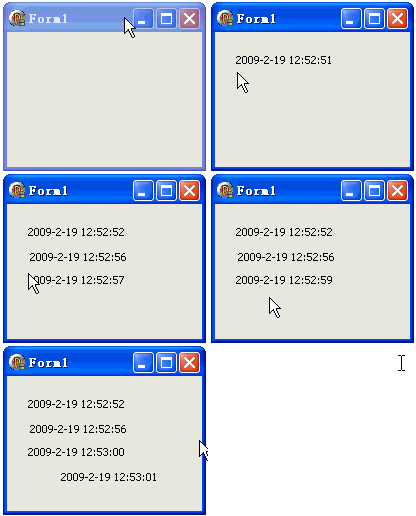
SetWaitableTimer 第 5 參數 lpArgToCompletionRoutine 可傳遞任意指標,APC 回調第一參數接收。此例傳遞 TPoint 記錄點擊位置並在該處繪製時間。
var
  hTimer: THandle;
  pt: TPoint;  // 全域座標暫存

procedure TimerAPCProc(lpArg: Pointer; dwLow, dwHigh: DWORD); stdcall;
var UTC, Local: TFileTime; ST: TSystemTime; DT: TDateTime; pt2: TPoint;
begin
  UTC.dwLowDateTime := dwLow;  UTC.dwHighDateTime := dwHigh;
  FileTimeToLocalFileTime(UTC, Local);
  FileTimeToSystemTime(Local, ST);
  DT := SystemTimeToDateTime(ST);
  pt2 := PPoint(lpArg)^;  // 解引用接收座標
  Form1.Canvas.Lock;
  Form1.Canvas.TextOut(pt2.X, pt2.Y, DateTimeToStr(DT));
  Form1.Canvas.Unlock;
  SleepEx(INFINITE, True);
end;

function MyThreadFun(p: Pointer): Integer; stdcall;
var DueTime: Int64;
begin
  DueTime := 0;
  { 傳遞 @pt 指標給 APC }
  if SetWaitableTimer(hTimer, DueTime, 1000, @TimerAPCProc, @pt, False) then
    SleepEx(INFINITE, True);
  Result := 0;
end;

procedure TForm1.FormMouseDown(Sender: TObject; Button: TMouseButton; Shift: TShiftState; X, Y: Integer);
var ID: DWORD;
begin
  pt := Point(X, Y);  // 記錄點擊座標
  if hTimer = 0 then hTimer := CreateWaitableTimer(nil, True, nil);
  CreateThread(nil, 0, @MyThreadFun, nil, 0, ID);
end;
object Form1: TForm1
  OnMouseDown = FormMouseDown
  ...
end
SetWaitableTimer 到期 → 將 APC 回調排入**目標線程** APC 隊列。SleepEx(..., True), WaitForSingleObjectEx(..., True) 等) 才會處理 APC。| 函數 | 特點 |
|---|---|
SleepEx(ms, True) | 最簡單,單參數毫秒 + 可喚醒旗標 |
WaitForSingleObjectEx(h, ms, True) | 等待單一物件 + APC |
WaitForMultipleObjectsEx(n, handles, waitAll, ms, True) | 等待多物件 + APC |
MsgWaitForMultipleObjectsEx(...) | 等待物件+訊息+APC (GUI 線程常用) |
SignalObjectAndWait(hSignal, hWait, ms, True) | 發信號+等待 原子操作 + APC |
SetWaitableTimer 與 SleepEx **必須在同一線程**,否則 APC 無法進隊。CancelWaitableTimer(hTimer) 可隨時停止週期觸發。WaitableTimer 精度達 0.1ms (100ns 單位),遠優於 TTimer (WM_TIMER 訊息佇列最低優先級,誤差常 > 10ms)。CreateWaitableTimer 支援跨進程同步。掌握 APC 回調與指標傳遞,即能發揮 WaitableTimer 超越 TTimer 的高精度、非阻塞、上下文感知定時能力。