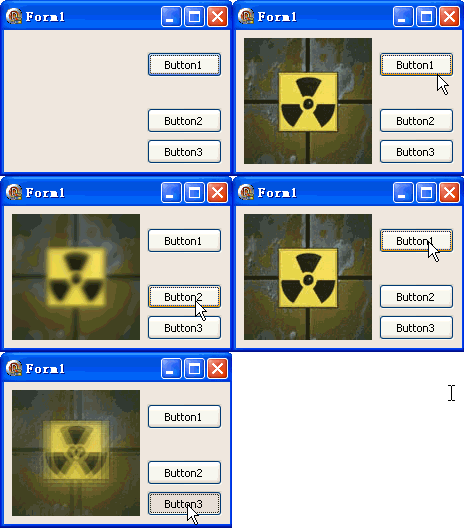
TDIB.SplitBlur(Intensity: Integer) 產生分離色調模糊。範例提供三個按鈕:載入圖片、強度 1、強度 4,方便比較不同參數效果。
unit Unit1;

interface

uses
  Windows, Messages, SysUtils, Variants, Classes, Graphics, Controls, Forms,
  Dialogs, DIB, StdCtrls;

type
  TForm1 = class(TForm)
    DXPaintBox1: TDXPaintBox;
    Button1: TButton;
    Button2: TButton;
    Button3: TButton;
    procedure Button1Click(Sender: TObject);
    procedure Button2Click(Sender: TObject);
    procedure Button3Click(Sender: TObject);
  end;

var
  Form1: TForm1;

implementation

{$R *.dfm}

procedure TForm1.Button1Click(Sender: TObject);
const
  ImgPath = 'C:\Temp\DX.jpg';
begin
  DXPaintBox1.DIB.LoadFromFile(ImgPath);
  DXPaintBox1.Width := DXPaintBox1.DIB.Width;
  DXPaintBox1.Height := DXPaintBox1.DIB.Height;
  DXPaintBox1.Repaint;
end;

procedure TForm1.Button2Click(Sender: TObject);
begin
  DXPaintBox1.DIB.SplitBlur(1);
  DXPaintBox1.Repaint;
end;

procedure TForm1.Button3Click(Sender: TObject);
begin
  DXPaintBox1.DIB.SplitBlur(4);
  DXPaintBox1.Repaint;
end;

end.
object Form1: TForm1
  ClientHeight = 142
  ClientWidth = 226
  object DXPaintBox1: TDXPaintBox
    Left = 8; Top = 8; Width = 81; Height = 73
    AutoStretch = False; Stretch = False
  end
  object Button1: TButton
    Left = 143; Top = 22; Width = 75; Height = 25
    Caption = 'Load'; OnClick = Button1Click
  end
  object Button2: TButton
    Left = 143; Top = 78; Width = 75; Height = 25
    Caption = 'Blur 1'; OnClick = Button2Click
  end
  object Button3: TButton
    Left = 143; Top = 109; Width = 75; Height = 25
    Caption = 'Blur 4'; OnClick = Button3Click
  end
end