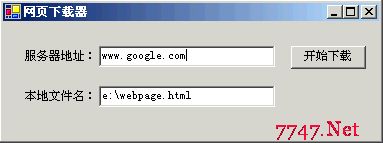
結合前兩節知識,實作一個以 TCP 連線下載網頁預設頁面並存檔的 Windows Forms 應用程式。
private string DoSocketGet(string server)
{
    Encoding ASCII = Encoding.ASCII;
    // HTTP GET 請求
    string Get = "GET / HTTP/1.1 Host: " + server + " Connection: Close ";
    Byte[] ByteGet = ASCII.GetBytes(Get);
    Byte[] RecvBytes = new Byte[256];
    String strRetPage = null;

    try
    {
        // 解析伺服器 IP 並建立端點
        IPAddress hostadd = Dns.Resolve(server).AddressList[0];
        IPEndPoint EPhost = new IPEndPoint(hostadd, 80);

        // 建立 TCP Socket
        Socket s = new Socket(AddressFamily.InterNetwork, SocketType.Stream, ProtocolType.Tcp);

        // 連線
        s.Connect(EPhost);
    }
    catch (Exception se)
    {
        MessageBox.Show("連線錯誤:" + se.Message, "提示", MessageBoxButtons.RetryCancel, MessageBoxIcon.Information);
    }

    if (!s.Connected)
    {
        strRetPage = "無法連線至伺服器!";
        return strRetPage;
    }

    try
    {
        // 發送 HTTP GET
        s.Send(ByteGet, ByteGet.Length, SocketFlags.None);
    }
    catch (Exception ce)
    {
        MessageBox.Show("發送錯誤:" + ce.Message, "提示", MessageBoxButtons.RetryCancel, MessageBoxIcon.Information);
    }

    // 接收回應
    Int32 bytes = s.Receive(RecvBytes, RecvBytes.Length, 0);
    strRetPage = "以下是伺服器 " + server + " 上的預設網頁: ";
    strRetPage += ASCII.GetString(RecvBytes, 0, bytes);

    while (bytes > 0)
    {
        bytes = s.Receive(RecvBytes, RecvBytes.Length, SocketFlags.None);
        strRetPage += ASCII.GetString(RecvBytes, 0, bytes);
    }

    // 關閉連線
    s.Shutdown(SocketShutdown.Both);
    s.Close();

    return strRetPage;
}
private void Download_Click(object sender, System.EventArgs e)
{
    byte[] content = Encoding.ASCII.GetBytes(DoSocketGet(ServerAddress.Text));
    try
    {
        // 寫入檔案(程式碼截斷,完整版應包含 FileStream 寫入)
        FileStream fs = new FileStream(Filename.Text, FileMode.Create);
        fs.Write(content, 0, content.Length);
        fs.Close();
        MessageBox.Show("下載完成!");
    }
    catch (Exception ex)
    {
        MessageBox.Show("檔案寫入錯誤:" + ex.Message);
    }
}
Dns.Resolve 取得 IPAddressIPEndPoint 組合 IP + Port 80Stream 類型 + Tcp 協定GET / HTTP/1.1 請求Receive 回傳 0 位元組Shutdown + Close 確保資料完整FileStream 寫入位元組陣列SslStream)