.NET Framework 內建支援主流圖片格式雙向轉換,透過 ImageFormat 列舉與 Bitmap.Save 方法即可輕鬆實現。
| 格式 | 副檔名 | ImageFormat 成員 |
|---|---|---|
| BMP | .bmp | ImageFormat.Bmp |
| GIF | .gif | ImageFormat.Gif |
| Icon | .ico | ImageFormat.Icon |
| JPEG | .jpg, .jpeg | ImageFormat.Jpeg |
| PNG | .png | ImageFormat.Png |
| TIFF | .tif | ImageFormat.Tiff |
| WMF | .wmf | ImageFormat.Wmf |
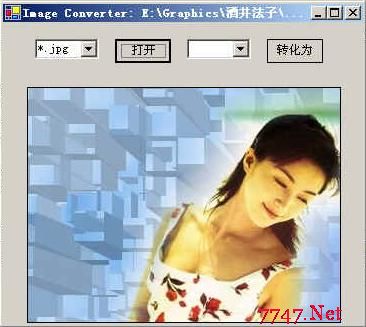
PictureBox (m_pictureBox):顯示圖片,BorderStyle=FixedSingleComboBox (m_cmbOpen/m_cmbSaveAs):來源/目標格式選擇,Items 加入 *.bmp *.jpg *.gif *.tifButton (m_btnOpen/m_btnSaveAs):開啟/轉換儲存private void m_btnOpen_Click(object sender, EventArgs e) {
OpenFileDialog ofd = new OpenFileDialog();
ofd.Filter = m_cmbOpen.Text + "|" + m_cmbOpen.Text;
ofd.InitialDirectory = Environment.CurrentDirectory;
ofd.Title = "開啟圖片檔案";
if (ofd.ShowDialog() == DialogResult.OK) {
string fileName = ofd.FileName;
m_bitmap = new Bitmap(fileName);
// 依比例縮放 PictureBox
if (m_bitmap.Width > m_bitmap.Height) {
m_pictureBox.Width = m_width0;
m_pictureBox.Height = (int)((double)m_bitmap.Height * m_width0 / m_bitmap.Width);
} else {
m_pictureBox.Height = m_height0;
m_pictureBox.Width = (int)((double)m_bitmap.Width * m_height0 / m_bitmap.Height);
}
m_pictureBox.Image = m_bitmap;
this.Text = "Image Converter: " + fileName;
m_btnSaveAs.Enabled = true;
}
}private void m_btnSaveAs_Click(object sender, EventArgs e) {
SaveFileDialog sfd = new SaveFileDialog();
sfd.Title = "轉換儲存為";
sfd.OverwritePrompt = true;
sfd.CheckPathExists = true;
sfd.Filter = m_cmbSaveAs.Text + "|" + m_cmbSaveAs.Text;
if (sfd.ShowDialog() == DialogResult.OK) {
string fileName = sfd.FileName;
switch (m_cmbSaveAs.Text) {
case "*.bmp":
m_bitmap.Save(fileName, ImageFormat.Bmp);
break;
case "*.jpg":
m_bitmap.Save(fileName, ImageFormat.Jpeg);
break;
case "*.gif":
m_bitmap.Save(fileName, ImageFormat.Gif);
break;
case "*.tif":
m_bitmap.Save(fileName, ImageFormat.Tiff);
break;
}
this.Text = "Image Converter: " + fileName;
}
}
Directory.GetFiles 列舉資料夾,迴圈處理EncoderParameters 設定壓縮品質Parallel.ForEach 加速批次處理Image.FromFile 自動偵測格式,不需 ComboBox 手動選擇| 類別 | 命名空間 | 用途 |
|---|---|---|
Bitmap | System.Drawing | 點陣圖操作、載入、儲存 |
ImageFormat | System.Drawing.Imaging | 指定儲存格式 |
OpenFileDialog | System.Windows.Forms | 開啟檔案對話框 |
SaveFileDialog | System.Windows.Forms | 儲存檔案對話框 |
PictureBox | System.Windows.Forms | 圖片顯示控制項 |