圓環進度條,支持設置百分比(0-100),中心顯示文本,外圍圓環按比例繪製掃描角度。效果圖:
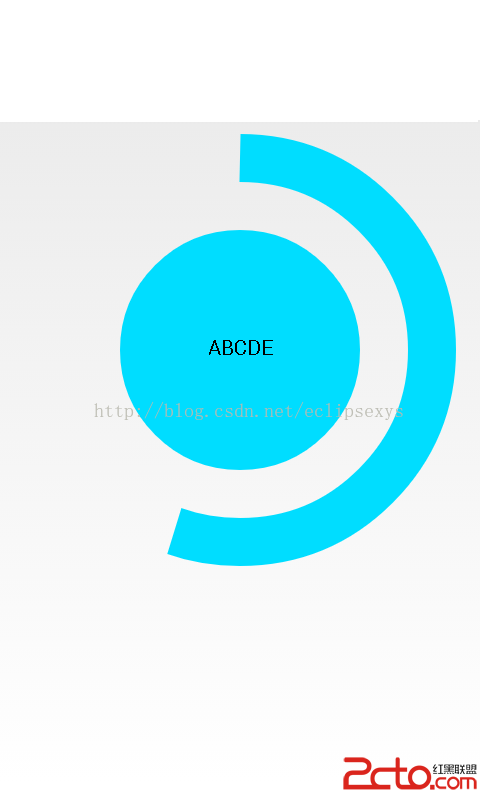
(cx,cy)、半徑、矩形區域 RectF。drawCircle(可選)。drawArc,startAngle=270(12點鐘方向),sweepAngle = percent * 3.6。drawText,基線微調 cy + textSize/4 垂直居中。setSweepValue(float percent) 觸發 invalidate() 重繪。public class CircleProgress extends View {
private Paint circlePaint, arcPaint, textPaint;
private RectF arcRect;
private float cx, cy, radius, strokeWidth;
private float sweepValue = 0f; // 0-100
private String showText = "";
private float textSize = 40f;
public CircleProgress(Context context, AttributeSet attrs) {
super(context, attrs);
init();
}
private void init() {
circlePaint = new Paint(Paint.ANTI_ALIAS_FLAG);
circlePaint.setColor(Color.BLUE);
circlePaint.setStyle(Paint.Style.STROKE);
circlePaint.setStrokeWidth(20f);
arcPaint = new Paint(Paint.ANTI_ALIAS_FLAG);
arcPaint.setColor(Color.RED);
arcPaint.setStyle(Paint.Style.STROKE);
arcPaint.setStrokeWidth(20f);
arcPaint.setStrokeCap(Paint.Cap.ROUND);
textPaint = new Paint(Paint.ANTI_ALIAS_FLAG);
textPaint.setColor(Color.BLACK);
textPaint.setTextSize(textSize);
textPaint.setTextAlign(Paint.Align.CENTER);
}
@Override protected void onMeasure(int wSpec, int hSpec) {
int w = MeasureSpec.getSize(wSpec);
int h = MeasureSpec.getSize(hSpec);
int d = Math.min(w, h);
setMeasuredDimension(d, d);
cx = cy = d / 2f;
radius = d * 0.35f;
strokeWidth = d * 0.1f;
circlePaint.setStrokeWidth(strokeWidth);
arcPaint.setStrokeWidth(strokeWidth);
float inset = strokeWidth / 2f;
arcRect = new RectF(inset, inset, d - inset, d - inset);
textSize = d * 0.25f;
textPaint.setTextSize(textSize);
}
@Override protected void onDraw(Canvas canvas) {
super.onDraw(canvas);
// 背景圓(可選)
// canvas.drawCircle(cx, cy, radius, circlePaint);
// 前景弧
float sweepAngle = sweepValue * 3.6f; // 100% = 360°
canvas.drawArc(arcRect, 270, sweepAngle, false, arcPaint);
// 中心文本
canvas.drawText(showText, cx, cy + textSize / 3f, textPaint);
}
public void setSweepValue(float value) {
sweepValue = Math.max(0, Math.min(100, value));
showText = String.format("%.0f%%", sweepValue);
invalidate();
}
public void setShowText(String text) {
showText = text;
invalidate();
}
}
<com.example.CircleProgress
    android:id="@+id/progress"
    android:layout_width="200dp"
    android:layout_height="200dp" />
CircleProgress cp = findViewById(R.id.progress);
cp.setSweepValue(75f);  // 顯示 75%
Paint.ANTI_ALIAS_FLAG 邊緣平滑。startAngle=270 從頂部開始,順時針。cy + textSize/3 經驗補正(Paint 基線在字符底部)。Paint.Cap.ROUND 使弧端點圓潤。invalidate() 觸發重繪,無動畫時極輕量。