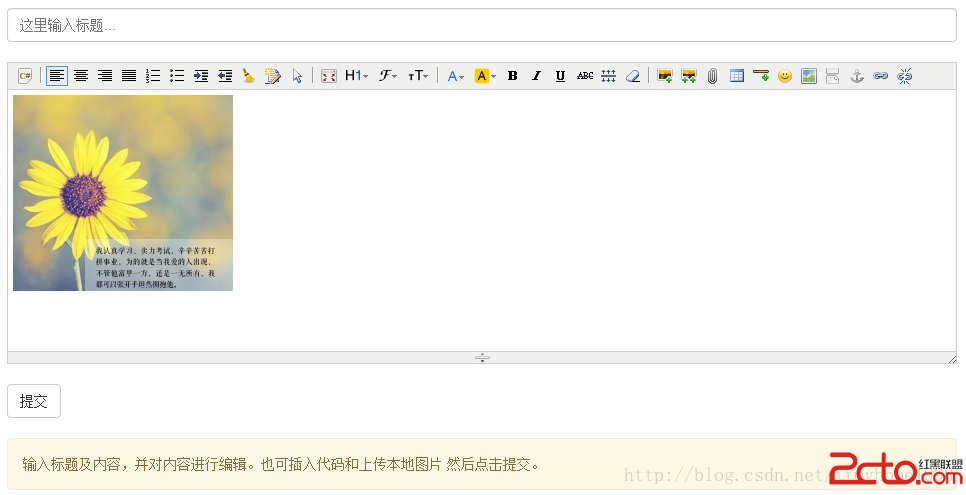
本文詳細記錄如何在 Struts 2 框架中整合 KindEditor 富文本編輯器的圖片上傳功能,重點解決 Struts 2 多部分請求包裝器導致的檔案取得問題。
kindeditor/jsp/lib/ 目錄。struts2-json-plugin)。<textarea id="editor_id" name="content"> 這裡輸入內容... </textarea>
<script type="text/javascript">
$(function(){
KindEditor.ready(function(K) {
var editor1 = K.create('#editor_id', {
items: [
'code', '|', 'justifyleft', 'justifycenter', 'justifyright', 'justifyfull',
'insertorderedlist', 'insertunorderedlist', 'indent', 'outdent', 'clearhtml',
'quickformat', 'selectall', '|', 'fullscreen', 'formatblock', 'fontname',
'fontsize', '|', 'forecolor', 'hilitecolor', 'bold', 'italic', 'underline',
'strikethrough', 'lineheight', 'removeformat', '|', 'image', 'multiimage',
'insertfile', 'table', 'hr', 'emoticons', 'baidumap', 'pagebreak',
'anchor', 'link', 'unlink'
],
uploadJson: 'ImgUpload.action', // 圖片上傳 Action
allowImageRemote: false
});
});
});
</script><package name="kindeditor_json" extends="json-default">
<!-- 圖片上傳 Action 配置 -->
<action name="ImgUpload" class="com.example.ImgUploadAction" method="imgUpload">
<result type="json"></result>
</action>
</package>public class ImgUploadAction extends ActionSupport {
private static final long serialVersionUID = 1L;
public String imgUpload() {
ActionContext ac = ActionContext.getContext();
HttpServletResponse response = (HttpServletResponse) ac.get(ServletActionContext.HTTP_RESPONSE);
HttpServletRequest request = (HttpServletRequest) ac.get(ServletActionContext.HTTP_REQUEST);
PrintWriter out = null;
try { out = response.getWriter(); } catch (IOException e) { e.printStackTrace(); }
// 存儲路徑配置
String savePath = ServletActionContext.getServletContext().getRealPath("/") + "attached/";
String saveUrl = request.getContextPath() + "/attached/";
// 允許的副檔名
Map extMap = new HashMap<>();
extMap.put("image", "gif,jpg,jpeg,png,bmp");
extMap.put("flash", "swf,flv");
extMap.put("media", "swf,flv,mp3,wav,wma,wmv,mid,avi,mpg,asf,rm,rmvb");
extMap.put("file", "doc,docx,xls,xlsx,ppt,htm,html,txt,zip,rar,gz,bz2");
long maxSize = 1000000; // 1MB
response.setContentType("text/html; charset=UTF-8");
// 關鍵點:Struts 2 會將 request 包裝為 MultiPartRequestWrapper
if (!ServletFileUpload.isMultipartContent(request)) {
out.println(getError("請選擇檔案。")); return null;
}
MultiPartRequestWrapper wrapper = (MultiPartRequestWrapper) request;
String fileName = wrapper.getFileNames("imgFile")[0];
File file = wrapper.getFiles("imgFile")[0];
// 後續:副檔名檢查、大小限制、目錄建立、檔案重命名、寫入磁碟...
// 最後回傳 JSON 給 KindEditor
JSONObject obj = new JSONObject();
obj.put("error", 0);
obj.put("url", saveUrl + "/" + newImgName);
out.println(obj.toJSONString());
return null;
}
private String getError(String message) {
JSONObject obj = new JSONObject();
obj.put("error", 1);
obj.put("message", message);
return obj.toJSONString();
}
} 問題:直接使用 Commons FileUpload 的 parseRequest(request) 取得的 List 為空,無法獲取上傳檔案。
原因:Struts 2 的攔截器已將原始 HttpServletRequest 包裝為 MultiPartRequestWrapper,導致 Commons FileUpload 無法正確解析。
解決:強制轉型為 MultiPartRequestWrapper,再調用其 getFileNames() 和 getFiles() 方法直接取得檔案資訊。