C++ 透過 CGI (Common Gateway Interface) 與 Web 伺服器互動,構建高效能 Web 應用。本文系統介紹 CGI 架構、HTTP 頭部、環境變量、GET/POST 處理、Cookie、檔案上傳,並使用 GNU Cgicc 庫簡化開發。
/var/www/cgi-bin) 下的可執行檔。Content-Type 頭 + 空行 + Body。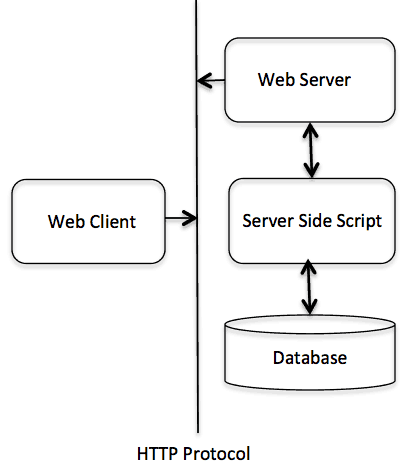
#include <iostream>
int main() {
    std::cout << "Content-type:text/html\r\n\r\n"; // 必須:頭部結束雙換行
    std::cout << "<html><head><title>Hello</title></head><body>"
              << "<h2>Hello World! C++ CGI</h2>"
              << "</body></html>";
    return 0;
}編譯:g++ hello.cpp -o hello.cgi,部署至 cgi-bin,chmod 755 hello.cgi。
| 頭部 | 用途 | 範例 |
|---|---|---|
| Content-Type | 響應體 MIME 類型 | text/html; charset=utf-8 |
| Set-Cookie | 設定 Cookie | SessionId=abc; Path=/; HttpOnly |
| Location | 重導向 | /login |
| Status | HTTP 狀態碼 | 200 OK, 404 Not Found |
| Expires | 快取過期 | Wed, 21 Oct 2025 07:28:00 GMT |
| 變量 | 含義 |
|---|---|
| REQUEST_METHOD | GET / POST / PUT... |
| QUERY_STRING | URL ? 後參數 |
| CONTENT_LENGTH | POST Body 長度 |
| CONTENT_TYPE | POST Body MIME |
| HTTP_COOKIE | 客戶端 Cookie |
| HTTP_USER_AGENT | 瀏覽器標識 |
| REMOTE_ADDR | 客戶端 IP |
| SCRIPT_NAME | CGI 腳本路徑 |
// 安裝
tar xzf cgicc-X.X.X.tar.gz && cd cgicc-X.X.X && ./configure --prefix=/usr && make && make install

// 編譯鏈接
g++ app.cpp -o app.cgi -lcgicc#include <cgicc/Cgicc.h> #include <cgicc/HTTPHTMLHeader.h> #include <cgicc/HTMLClasses.h>
using namespace cgicc;
int main() {
Cgicc form;
std::cout << HTTPHTMLHeader() << std::endl;
form_iterator name = form.getElement("first_name");
if (name != form.getElements().end() && !name->isEmpty())
std::cout << "名:" << **name << "<br/>";
// 同理 last_name
}// Checkbox
bool maths = form.queryCheckbox("maths");
// Radio / Select
form_iterator subject = form.getElement("subject");
if (subject != form.getElements().end()) std::cout << **subject;
// Textarea
form_iterator text = form.getElement("textcontent");
if (text != form.getElements().end()) std::cout << **text;// 寫入 (在 HTTPHTMLHeader 之前)
std::cout << "Set-Cookie: UserID=123; Path=/\r\n";
std::cout << "Set-Cookie: Theme=dark; Max-Age=3600\r\n";
std::cout << HTTPHTMLHeader();
// 讀取
Cgicc cgi;
const CgiEnvironment& env = cgi.getEnvironment();
for (const_cookie_iterator it = env.getCookieList().begin(); it != env.getCookieList().end(); ++it)
std::cout << it->getName() << "=" << it->getValue() << "<br/>";// HTML: <form enctype="multipart/form-data" action="/cgi-bin/upload.cgi" method="post"><input type="file" name="userfile"></form>
Cgicc cgi;
const_file_iterator file = cgi.getFile("userfile");
if (file != cgi.getFiles().end()) {
std::cout << HTTPContentHeader(file->getDataType()); // 自動輸出 Content-Type
file->writeToStream(std::cout); // 直接輸出檔案內容 (演示用)
// 實際應用:file->writeToStream(ofstream("uploaded.bin", std::ios::binary));
}
std::cout << "<p>上傳成功</p>";g++ -static -O2 app.cpp -o app.cgi -lcgicc 減少依賴部署風險。