開啟服務管理員 (services.msc) 嘗試啟動 Diagnostic Policy Service 時彈出:
Windows 無法在本機電腦啟動 Diagnostic Policy Service 服務。錯誤 5: 拒絕存取。
關鍵點:必須右鍵「以系統管理員身分執行」 services.msc 或命令提示字元輸入 net start "Diagnostic Policy Service"。普通使用者身分開啟服務管理員會導致「拒絕存取」。
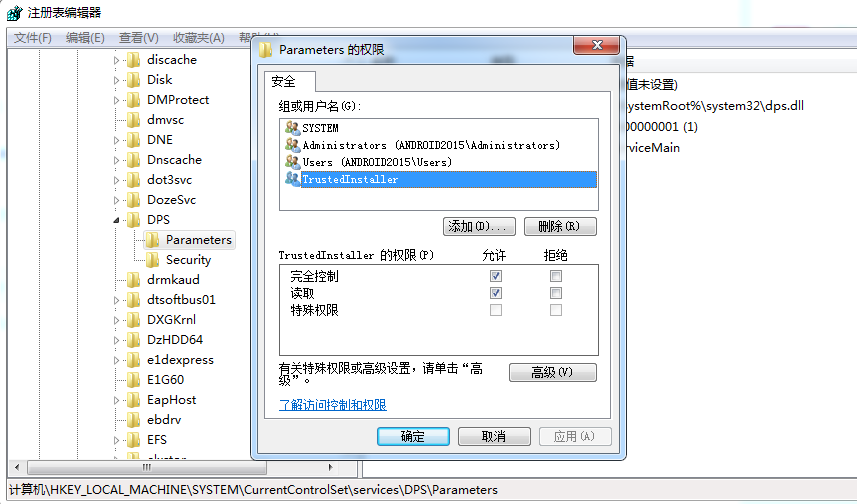
sc qc "Diagnostic Policy Service"
確認 DEPENDS 列出的服務(通常為 RPCSS、EventLog)均在運行中。
sfc /scannow
dism /online /cleanup-image /restorehealth
需在管理員命令提示字元執行,重啟後再試。
使用 Tweaking.com Windows Repair 工具勾選「Repair Windows Services」執行修復。
若安裝 360、火綠、電腦管家等,嘗試暫停防護或完全卸載後測試。
net start "Diagnostic Policy Service"
echo %errorlevel%
回傳 0 表示成功。若仍失敗,查看事件檢視器 System 日誌中 Service Control Manager 來源的詳細錯誤碼。
90% 的「錯誤 5: 拒絕存取」源於未以管理員權限啟動服務管理工具。養成「Win+X → Windows Terminal (Admin)」習慣,可避免大量誤判。