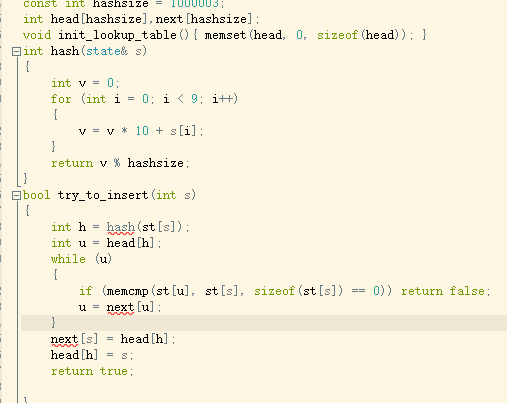
使用 JXL (jexcelapi) 導出 Excel 時,雖然迴圈正確跑完、sheet.addCell() 呼叫無誤,但輸出檔案只有一行資料。本文指出兩大核心錯誤:未顯式建立 Row 物件 (JXL 需手動管理列) 與 workbook.write() 放在迴圈內導致重複寫入/截斷,並提供修正後的完整代碼範例。
WritableSheet sheet = workbook.createSheet("Sheet1", 0);
int line = 0;
for (int i = 1; i <= 10; i++) {
    // ... 爬蟲取得資料 ...
    for (int j = 0; j < jsonArray.length(); j++) {
        // 建立 Cell
        Number rate = new Number(0, line, douRate); // 欄 0
        Label label = new Label(1, line, strComment); // 欄 1
        line++;
        sheet.addCell(rate);
        sheet.addCell(label);
        workbook.write(); // ❌ 錯誤:在迴圈內寫入
    }
}
workbook.close();
WritableSheet 採用「座標式」API:new Label(col, row, value),不需 也 無法 顯式建立 Row 物件 (這是 Apache POI HSSF/XSSF 的做法)。line++ 邏輯正確,問題在於 workbook.write() 位置錯誤導致資料未正常刷新。sheet.createRow(),直接指定 row 索引即可。workbook.write() 會將記憶體中完整的工作簿結構序列化寫入輸出流。workbook.close() 之前。import jxl.*;
import jxl.write.*;
import java.io.File;
import java.util.Date;
public class JxlExportDemo {
public static void main(String[] args) throws Exception {
WritableWorkbook workbook = Workbook.createWorkbook(new File("export.xls"));
WritableSheet sheet = workbook.createSheet("Comments", 0);
// 1. 寫入標題列 (row = 0)
Label hdrCol0 = new Label(0, 0, "Rating");
Label hdrCol1 = new Label(1, 0, "Content");
sheet.addCell(hdrCol0);
sheet.addCell(hdrCol1);
int line = 1; // 從第 1 列開始寫資料 (0 為標題)
// 模擬資料來源迴圈
for (int page = 1; page <= 3; page++) {
// 假設從網路/資料庫取得 List
List comments = fetchComments(page);
for (Comment c : comments) {
// 2. 建立 Cell,指定 (col, row)
Number rateCell = new Number(0, line, c.rating);
Label contentCell = new Label(1, line, c.content);
sheet.addCell(rateCell);
sheet.addCell(contentCell);
line++;
}
}
// 3. 所有資料加入完成後,統一寫入一次
workbook.write();
workbook.close();
System.out.println("導出完成,共 " + (line - 1) + " 筆資料");
}
static class Comment { double rating; String content; }
static List fetchComments(int page) { /* 略 */ return new ArrayList<>(); }
}
| 特性 | JXL (jexcelapi) | Apache POI (HSSF/XSSF) |
|---|---|---|
| 支援格式 | 僅 .xls (BIFF8) | .xls + .xlsx |
| Row 管理 | 隱式,由 Cell 座標決定 | 顯式 sheet.createRow(rowIdx) |
| 寫入觸發 | workbook.write() 一次性 | 可串流 SXSSF 分批寫入 |
| 記憶體佔用 | 全載入記憶體,不適合 > 10 萬列 | SXSSF 低記憶體模式 |
| 維護狀態 | 停止更新 (最後版 2009) | 活躍維護中 |
新專案強烈建議直接使用 Apache POI (含 SXSSFWorkbook 處理大資料),避免 JXL 停維、不支援 .xlsx、記憶體限制等坑。若必須維護舊 JXL 專案,請牢記:
workbook.write() 只呼叫一次,置於所有 addCell 之後、close() 之前。JXL 導出只有一行,主因是 workbook.write() 放在迴圈內導致重複覆寫/截斷。JXL 採用座標式 API 無需顯式建立 Row,只要確保「正確計算 row 索引、統一在最後寫入一次」即可正常導出多行資料。長期專案請規劃遷移至 Apache POI。