在 Java 圖形界面開發中,實作一個簡易的 BMI(Body Mass Index)計算器是入門級的經典練習。本文將詳細說明如何設計算法、處理用戶輸入、按鈕事件監聽,並提供完整可運行的代碼示例。
BMI 計算公式為:BMI = 體重 / (身高 * 身高)。判斷邏輯如下:
if (bmi < 18.5) → 瘦
else if (bmi < 24) → 正常
else → 胖
核心在於為「評估」按鈕註冊 ActionListener,在 actionPerformed 方法中獲取文本框數據、驗證、計算並更新結果欄位。
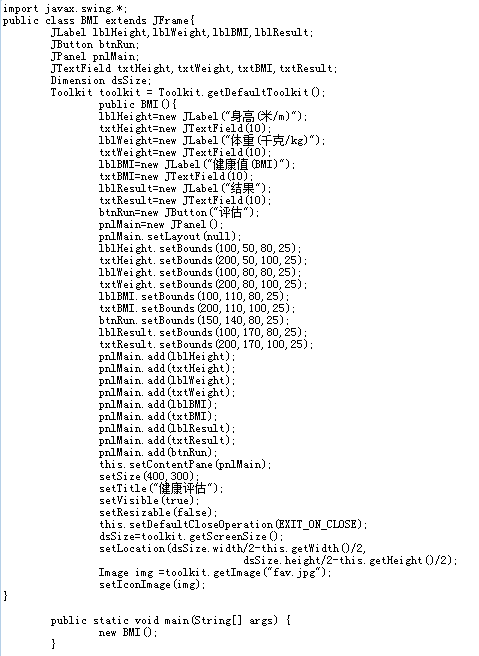
public class BMI extends JFrame {
    private JLabel lblHeight, lblWeight, lblBMI, lblResult;
    private JTextField txtHeight, txtWeight, txtBMI, txtResult;
    private JButton btnRun;
    private JPanel pnlMain;
    private DecimalFormat dformat = new DecimalFormat("#.00");

    public BMI() {
        // 初始化組件
        lblHeight = new JLabel("身高(米/m)");
        txtHeight = new JTextField(10);
        lblWeight = new JLabel("體重(千克/kg)");
        txtWeight = new JTextField(10);
        lblBMI = new JLabel("健康值(BMI)");
        txtBMI = new JTextField(10);
        lblResult = new JLabel("結果");
        txtResult = new JTextField(10);
        btnRun = new JButton("評估");
        pnlMain = new JPanel();
        pnlMain.setLayout(null);

        // 設置組件位置與大小
        lblHeight.setBounds(100, 50, 80, 25);
        txtHeight.setBounds(200, 50, 100, 25);
        lblWeight.setBounds(100, 80, 80, 25);
        txtWeight.setBounds(200, 80, 100, 25);
        lblBMI.setBounds(100, 110, 80, 25);
        txtBMI.setBounds(200, 110, 100, 25);
        lblResult.setBounds(100, 170, 80, 25);
        txtResult.setBounds(200, 170, 100, 25);
        btnRun.setBounds(150, 140, 80, 25);

        // 添加到面板
        pnlMain.add(lblHeight); pnlMain.add(txtHeight);
        pnlMain.add(lblWeight); pnlMain.add(txtWeight);
        pnlMain.add(lblBMI); pnlMain.add(txtBMI);
        pnlMain.add(lblResult); pnlMain.add(txtResult);
        pnlMain.add(btnRun);

        this.setContentPane(pnlMain);
        setSize(400, 300);
        setTitle("健康評估");
        setVisible(true);
        setResizable(false);
        setDefaultCloseOperation(JFrame.EXIT_ON_CLOSE);
        setLocationRelativeTo(null);

        // 核心:按鈕事件監聽
        btnRun.addActionListener(new ActionListener() {
            @Override
            public void actionPerformed(ActionEvent e) {
                // 輸入驗證
                if (txtWeight.getText().trim().isEmpty()) {
                    JOptionPane.showMessageDialog(null, "體重為空,請輸入一個正值體重!");
                    return;
                }
                if (txtHeight.getText().trim().isEmpty()) {
                    JOptionPane.showMessageDialog(null, "身高為空,請輸入一個正值身高!");
                    return;
                }

                double weight = Double.parseDouble(txtWeight.getText());
                if (weight <= 0) {
                    JOptionPane.showMessageDialog(null, "體重必須大於 0。");
                    return;
                }
                double height = Double.parseDouble(txtHeight.getText());
                if (height <= 0) {
                    JOptionPane.showMessageDialog(null, "身高必須大於 0。");
                    return;
                }

                // 計算 BMI
                double bmi = weight / (height * height);
                txtBMI.setText(dformat.format(bmi));
                txtResult.setText(getResult(bmi));
            }
        });
    }

    private String getResult(double bmi) {
        if (bmi < 18.5) return "瘦";
        else if (bmi < 24) return "正常";
        else return "胖";
    }

    public static void main(String[] args) {
        new BMI();
    }
}
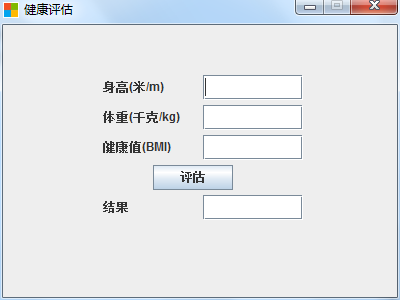
trim() 去除輸入首尾空格,避免 " " 通過驗證NumberFormatException 處理非數字輸入JFormattedTextField 限制輸入格式setEditable(false))通過本例可掌握 Java Swing 基本佈局、事件監聽模型、數據驗證與簡單業務邏輯封裝。此模式可擴展至更複雜的表單應用開發。