DataGridView 默認只支持單行列標題,若需實現類似 Excel 的多行合併表頭(如主標題跨多列、子標題分列),需通過重寫 OnCellPainting 事件自定義繪製。本文提供完整實現思路與代碼。
目標效果:
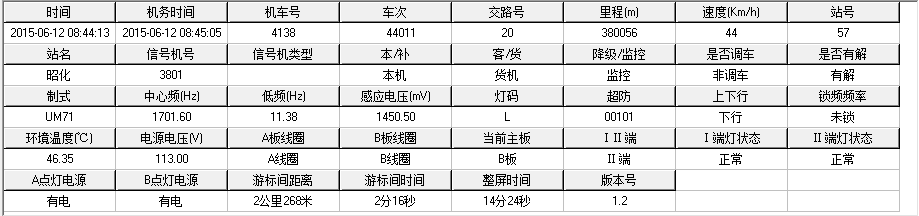
ColumnHeadersVisible = false 隱藏默認標題Paint 事件或重寫 OnPaint 中,在控件頂部保留區域繪製兩行表頭ColumnHeadersHeight 設置雙倍高度,在 CellPainting 中按行繪製不同內容
private void dataGridView1_CellPainting(object sender, DataGridViewCellPaintingEventArgs e) {
    // 僅處理列標題行
    if (e.RowIndex != -1) return;

    // 設置雙倍高度(在 Load 或構造函數中設置一次)
    // dataGridView1.ColumnHeadersHeight = 40;
    // dataGridView1.ColumnHeadersHeightSizeMode = DataGridViewColumnHeadersHeightSizeMode.DisableResizing;

    e.PaintBackground(e.CellBounds, true);

    // 計算兩行矩形
    Rectangle topRect = new Rectangle(e.CellBounds.X, e.CellBounds.Y, e.CellBounds.Width, e.CellBounds.Height / 2);
    Rectangle bottomRect = new Rectangle(e.CellBounds.X, e.CellBounds.Y + e.CellBounds.Height / 2, e.CellBounds.Width, e.CellBounds.Height / 2);

    // 繪製上半行:大類標題(需外部映射列索引->大類)
    string topText = GetTopHeaderText(e.ColumnIndex);
    if (!string.IsNullOrEmpty(topText)) {
        TextRenderer.DrawText(e.Graphics, topText, e.CellStyle.Font, topRect, e.CellStyle.ForeColor, TextFormatFlags.HorizontalCenter | TextFormatFlags.VerticalCenter);
        // 繪製右下邊框
        ControlPaint.DrawBorder(e.Graphics, topRect, Color.Black, ButtonBorderStyle.Solid);
    }

    // 繪製下半行:列標題
    string bottomText = dataGridView1.Columns[e.ColumnIndex].HeaderText;
    TextRenderer.DrawText(e.Graphics, bottomText, e.CellStyle.Font, bottomRect, e.CellStyle.ForeColor, TextFormatFlags.HorizontalCenter | TextFormatFlags.VerticalCenter);
    ControlPaint.DrawBorder(e.Graphics, bottomRect, Color.Black, ButtonBorderStyle.Solid);

    e.Handled = true; // 取消默認繪製
}
// 定義列分組:列索引 -> 大類標題
private Dictionary _topHeaders = new Dictionary {
    {0, "基本信息"}, {1, "基本信息"}, {2, "基本信息"},
    {3, "成績信息"}, {4, "成績信息"}, {5, "成績信息"}
};

private string GetTopHeaderText(int columnIndex) {
    // 僅在每組第一列顯示大類標題,或全部顯示
    return _topHeaders.ContainsKey(columnIndex) ? _topHeaders[columnIndex] : "";
}
若需大類標題真正跨列合併(無內部垂直分割線),需在 Paint 事件中手動計算合併區域:
private void dataGridView1_Paint(object sender, PaintEventArgs e) {
    if (dataGridView1.ColumnHeadersHeight < 40) return;

    var groups = new[] {
        new { Start = 0, Count = 3, Title = "基本信息" },
        new { Start = 3, Count = 3, Title = "成績信息" }
    };

    foreach (var g in groups) {
        Rectangle rect = dataGridView1.GetCellDisplayRectangle(g.Start, -1, true);
        rect.Width = 0;
        for (int i = 0; i < g.Count; i++) {
            rect.Width += dataGridView1.GetCellDisplayRectangle(g.Start + i, -1, true).Width;
        }
        rect.Height = dataGridView1.ColumnHeadersHeight / 2;

        // 填充背景
        using (var brush = new SolidBrush(Color.LightGray)) e.Graphics.FillRectangle(brush, rect);
        // 繪製文本
        TextRenderer.DrawText(e.Graphics, g.Title, dataGridView1.ColumnHeadersDefaultCellStyle.Font, rect, Color.Black, TextFormatFlags.HorizontalCenter | TextFormatFlags.VerticalCenter);
        // 繪製外框
        ControlPaint.DrawBorder(e.Graphics, rect, Color.Black, ButtonBorderStyle.Solid);
    }
}
DoubleBuffered = true 減少閃爍Invalidate() 重繪SourceGrid、DevExpress GridControl)原生支持多行表頭