點擊顏色/規格核取方塊,下方動態新增/移除對應的規格輸入列 (Table 行),支援多選,專案急需上線。
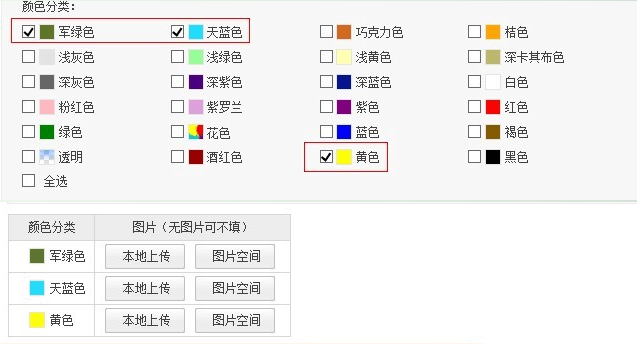
核心邏輯:監聽核取方塊 change 事件,統計被選中的項目,動態調整 Table 行數並填入值。
<!DOCTYPE html>
<html>
<head>
<script src="https://code.jquery.com/jquery-3.6.0.min.js"></script>
<script>
$(function() {
    $('#divchks input[type=checkbox]').on('change', function() { doTable(); });
});

function doTable() {
    var $checked = $('#divchks input[type=checkbox]:checked');
    var $table = $('#divtable table');
    if ($checked.length > 0) {
        if ($table.length === 0) { $('#divtable').append('<table border="1"></table>'); $table = $('#divtable table'); }
        syncRows($checked, $table);
    } else {
        $table.remove();
    }
}

function syncRows($checked, $table) {
    var $rows = $table.find('tr');
    // 增加行
    while ($rows.length < $checked.length) { $table.append('<tr><td></td><td></td></tr>'); $rows = $table.find('tr'); }
    // 減少行
    while ($rows.length > $checked.length) { $rows.last().remove(); $rows = $table.find('tr'); }
    // 填值
    $checked.each(function(idx) { $rows.eq(idx).find('td:first').text(this.value); });
}
</script>
</head>
<body>
<div id="divchks">
    <label><input type="checkbox" value="軍綠色"/> 軍綠色</label>
    <label><input type="checkbox" value="天藍色"/> 天藍色</label>
    <label><input type="checkbox" value="黃色"/> 黃色</label>
</div>
<div id="divtable"></div>
</body>
</html>:checked 選取器即時獲取選中集合。syncRows 先補行再減行,最後按索引賦值,邏輯清晰無閃爍。<input type="hidden" name="spec_${idx}"> 以便表單提交。此方案輕量、無相依、易維護,滿足淘寶發布頁動態規格編輯需求。