初學者構建登錄界面,點擊「登錄」按鈕後需跳轉至主應用界面。iOS 提供多種導航跳轉方式,掌握其區別與適用場景至關重要。
適用於有導航欄的層級式頁面(如設置頁、列表詳情)。
// Swift
let vcB = ViewControllerB()
navigationController?.pushViewController(vcB, animated: true)

// Objective-C
ViewControllerB *vcB = [[ViewControllerB alloc] init];
[self.navigationController pushViewController:vcB animated:YES];
UINavigationController 中。viewWillDisappear → viewDidDisappear (A);viewWillAppear → viewDidAppear (B)。適用於任務型、臨時性、需強制完成的頁面(如登錄、拍照、選擇器)。
// Swift (iOS 13+ 自動適配 presentationStyle)
let vcB = ViewControllerB()
vcB.modalPresentationStyle = .fullScreen // 或 .pageSheet, .formSheet
present(vcB, animated: true, completion: nil)

// Objective-C
ViewControllerB *vcB = [[ViewControllerB alloc] init];
vcB.modalPresentationStyle = UIModalPresentationFullScreen;
[self presentViewController:vcB animated:YES completion:nil];
dismiss(animated:completion:)。.pageSheet 可下拉關閉,需設置 .fullScreen 保持全屏。適用於靜態流程、原型快速構建、團隊協作。
"goMain")。performSegue(withIdentifier: "goMain", sender: self)。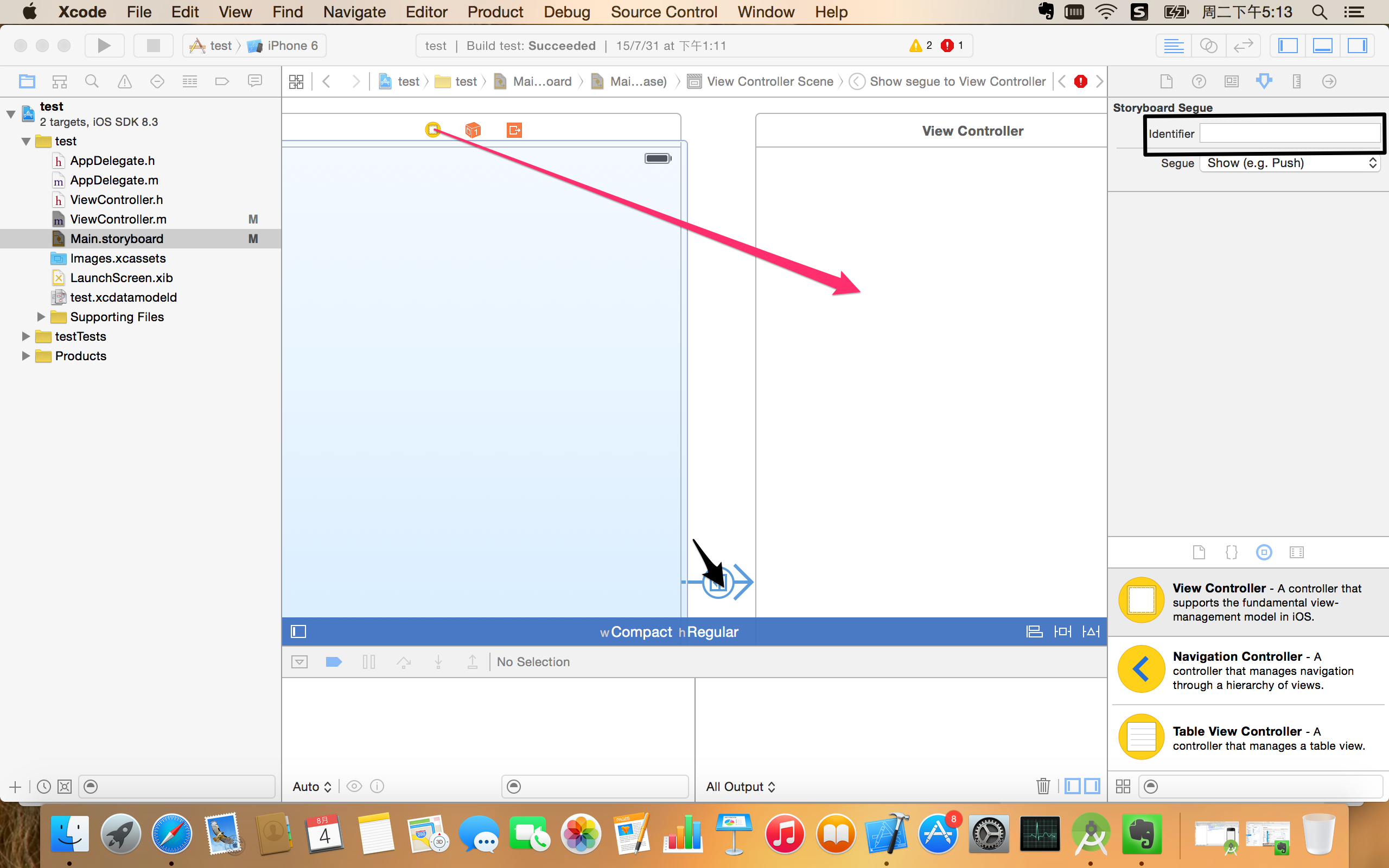
// 準備跳轉時傳值 (Segue 方式)
override func prepare(for segue: UIStoryboardSegue, sender: Any?) {
    if segue.identifier == "goMain" {
        let dest = segue.destination as! MainViewController
        dest.userToken = self.loginToken
    }
}

// 程式化跳轉傳值
let vcB = ViewControllerB()
vcB.userToken = self.loginToken
navigationController?.pushViewController(vcB, animated: true)
| 場景 | 推薦方式 | 理由 |
|---|---|---|
| 功能模塊逐級深入(列表→詳情→編輯) | Push | 自帶導航欄、返回棧、符合用戶心智模型 |
| 登錄、註冊、支付、拍照、選擇器 | Modal (.fullScreen) | 強制聚焦、任務完成前不離開、獨立上下文 |
| 靜態流程、設計師主導、少量動態邏輯 | Segue | 可視化、減少樣板代碼、易於團隊溝通 |
| 複雜動態條件、深度鏈接、程式化控制 | 代碼 Push/Present | 靈活、可測試、支持依賴注入 |
提示: 現代 iOS 開發推薦「代碼為主,Storyboard 輔助」或純代碼(Programmatic UI),便於版本控制、Code Review 與重構。