在 Windows 註冊表操作中,直接刪除擁有子鍵的項會失敗(ERROR_ACCESS_DENIED)。正確做法是後序遍歷:先遞歸刪除所有子鍵,最後再刪除當前鍵。本文提供完整的 C++ 邏輯與關鍵 API 說明,助你避開常見陷阱。
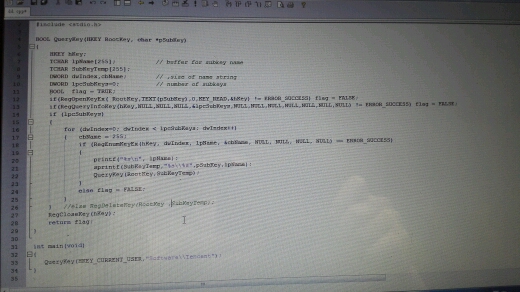
void DeleteRegistryKeyRecursively(HKEY hRoot, const wchar_t* subKeyPath) {
    HKEY hKey;
    if (RegOpenKeyEx(hRoot, subKeyPath, 0, KEY_ALL_ACCESS, &hKey) != ERROR_SUCCESS) return;

    // 1. 遞歸刪除所有子鍵
    WCHAR childName[256];
    DWORD childNameSize;
    while (RegEnumKeyEx(hKey, 0, childName, &childNameSize, nullptr, nullptr, nullptr, nullptr) == ERROR_SUCCESS) {
        std::wstring childPath = std::wstring(subKeyPath) + L"\\" + childName;
        DeleteRegistryKeyRecursively(hRoot, childPath.c_str());
    }
    RegCloseKey(hKey);

    // 2. 刪除自身(此時已無子鍵)
    RegDeleteKey(hRoot, subKeyPath);
}| API | 用途 | 關鍵權限標誌 |
|---|---|---|
| RegOpenKeyEx | 打開鍵句柄 | KEY_ALL_ACCESS (含 DELETE、ENUMERATE_SUB_KEYS) |
| RegEnumKeyEx | 枚舉子鍵名稱 | 索引固定用 0,因刪除後索引會前移 |
| RegDeleteKey | 刪除無子鍵的項 | Windows XP+ 支援刪除空鍵;Vista+ 需 RegDeleteKeyEx 指定 KEY_WOW64_64KEY |
| RegCloseKey | 釋放句柄 | 遞歸每層必須關閉,防止句柄洩漏 |
KEY_WOW64_32KEY 或 KEY_WOW64_64KEY。SHDeleteKey (Shell API) 一鍵刪除整棵子樹,內部已處理遞歸與重定向。LONG DeleteKeyTree(HKEY hRoot, PCWSTR pszSubKey, DWORD dwFlags = KEY_WOW64_64KEY) {
HKEY hKey;
LONG res = RegOpenKeyEx(hRoot, pszSubKey, 0, KEY_ENUMERATE_SUB_KEYS | DELETE | dwFlags, &hKey);
if (res != ERROR_SUCCESS) return res;
WCHAR szName[256];
DWORD cchName;
FILETIME ft;
while ((res = RegEnumKeyEx(hKey, 0, szName, &cchName, nullptr, nullptr, nullptr, &ft)) == ERROR_SUCCESS) {
std::wstring child = std::wstring(pszSubKey) + L"\\" + szName;
res = DeleteKeyTree(hRoot, child.c_str(), dwFlags);
if (res != ERROR_SUCCESS) break;
}
RegCloseKey(hKey);
if (res == ERROR_NO_MORE_ITEMS) {
res = RegDeleteKeyEx(hRoot, pszSubKey, dwFlags, 0);
}
return res;
}
掌握「先刪子、後刪父」的後序遍歷模式,配合正確權限與 32/64 位標誌,即可安全、完整地清理註冊表鍵值。