在開發自訂 Windows Forms 控件時,常需讓使用者在屬性視窗中透過下拉選單選擇 .NET 類型(System.Type)。預設情況下,直接將屬性型別宣告為 Type 並套用 [TypeConverter(typeof(System.Type))] 並無法產生預期的下拉選單效果。
需實作自訂的 UITypeEditor,並在 EditValue 方法中彈出類型選擇對話框。以下為關鍵步驟:
UITypeEditor 的類別(如 TypeSelectorEditor)。GetEditStyle 回傳 UITypeEditorEditStyle.Modal。EditValue 中使用 Type.GetType 或 Assembly.GetTypes() 列出可用類型,配合 IWindowsFormsEditorService 顯示下拉清單或對話框。[Editor(typeof(TypeSelectorEditor), typeof(UITypeEditor))]。public class TypeSelectorEditor : UITypeEditor {
public override UITypeEditorEditStyle GetEditStyle(ITypeDescriptorContext context) {
return UITypeEditorEditStyle.DropDown;
}
public override object EditValue(ITypeDescriptorContext context, IServiceProvider provider, object value) {
var svc = provider.GetService(typeof(IWindowsFormsEditorService)) as IWindowsFormsEditorService;
if (svc == null) return value;
var listBox = new ListBox();
// 填入常用類型或從組件掃描
foreach (var t in new[] { typeof(string), typeof(int), typeof(DateTime), typeof(object) }) {
listBox.Items.Add(t);
}
listBox.SelectedItem = value;
listBox.Click += (s, e) => svc.CloseDropDown();
svc.DropDownControl(listBox);
return listBox.SelectedItem ?? value;
}
}
// 套用於屬性
[Category("資料"), Description("值屬性的資料類型")]
[Editor(typeof(TypeSelectorEditor), typeof(UITypeEditor))]
public Type DataType { get; set; }
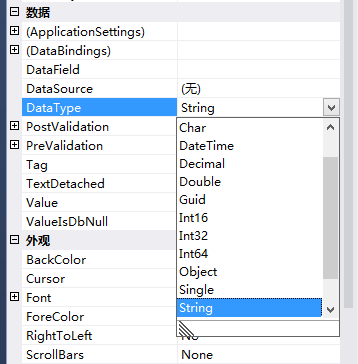
完整實作細節可參考 MSDN 論壇討論:UITypeEditor for Data Type System.Type