Tablet_API30
- Orientation: Portrait (可後續旋轉)
- Camera: Back: VirtualScene, Front: Emulated
- Memory: RAM 2048 MB, VM Heap 256 MB, Internal Storage 4 GB, SD Card 512 MB
- Graphics: Automatic (優先宿主 GPU) / Software (兼容性)
- Multi-Core CPU: 勾選 2 或 4 (視宿主核心數)
5. Finish → 左側列表出現模擬器 → 點擊 Play 三角啟動。
| 問題 | 修正 |
|---|---|
| 啟動卡在「Android」Logo | Graphics 改 Software;或 BIOS 開啟 VT-x/AMD-V,安裝 HAXM |
| 分辨率過大導致卡頓 | 選擇 Nexus 7 (1280x800) 低分辨率皮膚 |
| 無 Google Play 服務 | System Image 必須帶 Google Play 標誌 |
| M1 Mac 無 x86_64 鏡像 | 選擇 arm64 (Apple Silicon 專用),性能更優 |
avdmanager create avd -n Tablet_API30 -k "system-images;android-30;google_apis;x86_64" -d "pixel_c"
emulator -avd Tablet_API30 -gpu auto -memory 2048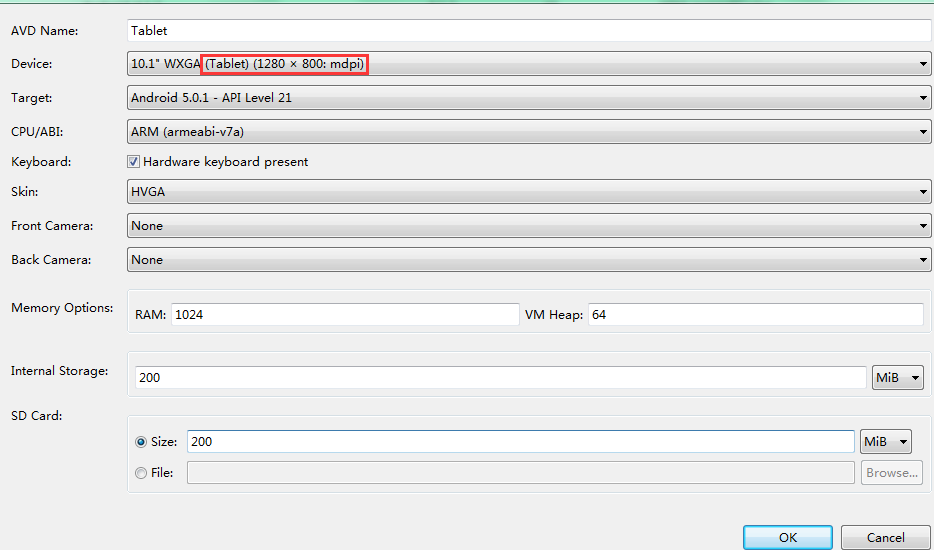
按上述參數創建,即可獲得流暢、含 GMS、適配平板 UI 的標準模擬器環境。