在 Canvas 繪製折線圖時,常需實現「滑鼠移動到數據點顯示詳細資訊」的交互效果。核心難點在於:Canvas 只是位圖,沒有 DOM 元素,需自行計算滑鼠座標與數據點的碰撞檢測。
<style>
#note { position: absolute; display: none; border: solid 1px #000; background: #fff; padding: 5px; }
</style>
<canvas id="canvas" style="border: solid 1px #000; margin: 100px 0 0 100px;" width="1000"></canvas>
<div id="note"></div>

<script>
var a = [10, 20, 30, 40, 50, 20, 30, 40];
var note = document.getElementById('note');
var c = document.getElementById('canvas');

// 獲取 Canvas 在頁面上的絕對位置
function getOffset(el) {
    var rect = el.getBoundingClientRect();
    return { x: rect.left + window.scrollX, y: rect.top + window.scrollY };
}

// 簡易碰撞檢測:以正方形區域判斷是否接觸圓點
function hitCheck(mouseX, mouseY, point, radius) {
    return (point.x - radius < mouseX && mouseX < point.x + radius &&
            point.y - radius < mouseY && mouseY < point.y + radius);
}

if (c.getContext) {
    var g = c.getContext('2d');
    var points = []; // 儲存所有圓心座標
    var radius = 3;
    var canvasPos = getOffset(c);

    // 繪製折線與數據點
    for (var i = 0, len = a.length; i < len; i++) {
        var x = (i + 1) * 100;
        var y = a[i];
        points.push({ x: x, y: y });

        g.beginPath();
        if (i === 0) g.moveTo(0, 0);
        else g.moveTo(i * 100, a[i - 1]);
        g.lineTo(x, y);
        g.arc(x, y, radius, 0, Math.PI * 2);
        g.fill();
        g.stroke();
        g.closePath();
    }

    // 滑鼠移動事件監聽
    var hoverTimer;
    c.addEventListener('mousemove', function(e) {
        clearTimeout(hoverTimer);
        var mouseX = e.clientX - canvasPos.x;
        var mouseY = e.clientY - canvasPos.y;

        hoverTimer = setTimeout(function() {
            var found = false;
            for (var i = 0; i < points.length; i++) {
                if (hitCheck(mouseX, mouseY, points[i], radius)) {
                    note.style.display = 'block';
                    note.style.left = (points[i].x + canvasPos.x + radius + 5) + 'px';
                    note.style.top = (points[i].y + canvasPos.y + radius + 5) + 'px';
                    note.innerHTML = 'X: ' + points[i].x + ' Y: ' + points[i].y;
                    found = true;
                    break;
                }
            }
            if (!found) note.style.display = 'none';
        }, 50); // 50ms 延遲減少閃爍
    }, false);
}
</script>
getBoundingClientRect() 獲取 Canvas 頁面座標,滑鼠座標減去偏移量得到 Canvas 內部座標。points,避免重複計算。setTimeout 延遲檢測,避免頻繁觸發導致提示框閃爍。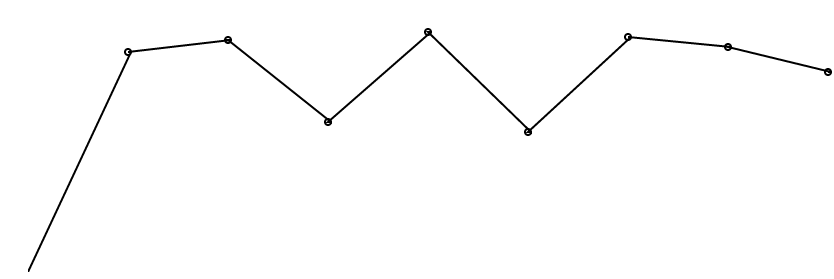
此方案無需引入圖表庫,適合輕量級可視化需求,代碼結構清晰易於擴展(如添加點擊事件、動畫過渡等)。