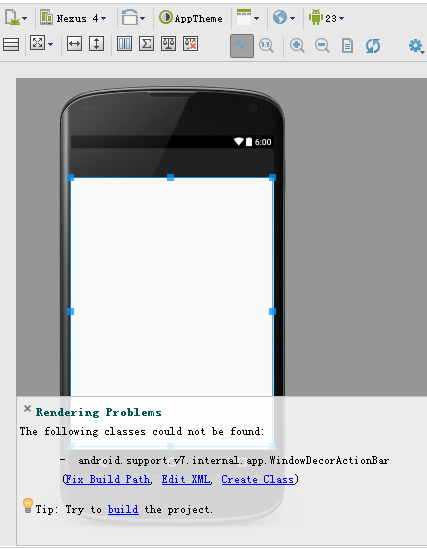
將 `compileSdkVersion` / `targetSdkVersion` 升級到 23 (Android 6.0 Marshmallow) 後,XML 預覽報 `Rendering Problems: Missing styles. Is the correct theme chosen for this layout?`。核心原因是 **AppCompat 主題未正確引用、或 `values-v23` 資源衝突**。以下提供標準修復步驟。
渲染錯誤:Missing styles. Is the correct theme chosen for this layout?
java.lang.IllegalArgumentException: You need to use a Theme.AppCompat theme (or descendant) with this activity.
| 原因 | 說明 |
|---|---|
| Activity 繼承 `AppCompatActivity` 但佈局預覽使用非 AppCompat 主題 | AS 預覽預設用 `Theme.Holo` 或 `Theme.Material`,不含 AppCompat 屬性 |
| `styles.xml` 缺少 `Base.Theme.AppCompat` 父主題 | 自定義主題未繼承 `Theme.AppCompat.Light.DarkActionBar` 等 |
| 依賴庫版本不匹配 | `appcompat-v7:23.x.x` 需與 `compileSdkVersion 23` 對應 |
| `values-v23/styles.xml` 覆蓋了基礎主題屬性 | 導致預覽找不到 `colorPrimary` 等屬性 |
android {
    compileSdkVersion 23
    buildToolsVersion "23.0.3"

    defaultConfig {
        targetSdkVersion 23
        // ...
    }
}

dependencies {
    implementation 'com.android.support:appcompat-v7:23.4.0' // 必須與 compileSdk 主版本一致
    implementation 'com.android.support:design:23.4.0'
    implementation 'com.android.support:recyclerview-v7:23.4.0'
    // 所有 support 庫版本號保持一致
}
<!-- res/values/styles.xml -->
<resources>
    <!-- 基礎應用主題:繼承 AppCompat -->
    <style name="AppTheme" parent="Theme.AppCompat.Light.DarkActionBar">
        <item name="colorPrimary">@color/colorPrimary</item>
        <item name="colorPrimaryDark">@color/colorPrimaryDark</item>
        <item name="colorAccent">@color/colorAccent</item>
        <!-- 去除 ActionBar 若不需要 -->
        <item name="windowActionBar">false</item>
        <item name="windowNoTitle">true</item>
    </style>
</resources>
<!-- res/values-v23/styles.xml -->
<resources>
    <style name="AppTheme" parent="AppTheme"> <!-- 繼承基礎 AppTheme,而非直接繼承 Material -->
        <!-- Android 6.0+ 專屬屬性,如 windowDrawsSystemBarBackgrounds -->
        <item name="android:windowDrawsSystemBarBackgrounds">true</item>
        <item name="android:statusBarColor">@color/colorPrimaryDark</item>
    </style>
</resources>
<application
    android:theme="@style/AppTheme"
    ... >
    <activity
        android:name=".MainActivity"
        android:theme="@style/AppTheme"> <!-- 也可單獨指定 -->
    </activity>
</application>
public class MainActivity extends AppCompatActivity { // 而非 Activity / ActionBarActivity
    @Override
    protected void onCreate(Bundle savedInstanceState) {
        super.onCreate(savedInstanceState);
        setContentView(R.layout.activity_main);
    }
}
Android 23 已屬舊版本,新專案建議直接使用 `compileSdkVersion 34` + `AndroidX`:
dependencies {
    implementation 'androidx.appcompat:appcompat:1.6.1'
    implementation 'com.google.android.material:material:1.9.0'
    implementation 'androidx.recyclerview:recyclerview:1.3.1'
}
styles.xml parent="Theme.MaterialComponents.Light.DarkActionBar"
Activity extends AppCompatActivity (androidx 版)
核心原則:**compileSdk、targetSdk、Support Library 版本三者主版本號一致;自定義主題必須繼承 Theme.AppCompat 系;Activity 繼承 AppCompatActivity**。按此檢查即可消除 Rendering Problems。