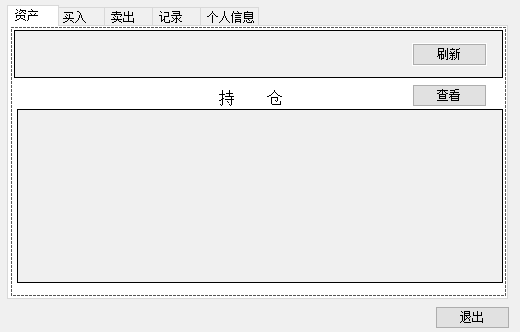
在同一視窗放置兩個 `DataGridView`,分別綁定不同資料庫視圖,點擊「刷新」顯示 A、點擊「查看」顯示 B,結果切換時資料消失。核心原因通常是:**直接對 `DataGridView.DataSource` 重新賦值而未正確處理 `BindingContext`、或兩個 Grid 共用同一 `BindingSource` 導致位置同步混亂**。以下提供標準解決模式。
// ❌ 直接重設 DataSource,且未考慮 BindingContext
private void btnRefresh_Click(object sender, EventArgs e) {
    grid1.DataSource = GetViewA(); // grid1 顯示 A
}

private void btnView_Click(object sender, EventArgs e) {
    grid2.DataSource = GetViewB(); // grid2 顯示 B,但 grid1 資料消失?
}
public partial class MainForm : Form {
    // 兩個獨立的 BindingSource,互不干擾
    private readonly BindingSource bsGrid1 = new BindingSource();
    private readonly BindingSource bsGrid2 = new BindingSource();

    public MainForm() {
        InitializeComponent();

        // 設計時或載入時綁定
        grid1.DataSource = bsGrid1;
        grid2.DataSource = bsGrid2;

        // 可選:設定 AutoGenerateColumns = false,手動定義 Columns
    }

    private void btnRefresh_Click(object sender, EventArgs e) {
        var dt = GetViewA(); // 返回 DataTable 或 List<T>
        bsGrid1.DataSource = dt; // 只更新 BindingSource
        // grid1 會自動重繪,grid2 完全不受影響
    }

    private void btnView_Click(object sender, EventArgs e) {
        var dt = GetViewB();
        bsGrid2.DataSource = dt;
    }

    // 範例資料取得
    private DataTable GetViewA() { /* ... */ return new DataTable(); }
    private DataTable GetViewB() { /* ... */ return new DataTable(); }
}
// 共用 DataTable,但用不同 DataView 過濾/排序
var dv1 = new DataView(sharedTable) { RowFilter = "Type='A'" };
var dv2 = new DataView(sharedTable) { RowFilter = "Type='B'" };
bsGrid1.DataSource = dv1;
bsGrid2.DataSource = dv2;
| 現象 | 原因 | 修正 |
|---|---|---|
| 切換後 Grid 顯示空白行 | `DataSource` 設為 `null` 再設新值,導致 Columns 清除 | 改用 `BindingSource.DataSource = newData` 保留 Columns |
| 兩個 Grid 同步捲動/選取 | 共用同一 `BindingSource` 或 `BindingContext` | 各自 `new BindingSource()` |
| 資料更新但介面不刷新 | `DataTable` 變更未觸發 `ListChanged` | 確認 `BindingSource` 綁定的是 `DataTable`/`BindingList` 而非陣列 |
| 例外:`Operation is not valid because it results in a reentrant call` | 在 `ListChanged` 事件中修改同一 `BindingSource` | 用 `BeginInvoke` 延遲執行或改用獨立資料源 |
// 即時檢查綁定狀態
private void DumpBindingInfo(DataGridView grid, string name) {
    Console.WriteLine($"{name}: DataSource={grid.DataSource?.GetType().Name}, " +
                      $"BindingContext={grid.BindingContext?.GetHashCode()}, " +
                      $"Rows={grid.Rows.Count}");
}

// 在按鈕點擊前後呼叫
DumpBindingInfo(grid1, "Grid1");
DumpBindingInfo(grid2, "Grid2");
核心原則:**每個 DataGridView 專屬一個 BindingSource**,資料切換只更新 BindingSource.DataSource,即可避免資料消失、同步干擾等疑難雜症。