新手在撰寫「點擊按鈕開啟新視窗」功能時,常遇到按鈕點擊無反應、被瀏覽器攔截、或函式名稱衝突等問題。以下整理典型錯誤與修正示範。
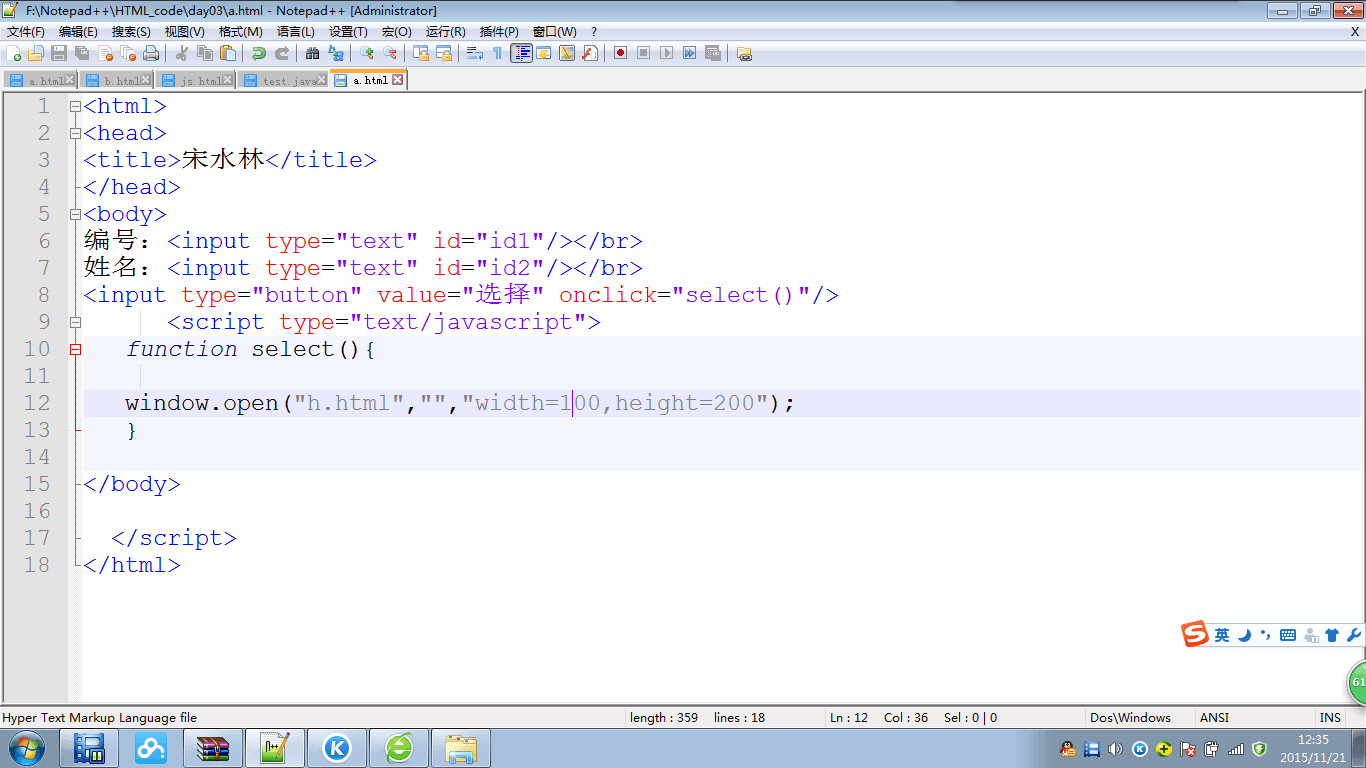
open、select、submit 等會覆蓋 window.open 或表單原生方法。setTimeout、AJAX 回呼中呼叫 window.open)會被攔截。onclick 與 addEventListener 混用導致覆蓋。<script>
function select() { // ❌ 與 document.select / window.select 衝突
window.open('https://example.com', '_blank');
}
</script>
<button onclick="select()">開啟</button>
<!DOCTYPE html>
<html>
<head>
  <meta charset="UTF-8">
  <title>開啟新視窗範例</title>
  <script>
    // ✅ 使用具體、不衝突的函式名稱
    function openDialog() {
      // 參數:URL、目標、特徵字串(寬高等)
      window.open('https://www.baidu.com', '_blank', 'width=500,height=400,menubar=no,toolbar=no');
    }
  </script>
</head>
<body>
  編號<input type="text" id="id1"><br>
  姓名<input type="text" id="id2"><br>
  <input type="button" value="選擇" onclick="openDialog()">
</body>
</html>
<script>
  function openCustomUrl(url, w, h) {
    const left = (screen.width - w) / 2;
    const top = (screen.height - h) / 2;
    const features = `width=${w},height=${h},left=${left},top=${top},resizable=yes,scrollbars=yes`;
    window.open(url, '_blank', features);
  }
</script>
<button onclick="openCustomUrl('https://google.com', 800, 600)">開啟 Google</button>
<a target="_blank">:使用者主動點擊連結不會被攔截。div 疊加層模擬視窗,避開攔截器。window.open('https://example.com') 測試是否被攔截。window、document、表單元素的原生屬性/方法重名。onclick 內的字串引號是否正確跳脫。只要避開命名衝突、確保在使用者點擊事件中直接呼叫 window.open,即可可靠開啟新視窗。