在近期的 Android 專案中,需要開發一個賽程對陣圖頁面,支援 2 到 16 支球隊參賽。當球隊數量不足 2 的 N 次方(如 6 隊)時,系統需按最近的 2 次方數(8 隊)邏輯渲染,空位以輪空(Bye)形式呈現。目標是從資料生成到視覺展示,打造流暢、酷炫的使用者體驗。
採用樹狀結構表達錦標賽邏輯:每個節點代表一場比賽,葉子節點為參賽隊伍,非葉子節點為對陣雙方。定義 MatchNode 類別,包含隊伍資訊、比分、子節點引用及輪空標記。
摒棄傳統 GridView 按行固定列數的僵化模式,改用自定義 ViewGroup 實現彈性佈局:
rounds = ceil(log2(teamCount))RecyclerView + 自定義 LayoutManager 實現虛擬化渲染,支援大量節點流暢滾動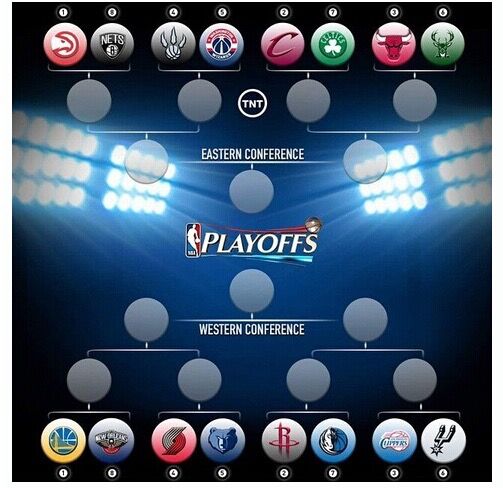
ViewPropertyAnimator 實現節點由內而外、由上而下的交錯縮放/淡入效果onDraw() 中使用 Path + Paint 繪製貝塞爾曲線連接父子節點,支援虛線/實線切換表示預賽/正式賽// 遞歸計算節點座標
private void calculatePositions(MatchNode node, int round, int index, int totalInRound) {
float x = round * horizontalSpacing + marginLeft;
float y = (index + 0.5f) * (height / (totalInRound + 1));
node.setPosition(x, y);
if (node.getLeft() != null) calculatePositions(node.getLeft(), round - 1, index * 2, totalInRound * 2);
if (node.getRight() != null) calculatePositions(node.getRight(), round - 1, index * 2 + 1, totalInRound * 2);
}
// 繪製連線
@Override
protected void onDraw(Canvas canvas) {
super.onDraw(canvas);
for (MatchNode node : allNodes) {
if (node.getParent() != null) {
Path path = new Path();
path.moveTo(node.getX(), node.getY());
path.quadTo((node.getX() + node.getParent().getX()) / 2, node.getY(), node.getParent().getX(), node.getParent().getY());
canvas.drawPath(path, linePaint);
}
}
}
DiffUtil 優化資料更新,避免整樹重繪Canvas.saveLayer() 實現節點陰光效果,提升視覺層次完整實現可參考開源專案 Android-Bracket-View,其模組化設計極易二次開發。