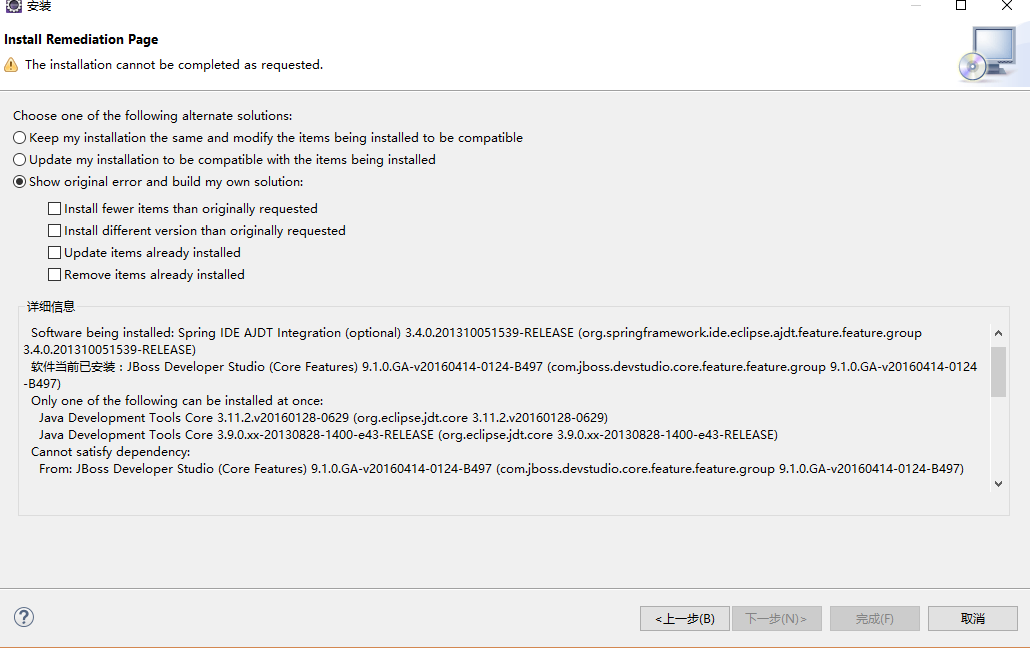
Eclipse 安裝 Spring 插件(Spring Tool Suite / Spring IDE)報錯,疑似與已安裝的 Hibernate 插件衝突。
<dependencies>
    <!-- Spring Core -->
    <dependency>
        <groupId>org.springframework</groupId>
        <artifactId>spring-context</artifactId>
        <version>5.3.21</version>
    </dependency>

    <!-- Spring Web MVC -->
    <dependency>
        <groupId>org.springframework</groupId>
        <artifactId>spring-webmvc</artifactId>
        <version>5.3.21</version>
    </dependency>

    <!-- Servlet API (provided) -->
    <dependency>
        <groupId>javax.servlet</groupId>
        <artifactId>javax.servlet-api</artifactId>
        <version>4.0.1</version>
        <scope>provided</scope>
    </dependency>

    <!-- Jackson JSON -->
    <dependency>
        <groupId>com.fasterxml.jackson.core</groupId>
        <artifactId>jackson-databind</artifactId>
        <version>2.13.3</version>
    </dependency>

    <!-- 測試 -->
    <dependency>
        <groupId>org.springframework</groupId>
        <artifactId>spring-test</artifactId>
        <version>5.3.21</version>
        <scope>test</scope>
    </dependency>
</dependencies>
<web-app xmlns="https://xmlns.jcp.org/xml/ns/javaee"
         version="4.0">
    <servlet>
        <servlet-name>dispatcher</servlet-name>
        <servlet-class>org.springframework.web.servlet.DispatcherServlet</servlet-class>
        <init-param>
            <param-name>contextConfigLocation</param-name>
            <param-value>/WEB-INF/spring-mvc.xml</param-value>
        </init-param>
        <load-on-startup>1</load-on-startup>
    </servlet>

    <servlet-mapping>
        <servlet-name>dispatcher</servlet-name>
        <url-pattern>/</url-pattern>
    </servlet-mapping>
</web-app>
<beans xmlns="https://www.springframework.org/schema/beans"
       xmlns:mvc="https://www.springframework.org/schema/mvc"
       xmlns:context="https://www.springframework.org/schema/context"
       xmlns:xsi="https://www.w3.org/2001/XMLSchema-instance"
       xsi:schemaLocation="
           https://www.springframework.org/schema/beans
           https://www.springframework.org/schema/beans/spring-beans.xsd
           https://www.springframework.org/schema/mvc
           https://www.springframework.org/schema/mvc/spring-mvc.xsd
           https://www.springframework.org/schema/context
           https://www.springframework.org/schema/context/spring-context.xsd">

    <!-- 掃描 Controller -->
    <context:component-scan base-package="com.example.controller" />

    <!-- 開啟註解驅動 + 靜態資源 -->
    <mvc:annotation-driven />
    <mvc:resources mapping="/resources/**" location="/resources/" />
    <mvc:resources mapping="/static/**" location="/static/" />

    <!-- 視圖解析器 -->
    <bean class="org.springframework.web.servlet.view.InternalResourceViewResolver">
        <property name="prefix" value="/WEB-INF/views/" />
        <property name="suffix" value=".jsp" />
    </bean>
</beans>
@Controller
@RequestMapping("/user")
public class UserController {
    @GetMapping("/list")
    public String list(Model model) {
        model.addAttribute("users", userService.findAll());
        return "user/list"; // → /WEB-INF/views/user/list.jsp
    }
}
| 維度 | IDE 插件 | 手動配置 |
|---|---|---|
| 版本控制 | 綁定 IDE 版本 | Maven 管理,團隊一致 |
| 遷移性 | 換 IDE 需重裝插件 | 項目即配置,開箱即用 |
| 除錯 | 插件內部錯誤難排查 | 源碼級可見,斷點直達 |
| 學習價值 | 隱藏細節 | 強制理解核心機制 |
Existing Maven Projects**拋棄插件依賴,擁抱 Maven + 手動配置**。這才是企業級開發的標準姿勢,也能避開 90% 的環境衝突問題。