不依賴 Windows 排程器或外部服務,純粹使用 ASP.NET 內部機制實現定時任務。關鍵在於 Global.asax 中啟動 System.Timers.Timer,並透過 Session_End 中發出 HTTP 請求喚醒已回收的應用程式池。
void Application_Start(object sender, EventArgs e)
{
    // 啟動定時器:每 1 秒觸發一次
    System.Timers.Timer myTimer = new System.Timers.Timer(1000);
    myTimer.Elapsed += new System.Timers.ElapsedEventHandler(TaskAction.SetContent);
    myTimer.Enabled = true;
    myTimer.AutoReset = true; // 週期性觸發
}

void Session_End(object sender, EventArgs e)
{
    // 關鍵:解決 IIS 應用程式池自動回收導致 Timer 停止的問題
    System.Threading.Thread.Sleep(1000);
    TaskAction.SetContent(); // 執行一次任務邏輯

    // 發出 HTTP 請求喚醒應用程式,觸發 Application_Start 重新啟動 Timer
    string url = "https://your-domain.com/YourPage.aspx"; // 替換為實際可存取的 URL
    HttpWebRequest req = (HttpWebRequest)WebRequest.Create(url);
    HttpWebResponse resp = (HttpWebResponse)req.GetResponse();
    Stream receiveStream = resp.GetResponseStream();
    // 讀取串流確保請求完成...
}
public static class TaskAction
{
    private static string content = "";
    public static string Content
    {
        get { return content; }
        set { content += "<div>" + value + "</div>"; }
    }

    // 定時器觸發的委派方法 (符合 ElapsedEventHandler 簽名)
    public static void SetContent(object source, ElapsedEventArgs e)
    {
        Content = DateTime.Now.ToString("yyyy-MM-dd HH:mm:ss");
    }

    // Session_End 喚醒時呼叫的無參數版本
    public static void SetContent()
    {
        Content = "END: " + DateTime.Now.ToString("yyyy-MM-dd HH:mm:ss");
    }
}
<div><%= TaskAction.Content %></div>
Application_Start 建立 Timer → 每秒執行 TaskAction.SetContentSession_EndSession_End 執行任務邏輯 → 發送 HTTP 請求至自身網站Application_Start → Timer 重新啟動web.config 中 <sessionState mode="InProc" />,StateServer 或 SQLServer 模式不會觸發 Session_End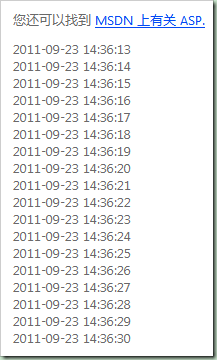
畫面會每秒更新一次時間戳記,應用程式池回收後經喚醒機制自動恢復運作。