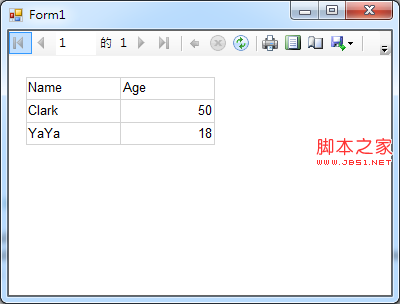
面對 SQL 注入或髒資料大量汙染資料庫時,逐筆修改極不實際。本文記錄開發一款 WinForms 批量資料替換小工具的完整思路:從列舉資料庫、資料表、欄位,到支援正則運算式的查找替換,附關鍵程式碼與介面截圖。
使用系統預存程序 sp_helpdb 取得資料庫清單:
private void btnTest_Click(object sender, EventArgs e)
{
    btnTest.Enabled = false;
    saveConfig();

    ConfigInfo.Server = txtIP.Text.Trim();
    ConfigInfo.DataBase = "master";
    ConfigInfo.UID = txtUID.Text.Trim();
    ConfigInfo.Pwd = txtPwd.Text.Trim();

    try
    {
        DataTable dt = Data.SqlHelper.ExecuteDataset(ConfigInfo.getConnect(), CommandType.Text, "sp_helpdb").Tables[0];
        cmbDataBaseList.DataSource = dt;
        cmbDataBaseList.DisplayMember = "name";
        cmbDataBaseList.SelectedIndex = 0;
        cmbDataBaseList.DropDownStyle = ComboBoxStyle.DropDownList;
        ExecuteFilterBtn.Enabled = true;
    }
    catch (Exception ex)
    {
        ExecuteFilterBtn.Enabled = false;
        MessageBox.Show("錯誤:" + ex.Message);
    }
    finally { btnTest.Enabled = true; }
}
查詢 sysobjects 系統表取得 xtype='U' (使用者資料表):
private void comboBox1_SelectedIndexChanged(object sender, EventArgs e)
{
    chkboxTableList.Items.Clear();
    ConfigInfo.DataBase = ((DataRowView)cmbDataBaseList.SelectedItem)["name"].ToString();
    DataSet ds = Data.SqlHelper.ExecuteDataset(ConfigInfo.getConnect(), CommandType.Text,
        "SELECT [name] FROM sysobjects WHERE xtype='U' ORDER BY [name] ASC");
    foreach (DataRow row in ds.Tables[0].Rows)
        chkboxTableList.Items.Add(row["name"].ToString());
}
遍歷勾選的資料表,逐行逐欄位檢查並替換,支援純文字與正則兩種模式:
private void ExecuteFilterBtn_Click(object sender, EventArgs e)
{
    saveConfig();
    total = 0;
    if (chkboxTableList.CheckedIndices.Count == 0) return;

    // 確認空查找字串
    if (txtSearchKey.Text.Trim() == "")
    {
        if (MessageBox.Show("查找內容為空,確認執行?", "提示", MessageBoxButtons.YesNo, MessageBoxIcon.Question) == DialogResult.No)
            return;
    }

    ExecuteFilterBtn.Enabled = false;
    string searchStr = txtSearchKey.Text.Trim() == "" ? " " : txtSearchKey.Text;
    string replaceStr = txtReplaceStr.Text;
    KeyType kt = chkIsRegex.Checked ? KeyType.Regex : KeyType.Text;

    // 收集目標資料表資訊
    List<TableInfo> tabList = new List<TableInfo>();
    foreach (int idx in chkboxTableList.CheckedIndices)
    {
        string tabName = chkboxTableList.Items[idx].ToString();
        TableInfo tInfo = FilterInfo.initTableInfo(tabName);
        if (tInfo != null) tabList.Add(tInfo);
    }

    try
    {
        if (tabList.Count == 0) return;
        pBar1.Visible = true; pBar1.Minimum = 1; pBar1.Maximum = tabList.Count; pBar1.Value = 1; pBar1.Step = 1;

        foreach (TableInfo info in tabList)
        {
            FilterInfo.Execute(info, searchStr, replaceStr, kt); // 核心替換邏輯封裝於 FilterInfo
            pBar1.PerformStep();
        }
    }
    catch (Exception ex) { MessageBox.Show("異常:" + ex.Message); }
    finally { ExecuteFilterBtn.Enabled = true; }

    MessageBox.Show("資料替換完畢,共修改 " + total + " 筆資料!");
}
KeyType.Regex 區分模式,底層使用 Regex.ReplacesaveConfig() 記住連線資訊,下次啟動自動填入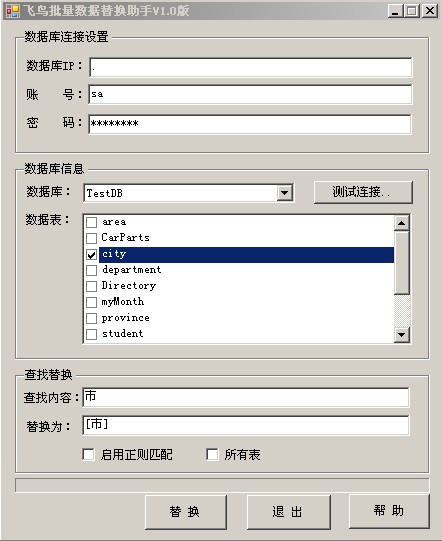
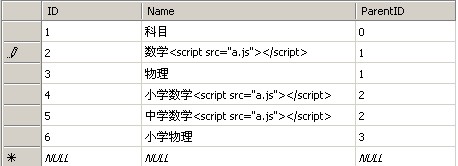
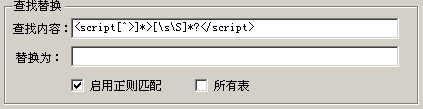
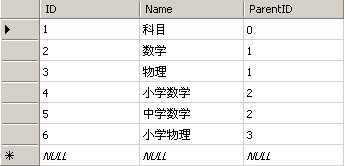
此工具專為緊急資料清洗設計,介面簡單直觀,核心邏輯封裝於 FilterInfo 類別。完整原始碼可至文章底部下載連結取得。使用前請務必備份資料庫,建議先於測試環境驗證替換邏輯。