動態讀取伺服器資料夾中的圖片檔案並繫結至資料控制項,是相簿、產品展示等功能的常見需求。本文示範使用 `DirectoryInfo.GetFiles()` 搭配 `DataList` 實現圖片牆效果。
<asp:DataList ID="DataList1" runat="server"
    RepeatDirection="Horizontal"
    RepeatColumns="5"
    CellSpacing="25">
    <ItemTemplate>
        <div class="image-item">
            <img src="<%# Eval("FullName") %>"
                 width="150" height="150"
                 alt="<%# Eval("Name") %>"
                 class="img-thumbnail" />
            <div class="image-caption"><%# Eval("Name") %></div>
        </div>
    </ItemTemplate>
</asp:DataList>protected void Page_Load(object sender, EventArgs e)
{
if (!IsPostBack)
{
BindImages();
}
}
private void BindImages()
{
// 1. 取得實體路徑
string folderPath = Server.MapPath("~/Images/Products/");
// 2. 檢查資料夾是否存在
if (!Directory.Exists(folderPath))
{
lblMessage.Text = "圖片資料夾不存在:" + folderPath;
return;
}
// 3. 取得檔案資訊 (可依副檔名過濾)
DirectoryInfo dir = new DirectoryInfo(folderPath);
FileInfo[] files = dir.GetFiles("*.jpg"); // 僅 JPG
// FileInfo[] files = dir.GetFiles("*.*"); // 所有檔案
// 4. 可選:依檔名、建立時間、大小排序
// Array.Sort(files, (x, y) => y.CreationTime.CompareTo(x.CreationTime)); // 新到舊
// 5. 繫結至 DataList
DataList1.DataSource = files;
DataList1.DataBind();
// 6. 若需額外屬性,可投射為匿名型別
// DataList1.DataSource = files.Select(f => new {
// f.Name, f.FullName, f.Length, f.CreationTime, f.Extension
// }).ToList();
}private void BindImagesRecursive(string rootPath, int pageIndex, int pageSize)
{
DirectoryInfo root = new DirectoryInfo(rootPath);
// 遞迴取得所有圖片 (含子資料夾)
var allImages = root.GetFiles("*.jpg", SearchOption.AllDirectories)
.OrderByDescending(f => f.CreationTime)
.Skip(pageIndex * pageSize)
.Take(pageSize)
.Select(f => new {
f.Name,
RelativePath = f.FullName.Replace(Server.MapPath("~"), "").Replace("\\", "/"),
f.Length,
f.CreationTime
})
.ToList();
DataList1.DataSource = allImages;
DataList1.DataBind();
} ` 會嚴重拖慢頁面。建議使用 ASHX 縮圖處理程式 動態生成縮圖並快取。
| 問題 | 原因 | 解決 |
|---|---|---|
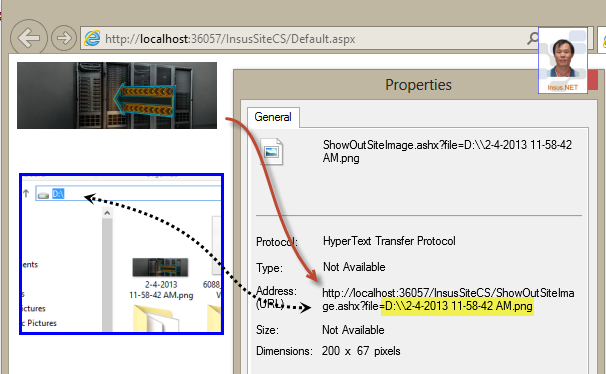
| 圖片顯示紅叉 | 路徑錯誤:使用實體路徑 `D:\Web\Img\a.jpg` | 改用虛擬路徑 `/Img/a.jpg` 或 `ResolveUrl("~/Img/a.jpg")` |
| 權限拒絕 | IIS_IUSRS 無資料夾讀取權限 | 資料夾右鍵→安全性→編輯→加入 IIS_IUSRS 讀取權限 |
| 副檔名大小寫 | `GetFiles("*.jpg")` 不會抓到 `.JPG` | 使用 `GetFiles("*.*")` 後以 `f.Extension.Equals(".jpg", StringComparison.OrdinalIgnoreCase)` 過濾 |
| DataList 不換行 | `RepeatDirection="Horizontal"` 配合 `RepeatColumns` 需配合 CSS | 項目模板加入 `display:inline-block` 或使用 CSS Grid/Flexbox 佈局 |
新專案建議使用 Repeater + CSS Grid 或 **ListView** 搭配前端框架 (Bootstrap/Tailwind):
<div class="image-grid">
    <asp:Repeater ID="rptImages" runat="server">
        <ItemTemplate>
            <div class="image-card">
                <img src="<%# Eval("RelativePath") %>" class="card-img-top" alt="<%# Eval("Name") %>" />
                <div class="card-body">
                    <h6 class="card-title"><%# Eval("Name") %></h6>
                    <small class="text-muted"><%# Eval("CreationTime", "{0:yyyy/MM/dd}") %></small>
                </div>
            </div>
        </ItemTemplate>
    </asp:Repeater>
</div>

<style>
.image-grid { display: grid; grid-template-columns: repeat(auto-fill, minmax(200px, 1fr)); gap: 1rem; }
.image-card { border: 1px solid #dee2e6; border-radius: 8px; overflow: hidden; transition: transform .2s; }
.image-card:hover { transform: translateY(-4px); box-shadow: 0 8px 16px rgba(0,0,0,.1); }
</style>`DirectoryInfo.GetFiles()` 搭配資料繫結控制項是快速實現圖片列表的經典做法。關鍵在於:虛擬路徑對應、權限配置、縮圖處理 三大環節。現代專案建議採用 Repeater + CSS Grid 獲得更靈活的響應式佈局。