基本綁定與預選
<asp:ListBox ID="ListBox1" runat="server" SelectionMode="Multiple">
    <asp:ListItem>A</asp:ListItem>
    <asp:ListItem>B</asp:ListItem>
    <asp:ListItem>C</asp:ListItem>
    <asp:ListItem>D</asp:ListItem>
    <asp:ListItem>E</asp:ListItem>
</asp:ListBox>
protected void Page_Load(object sender, EventArgs e)
{
    if (!IsPostBack)
    {
        foreach (ListItem item in ListBox1.Items)
        {
            if (item.Value == "A" || item.Value == "C")
                item.Selected = true;
        }
    }
}
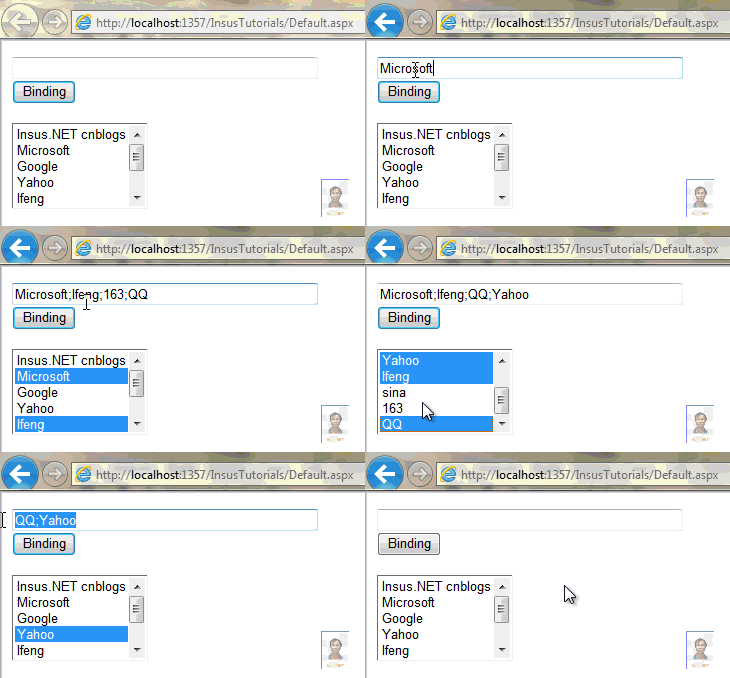
動態資料綁定 + 文字框輸入預選
前台
<asp:TextBox ID="TextBox1" runat="server" Width="300" /><br />
<asp:Button ID="Button1" runat="server" Text="綁定選取" OnClick="Button1_Click" /><br /><br />
<asp:ListBox ID="ListBox1" runat="server" Height="100" SelectionMode="Multiple" />
後台
protected void Page_Load(object sender, EventArgs e)
{
    if (!IsPostBack) BindData();
}

void BindData()
{
    ListBox1.DataSource = GetSites();
    ListBox1.DataTextField = "Key";
    ListBox1.DataValueField = "Value";
    ListBox1.DataBind();
}

Dictionary<string, string> GetSites()
{
    return new Dictionary<string, string>
    {
        {"Insus.NET", "https://www.cnblogs.com/insus"},
        {"Microsoft", "https://www.microsoft.com"},
        {"Google", "https://www.google.com"},
        {"Yahoo", "https://www.yahoo.com"},
        {"Ifeng", "https://www.ifeng.com"},
        {"Baidu", "https://www.baidu.com"},
        {"163", "https://www.163.com"},
        {"QQ", "https://www.qq.com"}
    };
}

protected void Button1_Click(object sender, EventArgs e)
{
    string[] names = TextBox1.Text.Split(';');
    foreach (ListItem li in ListBox1.Items)
        li.Selected = ((IList)names).Contains(li.Text);
}
刪除多個已選項目
正確寫法:反向迴圈
int count = ListBox1.SelectedItems.Count;
for (int i = count - 1; i >= 0; i--)
{
    ListBox1.Items.RemoveAt(ListBox1.SelectedIndices[i]);
}
ListBox1.ClearSelected();
錯誤示範:foreach 直接刪除
// 錯誤!集合修改時無法枚舉
foreach (object item in ListBox1.SelectedItems)
    ListBox1.Items.Remove(item); // 拋出 InvalidOperationException
替代方案:先存入陣列
var selected = ListBox1.SelectedItems.Cast<ListItem>().ToList();
foreach (var li in selected) ListBox1.Items.Remove(li);
總結
| 操作 | 關鍵點 |
|---|
| 靜態項目預選 | ListItem.Selected = true |
| 動態資料綁定 | DataTextField/DataValueField + DataBind() |
| 依文字框預選 | Split + IList.Contains |
| 批次刪除 | 反向 for 迴圈移除 SelectedIndices[i] |