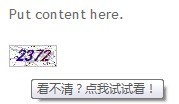
在 ASP.NET MVC 專案中,驗證碼是防止機器人惡意提交表單的常用手段。本文將示範如何將原本分散在視圖中的 <img> 標籤與 JavaScript 重新整理邏輯,封裝成一個可重複使用的 HtmlHelper 擴充方法,讓開發者只需在 Razor 視圖中呼叫 @Html.ValidateCode() 即可輸出完整的驗證碼圖片與點擊換圖功能。
早期做法需在視圖手寫 HTML 與腳本:
<img id="validateCode" src='@Url.Action("GetValidateCode")' />
<script>
$(document).ready(function () {
    $("#validateCode").bind("click", function () {
        var url = $(this).attr("src");
        url += "?" + Math.random();
        $(this).attr("src", url);
    });
});
</script>
這樣不僅重複代碼,還難以維護。接下來我們將其封裝為 HtmlHelper。
在專案中新增 ValidateCodeHelper.cs,內容如下:
using System;
using System.Web;
using System.Web.Mvc;
using System.Web.Routing;
using System.Text;

namespace MvcApplication1
{
    public static class ValidateCodeHelper
    {
        private const string IdPrefix = "validateCode";
        private const int DefaultLength = 4;

        // 多載方法鏈,提供彈性參數
        public static MvcHtmlString ValidateCode(this HtmlHelper helper)
        {
            return ValidateCode(helper, IdPrefix);
        }

        public static MvcHtmlString ValidateCode(this HtmlHelper helper, string id)
        {
            return ValidateCode(helper, id, DefaultLength);
        }

        public static MvcHtmlString ValidateCode(this HtmlHelper helper, string id, int length)
        {
            return ValidateCode(helper, id, length, null);
        }

        public static MvcHtmlString ValidateCode(this HtmlHelper helper, string id, object htmlAttributes)
        {
            return ValidateCode(helper, id, DefaultLength, htmlAttributes);
        }

        public static MvcHtmlString ValidateCode(this HtmlHelper helper, int length, object htmlAttributes)
        {
            return ValidateCode(helper, IdPrefix, length, htmlAttributes);
        }

        public static MvcHtmlString ValidateCode(this HtmlHelper helper, object htmlAttributes)
        {
            return ValidateCode(helper, DefaultLength, htmlAttributes);
        }

        public static MvcHtmlString ValidateCode(this HtmlHelper helper, int length)
        {
            return ValidateCode(helper, length, null);
        }

        // 核心實作
        public static MvcHtmlString ValidateCode(this HtmlHelper helper, string id, int length, object htmlAttributes)
        {
            string finalId = id + "_imgValidateCode";
            var tagBuild = new TagBuilder("img");
            tagBuild.GenerateId(finalId);

            // 動態判斷 Controller 路徑
            var defaultController = ((Route)RouteTable.Routes["Default"]).Defaults["controller"] + "/";
            var controller = HttpContext.Current.Request.Url.Segments.Length == 1
                ? defaultController
                : HttpContext.Current.Request.Url.Segments[1];

            tagBuild.MergeAttribute("src", string.Format("/{0}GetValidateCode?length={1}", controller, length));
            tagBuild.MergeAttribute("alt", "看不清?點我試試看!");
            tagBuild.MergeAttribute("style", "cursor:pointer;");
            tagBuild.MergeAttributes(AnonymousObjectToHtmlAttributes(htmlAttributes));

            // 產生點擊換圖的 JavaScript
            var sb = new StringBuilder();
            sb.Append("<script language=\"javascript\" type=\"text/javascript\">");
            sb.Append("$(document).ready(function () {");
            sb.AppendFormat("$(\"#{0}\").bind(\"click\", function () {{", finalId);
            sb.Append("var url = $(this).attr(\"src\");");
            sb.Append("url += \"&\" + Math.random();");
            sb.Append("$(this).attr(\"src\", url);");
            sb.Append("});");
            sb.Append("});");
            sb.Append("</script>");

            return MvcHtmlString.Create(tagBuild.ToString() + sb.ToString());
        }

        // 將匿名物件轉為 RouteValueDictionary
        public static RouteValueDictionary AnonymousObjectToHtmlAttributes(object htmlAttributes)
        {
            var result = new RouteValueDictionary();
            if (htmlAttributes != null)
            {
                foreach (System.ComponentModel.PropertyDescriptor property in System.ComponentModel.TypeDescriptor.GetProperties(htmlAttributes))
                {
                    result.Add(property.Name.Replace('_', '-'), property.GetValue(htmlAttributes));
                }
            }
            return result;
        }
    }
}
建立 ValidateCode.cs,負責產生隨機碼與繪製干擾線、噪點的圖片:
using System;
using System.Drawing;
using System.Drawing.Drawing2D;
using System.Drawing.Imaging;
using System.IO;

namespace MvcApplication1
{
    public class ValidateCode
    {
        public int MaxLength { get { return 10; } }
        public int MinLength { get { return 1; } }

        // 產生指定長度的數字驗證碼
        public string CreateValidateCode(int length)
        {
            int[] randMembers = new int[length];
            int[] validateNums = new int[length];
            string validateNumberStr = "";

            int seekSeek = unchecked((int)DateTime.Now.Ticks);
            Random seekRand = new Random(seekSeek);
            int beginSeek = (int)seekRand.Next(0, Int32.MaxValue - length * 10000);
            int[] seeks = new int[length];

            for (int i = 0; i < length; i++)
            {
                beginSeek += 10000;
                seeks[i] = beginSeek;
            }

            for (int i = 0; i < length; i++)
            {
                Random rand = new Random(seeks[i]);
                int pownum = 1 * (int)Math.Pow(10, length);
                randMembers[i] = rand.Next(pownum, Int32.MaxValue);
            }

            for (int i = 0; i < length; i++)
            {
                string numStr = randMembers[i].ToString();
                int numLength = numStr.Length;
                Random rand = new Random();
                int numPosition = rand.Next(0, numLength - 1);
                validateNums[i] = Int32.Parse(numStr.Substring(numPosition, 1));
            }

            for (int i = 0; i < length; i++)
            {
                validateNumberStr += validateNums[i].ToString();
            }
            return validateNumberStr;
        }

        // 繪製驗證碼圖片並回傳位元組陣列
        public byte[] CreateValidateGraphic(string validateCode)
        {
            Bitmap image = new Bitmap((int)Math.Ceiling(validateCode.Length * 12.0), 22);
            Graphics g = Graphics.FromImage(image);
            try
            {
                Random random = new Random();
                g.Clear(Color.White);

                // 干擾線
                for (int i = 0; i < 25; i++)
                {
                    int x1 = random.Next(image.Width);
                    int x2 = random.Next(image.Width);
                    int y1 = random.Next(image.Height);
                    int y2 = random.Next(image.Height);
                    g.DrawLine(new Pen(Color.Silver), x1, y1, x2, y2);
                }

                // 隨機字型與漸層筆刷
                string[] fontName = { "華文新魏", "宋體", "圓體", "黑體", "隸書" };
                Font font = new Font(fontName[new Random().Next(0, validateCode.Length)], 12, FontStyle.Bold | FontStyle.Italic);
                LinearGradientBrush brush = new LinearGradientBrush(new Rectangle(0, 0, image.Width, image.Height), Color.Blue, Color.DarkRed, 1.2f, true);
                g.DrawString(validateCode, font, brush, 3, 2);

                // 前景噪點
                for (int i = 0; i < 100; i++)
                {
                    int x = random.Next(image.Width);
                    int y = random.Next(image.Height);
                    image.SetPixel(x, y, Color.FromArgb(random.Next()));
                }

                // 邊框
                g.DrawRectangle(new Pen(Color.Silver), 0, 0, image.Width - 1, image.Height - 1);

                MemoryStream stream = new MemoryStream();
                image.Save(stream, ImageFormat.Jpeg);
                return stream.ToArray();
            }
            finally
            {
                g.Dispose();
                image.Dispose();
            }
        }

        public static int GetImageWidth(int validateNumLength) { return (int)(validateNumLength * 12.0); }
        public static double GetImageHeight() { return 23; }
    }
}
using System.Web.Mvc;

namespace MvcApplication1
{
    public class BaseController : Controller
    {
        public ActionResult GetValidateCode(int length)
        {
            ValidateCode vCode = new ValidateCode();
            string code = vCode.CreateValidateCode(length);
            Session["ValidateCode"] = code; // 存入 Session 供後續驗證
            byte[] bytes = vCode.CreateValidateGraphic(code);
            return File(bytes, "image/gif");
        }

        protected string GetValidateCode()
        {
            return Session["ValidateCode"]?.ToString();
        }
    }
}
using System.Web.Mvc;

namespace MvcApplication1.Controllers
{
    public class HomeController : BaseController
    {
        public ActionResult Index()
        {
            ViewBag.Message = "Welcome to ASP.NET MVC!";
            return View();
        }

        public ActionResult About()
        {
            string code = GetValidateCode(); // 取得驗證碼進行驗證邏輯
            return View();
        }
    }
}
@using MvcApplication1
@{
    ViewBag.Title = "About Us";
}
<h2>About</h2>
<p>Put content here.</p>
@Html.ValidateCode() <!-- 這裡自動輸出 img + script -->
完整專案可從 ValidateCode.rar 下載。