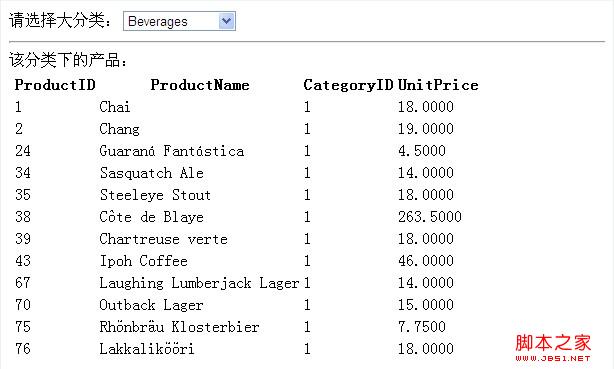
ListView 是 ASP.NET WebForms 3.5+ 引進的靈活資料顯示控制項,支援完整模板化、內建分頁、編輯/刪除/新增、群組顯示,且輸出乾淨 HTML(無 Table 強制結構)。本文以 Northwind 資料庫為例,示範 DropDownList 篩選 + ListView 主從畫面,含完整標記與後端碼。
<%@ Page Language="C#" AutoEventWireup="true" CodeFile="DropLvw.aspx.cs" Inherits="DropLvw" %>
<!DOCTYPE html>
<html xmlns="https://www.w3.org/1999/xhtml">
<head runat="server">
    <title>ListView 主從範例</title>
    <style>
        table { border-collapse: collapse; width: 100%; }
        th, td { border: 1px solid #ddd; padding: 8px; text-align: left; }
        th { background-color: #f2f2f2; }
        .alt { background-color: #f9f9f9; }
        .edit-mode input, .edit-mode select { width: 100%; box-sizing: border-box; }
    </style>
</head>
<body>
    <form id="form1" runat="server">
        <div>
            <h3>產品目錄 (依分類篩選)</h3>

            <!-- 分類下拉選單 -->
            請選擇大分類:
            <asp:DropDownList ID="ddlCategory" runat="server" AutoPostBack="True"
                DataSourceID="dsCategory" DataTextField="CategoryName"
                DataValueField="CategoryID" AppendDataBoundItems="true">
                <asp:ListItem Text="-- 全部 --" Value="" />
            </asp:DropDownList>
            <asp:SqlDataSource ID="dsCategory" runat="server"
                ConnectionString="<%$ ConnectionStrings:Northwind %>"
                SelectCommand="SELECT CategoryID, CategoryName FROM Categories ORDER BY CategoryName" />
            <hr />

            <!-- ListView 主體 -->
            <asp:ListView ID="lvProducts" runat="server" DataKeyNames="ProductID"
                DataSourceID="dsProducts" OnItemCommand="lvProducts_ItemCommand">

                <!-- 版面配置:定義表格結構與佔位符 -->
                <LayoutTemplate>
                    <table id="tblProducts" runat="server">
                        <thead>
                            <tr>
                                <th>ID</th><th>產品名稱</th><th>分類</th><th>單價</th><th>操作</th>
                            </tr>
                        </thead>
                        <tbody id="itemPlaceholder" runat="server"></tbody>
                    </table>
                    <!-- 分頁器 -->
                    <asp:DataPager ID="dpProducts" runat="server" PagedControlID="lvProducts" PageSize="5">
                        <Fields>
                            <asp:NextPreviousPagerField ButtonType="Button" ShowFirstPageButton="true" ShowLastPageButton="true" />
                            <asp:NumericPagerField ButtonCount="5" />
                        </Fields>
                    </asp:DataPager>
                </LayoutTemplate>

                <!-- 單筆資料顯示 -->
                <ItemTemplate>
                    <tr>
                        <td><%# Eval("ProductID") %></td>
                        <td><%# Eval("ProductName") %></td>
                        <td><%# Eval("CategoryName") %></td>
                        <td><%# Eval("UnitPrice", "{0:C}") %></td>
                        <td>
                            <asp:LinkButton ID="btnEdit" runat="server" CommandName="Edit" Text="編輯" /> |
                            <asp:LinkButton ID="btnDelete" runat="server" CommandName="Delete" Text="刪除" OnClientClick="return confirm('確定刪除?');" />
                        </td>
                    </tr>
                </ItemTemplate>

                <!-- 交替列樣式 -->
                <AlternatingItemTemplate>
                    <tr class="alt">
                        <td><%# Eval("ProductID") %></td>
                        <td><%# Eval("ProductName") %></td>
                        <td><%# Eval("CategoryName") %></td>
                        <td><%# Eval("UnitPrice", "{0:C}") %></td>
                        <td>
                            <asp:LinkButton ID="btnEdit" runat="server" CommandName="Edit" Text="編輯" /> |
                            <asp:LinkButton ID="btnDelete" runat="server" CommandName="Delete" Text="刪除" OnClientClick="return confirm('確定刪除?');" />
                        </td>
                    </tr>
                </AlternatingItemTemplate>

                <!-- 編輯模式 -->
                <EditItemTemplate>
                    <tr class="edit-mode">
                        <td><%# Eval("ProductID") %></td>
                        <td><asp:TextBox ID="txtName" runat="server" Text='<%# Bind("ProductName") %>' /></td>
                        <td>
                            <asp:DropDownList ID="ddlCatEdit" runat="server"
                                DataSourceID="dsCategory" DataTextField="CategoryName" DataValueField="CategoryID"
                                SelectedValue='<%# Bind("CategoryID") %>' AppendDataBoundItems="true">
                                <asp:ListItem Text="--請選擇--" Value="" />
                            </asp:DropDownList>
                        </td>
                        <td><asp:TextBox ID="txtPrice" runat="server" Text='<%# Bind("UnitPrice", "{0:F2}") %>' /></td>
                        <td>
                            <asp:LinkButton ID="btnUpdate" runat="server" CommandName="Update" Text="更新" /> |
                            <asp:LinkButton ID="btnCancel" runat="server" CommandName="Cancel" Text="取消" />
                        </td>
                    </tr>
                </EditItemTemplate>

                <!-- 新增模式 -->
                <InsertItemTemplate>
                    <tr class="edit-mode">
                        <td>(自動產生)</td>
                        <td><asp:TextBox ID="txtNameIns" runat="server" Text='<%# Bind("ProductName") %>' /></td>
                        <td>
                            <asp:DropDownList ID="ddlCatIns" runat="server"
                                DataSourceID="dsCategory" DataTextField="CategoryName" DataValueField="CategoryID"
                                SelectedValue='<%# Bind("CategoryID") %>' AppendDataBoundItems="true">
                                <asp:ListItem Text="--請選擇--" Value="" />
                            </asp:DropDownList>
                        </td>
                        <td><asp:TextBox ID="txtPriceIns" runat="server" Text='<%# Bind("UnitPrice", "{0:F2}") %>' /></td>
                        <td>
                            <asp:LinkButton ID="btnInsert" runat="server" CommandName="Insert" Text="新增" /> |
                            <asp:LinkButton ID="btnCancelIns" runat="server" CommandName="Cancel" Text="取消" />
                        </td>
                    </tr>
                </InsertItemTemplate>>

                <!-- 空資料提示 -->
                <EmptyDataTemplate>
                    <div class="alert">此分類下無產品資料。</div>
                </EmptyDataTemplate>

                <!-- 選取列強調(可選) -->
                <SelectedItemTemplate>
                    <tr style="background:#e6f7ff;">
                        <td><%# Eval("ProductID") %></td>
                        <td><%# Eval("ProductName") %></td>
                        <td><%# Eval("CategoryName") %></td>
                        <td><%# Eval("UnitPrice", "{0:C}") %></td>
                        <td><asp:LinkButton ID="btnEdit" runat="server" CommandName="Edit" Text="編輯" /></td>
                    </tr>
                </SelectedItemTemplate>

            </asp:ListView>

            <!-- 產品資料來源:依分類篩選 -->
            <asp:SqlDataSource ID="dsProducts" runat="server"
                ConnectionString="<%$ ConnectionStrings:Northwind %>"
                SelectCommand="SELECT p.ProductID, p.ProductName, p.UnitPrice, c.CategoryName, p.CategoryID
                               FROM Products p INNER JOIN Categories c ON p.CategoryID = c.CategoryID
                               WHERE (@CategoryID IS NULL OR p.CategoryID = @CategoryID)
                               ORDER BY p.ProductName"
                DeleteCommand="DELETE FROM Products WHERE ProductID = @ProductID"
                InsertCommand="INSERT INTO Products (ProductName, CategoryID, UnitPrice) VALUES (@ProductName, @CategoryID, @UnitPrice)"
                UpdateCommand="UPDATE Products SET ProductName=@ProductName, CategoryID=@CategoryID, UnitPrice=@UnitPrice WHERE ProductID=@ProductID"
                OnInserting="dsProducts_Inserting" OnUpdating="dsProducts_Updating" OnDeleting="dsProducts_Deleting">
                <SelectParameters>
                    <asp:ControlParameter ControlID="ddlCategory" Name="CategoryID" PropertyName="SelectedValue" Type="Int32" DefaultValue="" ConvertEmptyStringToNull="true" />
                </SelectParameters>
                <DeleteParameters>
                    <asp:Parameter Name="ProductID" Type="Int32" />
                </DeleteParameters>
                <InsertParameters>
                    <asp:Parameter Name="ProductName" Type="String" />
                    <asp:Parameter Name="CategoryID" Type="Int32" />
                    <asp:Parameter Name="UnitPrice" Type="Decimal" />
                </InsertParameters>
                <UpdateParameters>
                    <asp:Parameter Name="ProductName" Type="String" />
                    <asp:Parameter Name="CategoryID" Type="Int32" />
                    <asp:Parameter Name="UnitPrice" Type="Decimal" />
                    <asp:Parameter Name="ProductID" Type="Int32" />
                </UpdateParameters>
            </asp:SqlDataSource>

            <!-- 新增按鈕觸發 -->
            <asp:Button ID="btnNew" runat="server" Text="新增產品" OnClick="btnNew_Click" />
        </div>
    </form>
</body>
</html>
using System;
using System.Web.UI.WebControls;

public partial class DropLvw : System.Web.UI.Page
{
    protected void Page_Load(object sender, EventArgs e)
    {
        // 無需手動 DataBind,SqlDataSource 自動處理
    }

    // 進入新增模式
    protected void btnNew_Click(object sender, EventArgs e)
    {
        lvProducts.InsertItemPosition = InsertItemPosition.FirstItem;
    }

    // 新增前驗證
    protected void dsProducts_Inserting(object sender, SqlDataSourceCommandEventArgs e)
    {
        if (string.IsNullOrWhiteSpace(e.Command.Parameters["@ProductName"].Value?.ToString()))
        {
            e.Cancel = true;
            ShowMessage("產品名稱不可空白");
        }
        if (e.Command.Parameters["@CategoryID"].Value == DBNull.Value)
        {
            e.Cancel = true;
            ShowMessage("請選擇分類");
        }
    }

    // 更新前驗證
    protected void dsProducts_Updating(object sender, SqlDataSourceCommandEventArgs e)
    {
        if (string.IsNullOrWhiteSpace(e.Command.Parameters["@ProductName"].Value?.ToString()))
        {
            e.Cancel = true;
            ShowMessage("產品名稱不可空白");
        }
    }

    // 刪除前確認(可在此做軟刪除或檢查關聯)
    protected void dsProducts_Deleting(object sender, SqlDataSourceCommandEventArgs e)
    {
        // 例如:檢查是否有訂單明細引用
        // if (HasOrderDetails((int)e.Command.Parameters["@ProductID"].Value)) e.Cancel = true;
    }

    // 處理 ListView 自訂命令(如有)
    protected void lvProducts_ItemCommand(object sender, ListViewCommandEventArgs e)
    {
        if (e.CommandName == "Cancel")
            lvProducts.InsertItemPosition = InsertItemPosition.None;
    }

    private void ShowMessage(string msg)
    {
        // 簡單示範,實務建議用 ValidationSummary 或 Toast
        ClientScript.RegisterStartupScript(GetType(), "alert", $"alert('{msg}');", true);
    }
}
<connectionStrings>
  <add name="Northwind"
       connectionString="Data Source=.;Initial Catalog=Northwind;Integrated Security=True"
       providerName="System.Data.SqlClient" />
</connectionStrings>
| 模板 | 用途 | 必要性 |
|---|---|---|
LayoutTemplate |
整體外框、表頭、itemPlaceholder、分頁器 |
必要 |
ItemTemplate |
一般資料列 | 必要 |
AlternatingItemTemplate |
交替列樣式 | 選用 |
EditItemTemplate |
編輯模式 UI(Bind 雙向綁定) |
啟用編輯時必要 |
InsertItemTemplate |
新增模式 UI | 啟用新增時必要 |
EmptyDataTemplate |
無資料時顯示 | 選用 |
SelectedItemTemplate |
選取列強調 | 選用 |
GroupTemplate / GroupSeparatorTemplate |
群組顯示(如每列 3 個項目) | 選用 |
LayoutTemplate 內或外部,設定 PagedControlID 指向 ListView。PageSize 控制每頁筆數。NextPreviousPagerField(上一頁/下一頁)、NumericPagerField(頁碼)、TemplatePagerField(自訂)。
<LayoutTemplate>
    <div id="itemPlaceholder" runat="server"></div>
</LayoutTemplate>
<GroupTemplate>
    <div class="row">
        <span id="itemPlaceholder" runat="server"></span>
    </div>
</GroupTemplate>
<GroupSeparatorTemplate></div><div class="row"></GroupSeparatorTemplate>
<ItemTemplate>
    <div class="col-md-4"><div class="card">...</div></div>
</ItemTemplate>
並設定 GroupItemCount="3"。
分離資料存取邏輯,支援單元測試:
<asp:ObjectDataSource ID="odsProducts" runat="server"
    TypeName="MyApp.BLL.ProductService"
    SelectMethod="GetByCategory"
    InsertMethod="Create" UpdateMethod="Update" DeleteMethod="Delete"
    DataObjectTypeName="MyApp.Models.Product">
    <SelectParameters>
        <asp:ControlParameter ControlID="ddlCategory" Name="categoryId" />
    </SelectParameters>
</asp:ObjectDataSource>
<EditItemTemplate>
    <td>
        <asp:TextBox ID="txtName" runat="server" Text='<%# Bind("ProductName") %>' />
        <asp:RequiredFieldValidator runat="server" ControlToValidate="txtName" Text="*" ErrorMessage="必填" />
    </td>
</EditItemTemplate>
lvProducts.InsertItemPosition = InsertItemPosition.FirstItem(或 LastItem)。Bind 在 DropDownList SelectedValue 報錯:確認資料來源包含該值,或加 AppendDataBoundItems="true" 並提供空白項目。DataPager.PagedControlID 是否正確指向 ListView ID。DataKeyNames 包含主鍵,且 SqlDataSource 的 Command/Parameters 名稱一致。ListView 是 WebForms 最強大、彈性最高的資料呈現控制項,完全掌控 HTML 輸出。SqlDataSource/ObjectDataSource + DataPager 可零後端碼完成 CRUD + 分頁。ListView 仍是最佳選擇。