namespace Microshaoft.Utils
{
    public class DownLoadState      // 下載分塊狀態封裝
    public class ExceptionEventArgs // 例外事件參數,含 ExceptionAction (Throw/CancelAll/Ignore/Retry)
    public class DownLoadEventArgs  // 資料接收事件參數
    public class ThreadProcessEventArgs // 執行緒結束事件參數

    public class HttpWebClient
    {
        public event DataReceiveEventHandler DataReceive;
        public event ExceptionEventHandler ExceptionOccurrs;
        public event ThreadProcessEventHandler ThreadProcessEnd;

        public void DownloadFile(string url, string fileName, int chunks);      // 進入點
        public void DownloadFileChunk(string url, string fileName, int fromPos, int length); // 單塊下載
        // 內部:ResponseAsBytes、OnDataReceive、OnThreadProcess...
    }
}
HttpWebRequest req = (HttpWebRequest)WebRequest.Create(url);
req.AddRange(fromPosition); // 關鍵:Range: bytes=fromPosition-
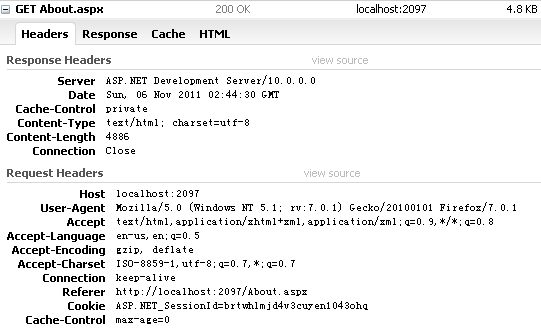
伺服器回應 `206 Partial Content`,`Content-Range` 標頭指示實際回傳範圍。
var client = new HttpWebClient();
client.DataReceive += (s, e) => {
    using (var fs = new FileStream(e.DownloadState.FileName, FileMode.OpenOrCreate, FileAccess.ReadWrite, FileShare.ReadWrite))
    {
        fs.Position = e.DownloadState.Position;
        fs.Write(e.DownloadState.Data, 0, e.DownloadState.Data.Length);
    }
    Console.Write($"已下載 {e.DownloadState.Position + e.DownloadState.Data.Length} / {client.FileLength}");
};
client.ExceptionOccurrs += (s, e) => {
    Console.WriteLine($"錯誤: {e.Exception.Message}, 重試中...");
    e.ExceptionAction = ExceptionActions.Retry; // 或 Ignore
    // 可在此重新呼叫 DownloadFileChunk 續傳
};
client.ThreadProcessEnd += (s, e) => { /* 計數完成 */ };

client.DownloadFile("https://example.com/large.zip", @"D:\temp\large.zip", 10); // 10 執行緒