採用經典 **jQuery AJAX + .ashx 處理常式 + NHibernate ORM** 三層架構,實現評論的非同步讚/踩計數更新。
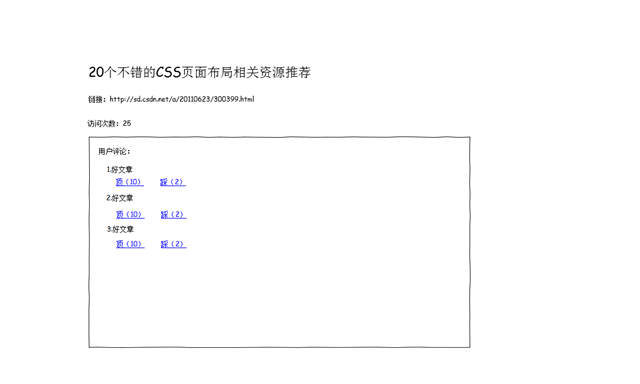
CREATE TABLE "Info" (
    "Id" SERIAL PRIMARY KEY,
    "Content" TEXT NOT NULL
);

CREATE TABLE "Review" (
    "Id" SERIAL PRIMARY KEY,
    "InfoId" INT NOT NULL REFERENCES "Info"("Id"),
    "Content" TEXT NOT NULL,
    "Support" INT DEFAULT 0,
    "Opposition" INT DEFAULT 0
);public class Info
{
public virtual int Id { get; set; }
public virtual string Content { get; set; }
}
public class Review
{
public virtual int Id { get; set; }
public virtual int InfoId { get; set; }
public virtual string Content { get; set; }
public virtual int Support { get; set; }
public virtual int Opposition { get; set; }
}<class name="Review" table=""Review"">
<id name="Id"><generator class="native"/></id>
<property name="InfoId" column=""InfoId""/>
<property name="Content" column=""Content""/>
<property name="Support" column=""Support""/>
<property name="Opposition" column=""Opposition""/>
</class>public class ReviewService
{
public Review UpdateSupport(int reviewId)
{
using (var session = NHibernateHelper.OpenSession())
using (var tx = session.BeginTransaction())
{
var review = session.Get(reviewId);
if (review != null)
{
review.Support++;
session.Update(review);
tx.Commit();
}
return review;
}
}
public Review UpdateOpposition(int reviewId)
{
using (var session = NHibernateHelper.OpenSession())
using (var tx = session.BeginTransaction())
{
var review = session.Get(reviewId);
if (review != null)
{
review.Opposition++;
session.Update(review);
tx.Commit();
}
return review;
}
}
} <%@ WebHandler Language="C#" Class="ChangeState" %>
using System;
using System.Web;
using AjaxDemo.BLL;
using AjaxDemo.Modal;
namespace AjaxDemo.Ajax
{
public class ChangeState : IHttpHandler
{
public void ProcessRequest(HttpContext context)
{
// 參數驗證
if (!int.TryParse(context.Request.QueryString["id"], out var id) ||
!int.TryParse(context.Request.QueryString["state"], out var state))
{
context.Response.StatusCode = 400;
context.Response.Write("參數錯誤");
return;
}
var service = new ReviewService();
Review review = state switch
{
0 => service.UpdateSupport(id), // 0 = 讚
1 => service.UpdateOpposition(id), // 1 = 踩
_ => null
};
if (review == null)
{
context.Response.StatusCode = 404;
context.Response.Write("找不到評論");
return;
}
// 回傳純數字,前端直接顯示
context.Response.ContentType = "text/plain";
context.Response.Write(state == 0 ? review.Support : review.Opposition);
}
public bool IsReusable => false;
}
}<%@ Page Language="C#" AutoEventWireup="true" CodeBehind="ViewDetail.aspx.cs" Inherits="AjaxDemo.ViewDetail" %>
<!DOCTYPE html>
<html xmlns="https://www.w3.org/1999/xhtml">
<head runat="server">
<title>評論讚/踩示範</title>
<script src="Scripts/jquery-3.7.1.min.js"></script>
<style>
.review-item { border-bottom: 1px solid #eee; padding: 1rem 0; }
.vote-btn { cursor: pointer; color: #3498db; text-decoration: none; margin-right: 1rem; }
.vote-btn.voted { color: #e74c3c; font-weight: bold; pointer-events: none; }
</style>
</head>
<body>
<form id="form1" runat="server">
<div id="infoDetail">
<h1><asp:Label ID="lblInfoContent" runat="server" /></h1>
</div>
<div id="reviews">
<h3>網友評論</h3>
<asp:Repeater ID="rptReviews" runat="server">
<ItemTemplate>
<div class="review-item" data-id="<%# Eval("Id") %>">
<p><%# Eval("Content") %></p>
<a href="#" class="vote-btn btn-support" data-action="support">
讚 (<span class="count-support"><%# Eval("Support") %></span>)
</a>
<a href="#" class="vote-btn btn-oppose" data-action="oppose">
踩 (<span class="count-oppose"><%# Eval("Opposition") %></span>)
</a>
</div>
</ItemTemplate>
</asp:Repeater>
</div>
</form>
<script>
$(function () {
// 事件代理:針對動態新增評論也有效
$('#reviews').on('click', '.vote-btn', function (e) {
e.preventDefault();
var $btn = $(this);
var $item = $btn.closest('.review-item');
var reviewId = $item.data('id');
var action = $btn.data('action'); // 'support' 或 'oppose'
// 防重複點擊
if ($btn.hasClass('voted')) return;
var state = action === 'support' ? 0 : 1;
var $countSpan = $btn.find('.count-support, .count-oppose');
$.get('./Ajax/ChangeState.ashx', { id: reviewId, state: state })
.done(function (data) {
$countSpan.text(data); // 更新計數
$btn.addClass('voted'); // 標記已投票
// 可選:同步禁用另一個按鈕
$btn.siblings('.vote-btn').addClass('voted');
})
.fail(function (xhr) {
alert('操作失敗:' + xhr.responseText);
});
});
});
</script>
</body>
</html>| 決策點 | 方案 | 理由 |
|---|---|---|
| 前端參數傳遞 | QueryString (?id=1&state=0) | 簡單、GET 請求可快取 (但此處為寫操作不可快取)、易除錯 |
| 回傳格式 | 純文字數字 | 輕量、無需 JSON 解析、直接 .text(data) |
| 防重複投票 | 前端 .voted 樣式類別 + pointer-events: none | 即時回饋、減少伺服器請求 (生產環境需結合 Cookie/資料庫記錄用戶投票狀態) |
| 事件綁定 | jQuery 事件代理 .on('click', '.vote-btn') | 支援 AJAX 載入更多評論後自動生效、效能優於逐個綁定 |
| 資料庫鎖定 | NHibernate 隱性樂觀鎖 (Version 欄位) 或資料庫 Row Lock | 高併發下防止計數遺失更新,建議加 <version/> 映射 |
UserVote 表 (UserId, ReviewId, VoteType, CreateTime),後端檢查是否已投過票。ISession 測試 ReviewService 邏輯,整合測試 ChangeState.ashx 端點。.ashx 對應 SimpleHandlerFactory (預設已設定)。hibernate.cfg.xml 正確複製至輸出目錄 (Copy if newer)。Npgsql.dll 版本與 NHibernate 相容。aspnet_regiis -pef 加密 connectionStrings 區段)。此範例展示了傳統 ASP.NET Web Forms 以最輕量方式實現 AJAX 互動的完整鏈路,適合快速原型與中小型專案;大型高併發系統建議遷移至 ASP.NET Core + EF Core + SignalR + Redis 技術棧。