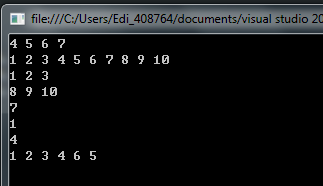
在撰寫技術文件、部落格文章、程式碼審查報告時,常需要將原始碼輸出為帶行號的格式。本文提供一個極簡的 C++ 控制台程式,讀取指定原始碼檔案,自動加上行號後輸出至新檔案與螢幕,展示 STL `std::map` 與函數物件的實用技巧。
/*
(C) OOMusou 2008
Filename : map_code_line.cpp
Compiler : Visual C++ 9.0 / Visual Studio 2008
Description : Demo how to add line number for code
Release : 07/18/2008 1.0
*/
#include
#include
#include
#include | 程式碼片段 | 說明 |
|---|---|
map<int, string> lines; | 以行號為 Key、程式碼行內容為 Value 的有序容器,自動按行號排序 |
lines[line_num++] = line; | map 的 `operator[]` 若 Key 不存在會自動插入,配合後置遞增一次完成「讀行、存入、行號+1」 |
for_each(lines.begin(), lines.end(), print_map()); | 配合函數物件輸出,`map` 不支援 `std::copy` 直接輸出 pair,退而求其次用 `for_each` |
struct print_map { void operator()(pair<int,string> p) {...} }; | 函數物件封裝輸出邏輯,同時寫入螢幕與檔案 |
1 /*
2 (C) OOMusou 2008 https://oomusou.cnblogs.com
3
4 Filename : map_code_line.cpp
5 Compiler : Visual C++ 9.0 / Visual Studio 2008
6 Description : Demo how to add line number for code
7 Release : 07/18/2008 1.0
8 */
9 #include
10 #include
11 #include
12 #include # 終端機直接執行
cat -n source.cpp > source_with_lines.cpp
# 或
nl -ba source.cpp > source_with_lines.cpp#!/usr/bin/env python3
import sys
def add_line_numbers(input_file, output_file=None, format='text'):
with open(input_file, 'r', encoding='utf-8') as f:
lines = f.readlines()
if format == 'markdown':
out = [f"{i+1:4d} | {line.rstrip()}" for i, line in enumerate(lines)]
elif format == 'html':
out = [f'{i+1:4d}{line.rstrip()}' for i, line in enumerate(lines)]
else:
out = [f"{i+1:4d} {line.rstrip()}" for i, line in enumerate(lines)]
result = '\n'.join(out)
if output_file:
with open(output_file, 'w', encoding='utf-8') as f:
f.write(result)
else:
print(result)
if __name__ == '__main__':
add_line_numbers(sys.argv[1], sys.argv[2] if len(sys.argv) > 2 else None, 'markdown')Editor Line Numbers、Copy with Line Numbers (複製時自動帶行號)Productivity Power Tools → Copy As HTML 含行號TextFX → TextFX Edit → Insert Line Numbers總結: C++ STL `map` 配合 `operator[]` 自動插入特性,寫出極簡洁的行號產生器。現代開發環境建議直接善用編輯器內建功能或 Python 腳本,更靈活且支援多種輸出格式。