多核 CPU 普及下,傳統單執行緒 for/foreach 無法發揮硬體效能。.NET 4.0+ 引入 System.Threading.Tasks.Parallel 與 PLINQ,讓開發者以近似序列寫法即可自動分區、排程、負載平衡,專注業務邏輯而非執行緒管理。
| 序列寫法 | 並行對應 | 適用場景 |
|---|---|---|
for (int i=0; i<N; i++) | Parallel.For(0, N, i => ...) | 索引運算、陣列處理 |
foreach (var x in coll) | Parallel.ForEach(coll, x => ...) | 任意 IEnumerable 集合 |
coll.Select(x => ...) | coll.AsParallel().Select(x => ...) | 查詢轉換、需回傳結果 |
Parallel.For(0, 100, i => {
    DoSomething(i); // 自動分區、多核執行
});
需求:對 List<int> 求和。若直接 Interlocked.Add 會有高爭用。解法:每個 Task 維護區域變數,最後合併。
long total = 0;
Parallel.For<long>(
    0, list.Count,
    () => 0L,                           // localInit: 每個 Task 初始區域和
    (i, loop, subtotal) => {          // body: 累加到區域變數
        subtotal += list[i];
        return subtotal;
    },
    subtotal => Interlocked.Add(ref total, subtotal) // localFinally: 合併到全域
);
原理: TPL 內部建立 Partitioner,每個分區一個 Task,localInit 執行一次,body 重複執行,localFinally 在 Task 結束時呼叫一次,極大減少原子操作次數。
loop.Break():完成當前索引**之前**的所有迭代,再停止(保證順序前段完成)loop.Stop():盡快停止,不保證已排程迭代執行Parallel.For(0, list.Count, (i, loop) => {
if (list[i] == target) {
foundIndex = i;
loop.Break(); // 找到第一個即停止,保證索引較小的都已執行
}
Process(list[i]);
});
// 基礎
Parallel.ForEach(items, item => Process(item));

// 帶區域狀態求和
long sum = 0;
Parallel.ForEach<Item, long>(
    items,
    () => 0L,
    (item, loop, local) => local + item.Value,
    local => Interlocked.Add(ref sum, local)
);

// 自訂分區器:針對非均勻負載
var partitioner = Partitioner.Create(0, items.Count, chunkSize: 100);
Parallel.ForEach(partitioner, range => {
    for (int i = range.Item1; i < range.Item2; i++) Process(items[i]);
});
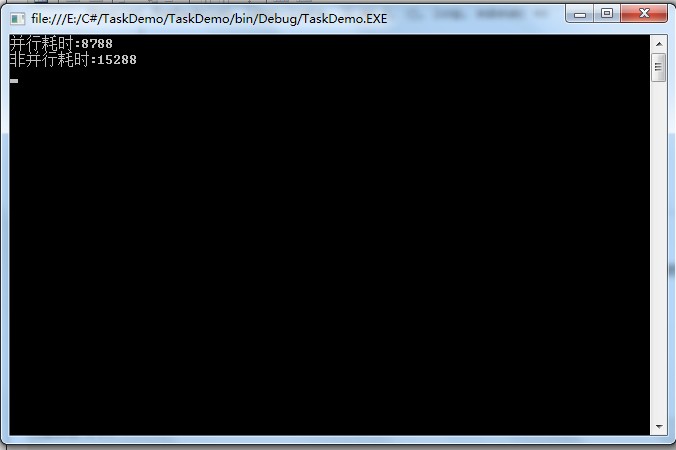
const int N = 10_000_000;
var listSeq = new List<int>(N);
var listPar = new List<int>(N);

// 順序
var sw1 = Stopwatch.StartNew();
for (int i = 0; i < N; i++) listSeq.Add(new Random(i).Next());
sw1.Stop();

// 並行 - 注意:Random 非執行緒安全,示範用 ThreadLocal
var sw2 = Stopwatch.StartNew();
Parallel.For(0, N,
    () => new Random(Guid.NewGuid().GetHashCode()), // localInit
    (i, loop, rnd) => { listPar.Add(rnd.Next()); return rnd; },
    _ => { }
);
sw2.Stop();

Console.WriteLine($"Sequential: {sw1.ElapsedMilliseconds} ms");
Console.WriteLine($"Parallel:   {sw2.ElapsedMilliseconds} ms");
典型結果(8 核): Sequential ~1800ms → Parallel ~350ms(加速比 ~5×,受限於記憶體頻寬與鎖)。
Random、StringBuilder、EF DbContext → 使用 ThreadLocal<T> 或區域狀態模式x++)時,排程開銷 > 計算收益 → 合併區塊或改用 SIMD (System.Numerics.Vector).Result、.Wait()、同步 IO → 改非同步或改用 Task.WhenAll 批次AggregateException → 必須 try/catch (AggregateException ae) 並 ae.Flatten()AsParallel() 不保證順序,需 .AsOrdered() 或手動排序var result = numbers.AsParallel()
.Where(n => n % 2 == 0)
.Select(n => ExpensiveCompute(n))
.OrderBy(n => n) // 需序時加 AsOrdered()
.ToList();
// 取消權杖支援
var cts = new CancellationTokenSource();
Task.Run(() => { Thread.Sleep(1000); cts.Cancel(); });
var q = data.AsParallel().WithCancellation(cts.Token).Select(...);
需要回傳結果集合? → PLINQ (AsParallel)
只需副作用(寫檔、發請求)? → Parallel.For/ForEach
負載極不均勻? → Partitioner.Create + Parallel.ForEach(range)
需精確控制併發度? → ParallelOptions { MaxDegreeOfParallelism = Environment.ProcessorCount }
善用 Parallel 與 PLINQ,配合 ThreadLocal、Partitioner、CancellationToken,即可在幾行程式碼內釋放多核算力,將 CPU 密集型任務加速 4-8 倍。