本節實作 ASP.NET MVC 2.0 表單驗證登入/登出功能,涵蓋 Model 設計、強型別 View、Controller 雙 Action 模式、FormsAuthentication 票據管理、登出導向首頁。
<%: %> 自動 HTML 編碼輸出(防 XSS),功能等同 <%= %> 但更安全,MVC 2 引入,建議優先使用。
public class Login {
    [DisplayName("使用者名稱")]
    public string UserName { get; set; }

    [DisplayName("密碼")]
    public string UserPwd { get; set; }

    [DisplayName("記住我")]
    public bool RememberMe { get; set; }
}
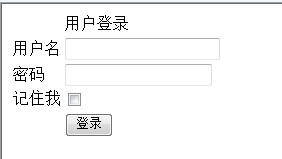
<%@ Page Language="C#" Inherits="System.Web.Mvc.ViewPage" %> 登入 <% if (ViewData["msg"] != null) { %><%: ViewData["msg"] %><% } %><% Html.BeginForm(); %><% Html.EndForm(); %>
使用者登入 <%: Html.LabelFor(m => m.UserName) %> <%: Html.TextBoxFor(m => m.UserName) %> <%: Html.LabelFor(m => m.UserPwd) %> <%: Html.PasswordFor(m => m.UserPwd) %> <%: Html.LabelFor(m => m.RememberMe) %> <%: Html.CheckBoxFor(m => m.RememberMe) %>
public class UserController : Controller {
    // GET: 顯示登入頁面
    public ActionResult Login() {
        return View();
    }

    // POST: 處理登入提交
    [HttpPost]
    public ActionResult Login(Models.Login model) {
        if (new Models.SqlHelper().UserLogin(model)) {
            // 登入成功:建立 FormsAuthentication Ticket
            FormsService.SignIn(model.UserName, model.RememberMe);
            return RedirectToAction("Index");
        }

        // 登入失敗
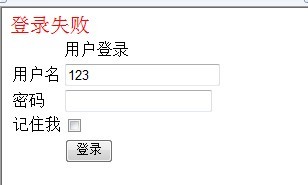
        ViewData["msg"] = "登入失敗,帳號或密碼錯誤";
        return View(model);  // 保留輸入值回傳 View
    }
}
public bool UserLogin(Login model) {
    string sql = "SELECT * FROM UserInfo WHERE UserName=@u AND UserPwd=@p";
    using (SqlConnection cn = new SqlConnection(conStr)) {
        cn.Open();
        using (SqlCommand cmd = new SqlCommand(sql, cn)) {
            cmd.Parameters.AddWithValue("@u", model.UserName);
            cmd.Parameters.AddWithValue("@p", model.UserPwd);  // 實務應比對雜湊
            SqlDataAdapter da = new SqlDataAdapter(cmd);
            DataSet ds = new DataSet();
            da.Fill(ds);
            return ds.Tables[0].Rows.Count > 0;
        }
    }
}
    <% if (Request.IsAuthenticated) { %>
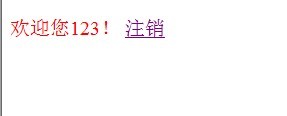
        歡迎您 <%: Page.User.Identity.Name %>!
        <%: Html.ActionLink("登出", "LoginOff") %>
    <% } else { %>
        <%: Html.ActionLink("登入", "Login") %>
    <% } %>
public ActionResult LoginOff() {
    FormsService.SignOut();  // 清除 FormsAuthentication Cookie
    return RedirectToAction("Index");
}
public static class FormsService {
    public static void SignIn(string userName, bool rememberMe) {
        FormsAuthentication.SetAuthCookie(userName, rememberMe);
    }

    public static void SignOut() {
        FormsAuthentication.SignOut();
    }
}
<%: Html.ActionLink("連結文字", "ActionName", "ControllerName", routeValues, htmlAttributes) %>

<%: Html.ActionLink("登出", "LoginOff", "User") %>
MVC 2.0 表單驗證登入/登出流程清晰:Model 定義資料結構,View 強型別繫結,Controller 雙 Action 分離關注點,FormsAuthentication 管理身分票據。這套模式延續至今仍是 ASP.NET Core Identity 的基礎架構雛形。實務專案請務必:密碼雜湊儲存、HTTPS 傳輸、防 CSRF (AntiForgeryToken)、實作記住我永久 Cookie 機制。