承接前四節(建立專案、使用者註冊、客戶端驗證、伺服器端驗證),本文完成使用者管理的最後兩項核心功能:編輯與刪除,展示完整的 CRUD 閉環。
public ActionResult Index() {
    DataSet ds = new Models.SqlHelper().GetAllUsers();
    if (ds != null && ds.Tables[0].Rows.Count > 0) {
        var list = new List();
        foreach (DataRow row in ds.Tables[0].Rows) {
            list.Add(new Models.UserModels {
                UserName = row["UserName"].ToString(),
                UserPwd = row["UserPwd"].ToString(),
                Email = row["Email"].ToString()
            });
        }
        ViewData["users"] = list;
    }
    return View();
}
| 使用者名稱 | 密碼 | 電子郵件 | 操作 |
|---|---|---|---|
| <%: item.UserName %> | <%: item.UserPwd %> | <%: item.Email %> | <%: Html.ActionLink("編輯", "EditUser", "User", new { userName = item.UserName }, null) %> | <%: Html.ActionLink("刪除", "DelUser", "User", new { userName = item.UserName }, null) %> |
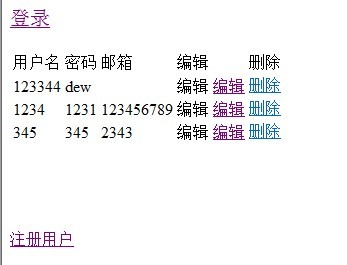
public ActionResult EditUser(string userName) {
    DataSet ds = new Models.SqlHelper().GetSingleUser(userName);
    if (ds != null && ds.Tables[0].Rows.Count > 0) {
        ViewData["username"] = ds.Tables[0].Rows[0]["username"].ToString();
        ViewData["userPwd"] = ds.Tables[0].Rows[0]["userpwd"].ToString();
        ViewData["email"] = ds.Tables[0].Rows[0]["email"].ToString();
        return View("EditUser");
    }
    return View("Error");
}
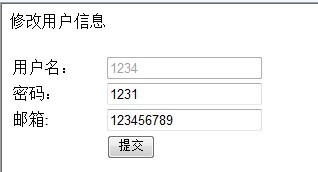
[HttpPost]
public ActionResult EditUser() {
    string userName = Request.QueryString["username"];
    string userPwd = Request.Form["txtUserPwd"];
    string email = Request.Form["txtEmail"];

    if (string.IsNullOrEmpty(userName) || string.IsNullOrEmpty(userPwd)) {
        ViewData["errMsg"] = "使用者名稱與密碼不可為空";
        return EditUser(userName);
    }

    bool result = new Models.SqlHelper().UpdateUser(userName, userPwd, email);
    if (result) {
        return RedirectToAction("Index");
    } else {
        ViewData["errMsg"] = "更新失敗,請稍後再試";
        return EditUser(userName);
    }
}
public ActionResult DelUser(string userName) {
    bool result = new Models.SqlHelper().DelUser(userName);
    // 刪除後重新載入列表資料
    return RedirectToAction("Index");
}
public class SqlHelper {
    // 更新使用者
    public bool UpdateUser(string userName, string userPwd, string email) {
        string sql = "UPDATE UserInfo SET UserPwd=@pwd, Email=@email WHERE UserName=@name";
        using (var conn = new SqlConnection(conStr)) {
            conn.Open();
            using (var cmd = new SqlCommand(sql, conn)) {
                cmd.Parameters.AddWithValue("@pwd", userPwd);
                cmd.Parameters.AddWithValue("@email", email);
                cmd.Parameters.AddWithValue("@name", userName);
                return cmd.ExecuteNonQuery() > 0;
            }
        }
    }

    // 刪除使用者
    public bool DelUser(string userName) {
        string sql = "DELETE FROM UserInfo WHERE UserName=@name";
        using (var conn = new SqlConnection(conStr)) {
            conn.Open();
            using (var cmd = new SqlCommand(sql, conn)) {
                cmd.Parameters.AddWithValue("@name", userName);
                return cmd.ExecuteNonQuery() > 0;
            }
        }
    }
}
| 概念 | 本系列實作位置 |
|---|---|
| Model | UserModels、RegisterModel、LoginModel、SqlHelper |
| View | .aspx 頁面(強型別 ViewPage<T>) |
| Controller | UserController(ActionResult 方法) |
| 路由 | /Controller/Action/參數 |
| 模型繫結 | Action 參數自動對應表單欄位 |
| 驗證 | DataAnnotations(伺服端)+ jQuery Validate(客戶端) |
| 防偽 | [ValidateAntiForgeryToken] |
五節教學完整呈現了 ASP.NET MVC 2.0 從專案建立、模型設計、視圖建構、控制器邏輯、雙端驗證到 CRUD 完整流程。掌握這些基礎,即可著手開發實務級 MVC 應用。建議後續深入學習:Entity Framework ORM、Repository 模式、單元測試、領域驅動設計(DDD)等進階主題。