會員中心包含:側邊導航、顯示/修改個人資料、修改密碼、登出。核心技術:TryUpdateModel 白名單綁定、ChangePasswordViewModel 驗證、Sha256 密碼雜湊。
[HttpPost]
[ValidateAntiForgeryToken]
public ActionResult Login(LoginViewModel model, string returnUrl)
{
    if (ModelState.IsValid)
    {
        var user = _userService.Find(model.UserName);
        if (user == null) ModelState.AddModelError("UserName", "用戶不存在");
        else if (user.Password == SecurityHelper.Sha256(model.Password))
        {
            // 更新最後登入時間與 IP
            user.LastLoginTime = DateTime.Now;
            user.LastLoginIP = Request.UserHostAddress;
            _userService.Update(user);

            // 建立身分識別並登入
            var identity = _userService.CreateIdentity(user, DefaultAuthenticationTypes.ApplicationCookie);
            AuthenticationManager.SignOut(DefaultAuthenticationTypes.ApplicationCookie);
            AuthenticationManager.SignIn(new AuthenticationProperties { IsPersistent = model.RememberMe }, identity);

            return RedirectToLocal(returnUrl);
        }
        else ModelState.AddModelError("Password", "密碼錯誤");
    }
    return View(model);
}
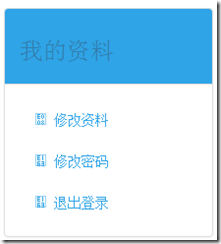
<div class="panel panel-primary">
    <div class="panel-heading"><h3>我的資料</h3></div>
    <div class="panel-body">
        <ul class="nav nav-pills nav-stacked">
            <li><a href="@Url.Action("Details")"><span class="glyphicon glyphicon-user"></span> 修改資料</a></li>
            <li><a href="@Url.Action("ChangePassword")"><span class="glyphicon glyphicon-lock"></span> 修改密碼</a></li>
            <li><a href="@Url.Action("Logout")"><span class="glyphicon glyphicon-log-out"></span> 退出登錄</a></li>
        </ul>
    </div>
</div>
public ActionResult Menu() => PartialView("_UserMenu");
public ActionResult Details()
{
    var user = _userService.Find(User.Identity.Name);
    return View(user);
}
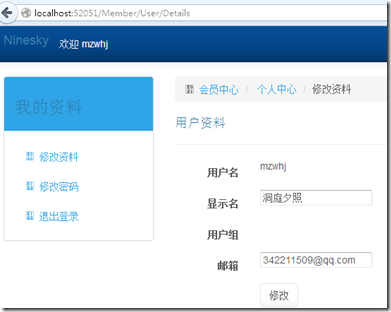
@model Ninesky.Models.User

@{
    ViewBag.Title = "我的資料";
}

<div class="row">
    <div class="col-md-3">@Html.Action("Menu")</div>
    <div class="col-md-9">
        <ol class="breadcrumb">
            <li><a href="@Url.Action("Index", "Home")"><span class="glyphicon glyphicon-home"></span> 會員中心</a></li>
            <li><a href="@Url.Action("Details")">個人中心</a></li>
            <li class="active">修改資料</li>
        </ol>

        @using (Html.BeginForm("Modify", "User"))
        {
            @Html.AntiForgeryToken()
            <div class="form-horizontal">
                <h4>用戶資料</h4> <hr />
                @Html.ValidationSummary(true)
                @Html.HiddenFor(m => m.UserID)

                <div class="form-group">
                    @Html.LabelFor(m => m.UserName, new { @class = "control-label col-md-2" })
                    <div class="col-md-10">@Html.DisplayFor(m => m.UserName)</div>
                </div>

                <div class="form-group">
                    @Html.LabelFor(m => m.DisplayName, new { @class = "control-label col-md-2" })
                    <div class="col-md-10">
                        @Html.EditorFor(m => m.DisplayName)
                        @Html.ValidationMessageFor(m => m.DisplayName)
                    </div>
                </div>

                <div class="form-group">
                    <label class="control-label col-md-2">用戶組</label>
                    <div class="col-md-10">
                        @foreach (var r in Model.UserRoleRelations)
                        { <span>@r.Role.Name</span><br /> }
                    </div>
                </div>

                <div class="form-group">
                    @Html.LabelFor(m => m.Email, new { @class = "control-label col-md-2" })
                    <div class="col-md-10">
                        @Html.EditorFor(m => m.Email)
                        @Html.ValidationMessageFor(m => m.Email)
                    </div>
                </div>

                <div class="form-group">
                    <div class="col-md-offset-2 col-md-10">
                        <input type="submit" value="修改" class="btn btn-default" />
                    </div>
                </div>
            </div>
        }
    </div>
</div>

@section Scripts { @Scripts.Render("~/bundles/jqueryval") }
[HttpPost]
[ValidateAntiForgeryToken]
public ActionResult Modify()
{
    var user = _userService.Find(User.Identity.Name);
    if (user == null) ModelState.AddModelError("", "用戶不存在");
    else
    {
        // 僅允許更新 DisplayName、Email
        if (TryUpdateModel(user, new[] { "DisplayName", "Email" }))
        {
            if (ModelState.IsValid)
            {
                if (_userService.Update(user))
                    ModelState.AddModelError("", "修改成功!");
                else
                    ModelState.AddModelError("", "無變更內容");
            }
        }
        else ModelState.AddModelError("", "模型綁定失敗");
    }
    return View("Details", user);
}
public class ChangePasswordViewModel
{
    [Required(ErrorMessage = "必填")]
    [StringLength(20, MinimumLength = 6, ErrorMessage = "{2}~{1}字元")]
    [DataType(DataType.Password)]
    [Display(Name = "原密碼")]
    public string OriginalPassword { get; set; }

    [Required(ErrorMessage = "必填")]
    [StringLength(20, MinimumLength = 6, ErrorMessage = "{2}~{1}字元")]
    [DataType(DataType.Password)]
    [Display(Name = "新密碼")]
    public string Password { get; set; }

    [Required(ErrorMessage = "必填")]
    [Compare("Password", ErrorMessage = "兩次輸入不一致")]
    [DataType(DataType.Password)]
    [Display(Name = "確認密碼")]
    public string ConfirmPassword { get; set; }
}
public ActionResult ChangePassword() => View();

[HttpPost]
[ValidateAntiForgeryToken]
public ActionResult ChangePassword(ChangePasswordViewModel model)
{
    if (ModelState.IsValid)
    {
        var user = _userService.Find(User.Identity.Name);
        if (user.Password == SecurityHelper.Sha256(model.OriginalPassword))
        {
            user.Password = SecurityHelper.Sha256(model.Password);
            if (_userService.Update(user))
                ModelState.AddModelError("", "密碼修改成功");
            else
                ModelState.AddModelError("", "修改失敗");
        }
        else ModelState.AddModelError("OriginalPassword", "原密碼錯誤");
    }
    return View(model);
}
@model Ninesky.Web.Areas.Member.Models.ChangePasswordViewModel

@{
    ViewBag.Title = "修改密碼";
}

<div class="row">
    <div class="col-md-3">@Html.Action("Menu")</div>
    <div class="col-md-9">
        @* Breadcrumb *@
        @using (Html.BeginForm())
        {
            @Html.AntiForgeryToken()
            <div class="form-horizontal">
                <h4>修改密碼</h4> <hr />
                @Html.ValidationSummary(true)

                @* OriginalPassword, Password, ConfirmPassword 三欄位 *@

                <div class="form-group">
                    <div class="col-md-offset-2 col-md-10">
                        <input type="submit" value="修改" class="btn btn-default" />
                    </div>
                </div>
            </div>
        }
    </div>
</div>

@section Scripts { @Scripts.Render("~/bundles/jqueryval") }
@using Microsoft.AspNet.Identity

@if (Request.IsAuthenticated)
{
    using (Html.BeginForm("Logout", "User", FormMethod.Post, new { id = "logoutForm", @class = "navbar-right" }))
    {
        @Html.AntiForgeryToken()
        <ul class="nav navbar-nav navbar-right">
            <li>@Html.ActionLink("你好 " + User.Identity.GetUserName() + "!", "Manage", "Account", null, new { title = "管理" })</li>
            <li><a href="javascript:document.getElementById('logoutForm').submit()">注銷</a></li>
        </ul>
    }
}
else
{
    <ul class="nav navbar-nav navbar-right">
        <li>@Html.ActionLink("註冊", "Register", "User", new { Area = "Member" }, new { id = "registerLink" })</li>
        <li>@Html.ActionLink("登錄", "Login", "User", new { Area = "Member" }, new { id = "loginLink" })</li>
    </ul>
}
為 Member 區域控制器加上 [Authorize],登入/註冊/驗證碼 Action 加上 [AllowAnonymous]。
| 技術 | 應用場景 | 關鍵代碼 |
|---|---|---|
| TryUpdateModel 白名單 | 防參數綁定攻擊,僅允許修改指定欄位 | TryUpdateModel(user, new[] { "DisplayName", "Email" }) |
| ChangePasswordViewModel | 密碼變更專用驗證模型,含 Compare 屬性 | [Compare("Password")] |
| Sha256 雜湊 | 密碼不以明文儲存 | SecurityHelper.Sha256(password) |
| _LoginPartial | 全站共用登入狀態顯示 | @if (Request.IsAuthenticated) |
| Area + Authorize | 會員區統一權限管控 | [Authorize] on Controller |
會員中心基礎功能告一段落。TryUpdateModel 白名單綁定是防止過度發佈攻擊的標準做法;ChangePasswordViewModel 封裝密碼變更驗證邏輯,配合 DataAnnotations 實現伺服器/客戶端雙重驗證。下一階段進入內容管理模組(文章、諮詢、附件)。