文章發布包含四大子系統:
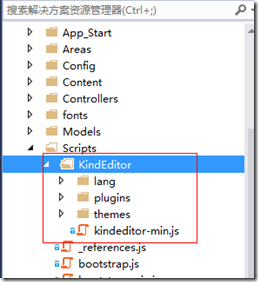
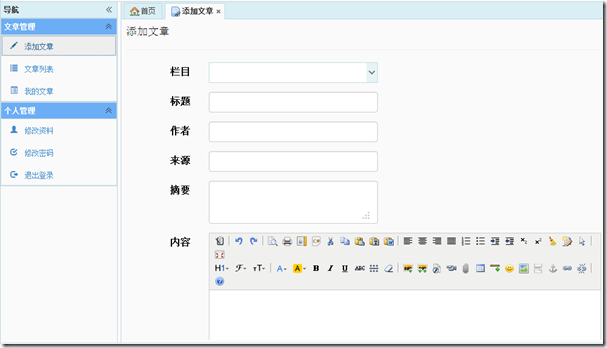
官網 下載最新版,解壓後將 kindeditor 資料夾複製至專案 Scripts/ 目錄。
@section Scripts {
    <script src="~/Scripts/KindEditor/kindeditor-min.js"></script>
    <script>
        KindEditor.ready(function (K) {
            // 內容編輯器
            window.editor = K.create('#Content', {
                height: '500px',
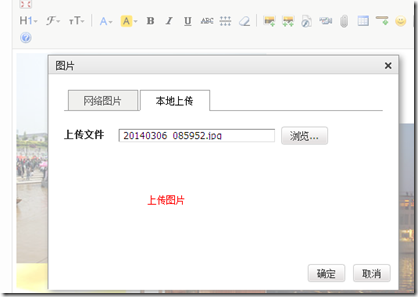
                uploadJson: '@Url.Action("Upload", "Attachment")',
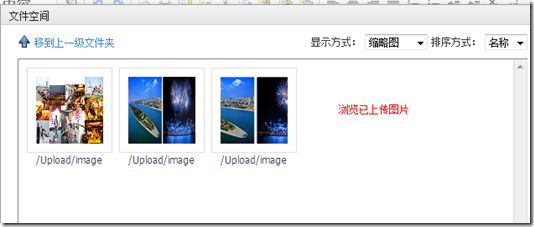
                fileManagerJson: '@Url.Action("FileManagerJson", "Attachment")',
                allowFileManager: true,
                formatUploadUrl: false
            });

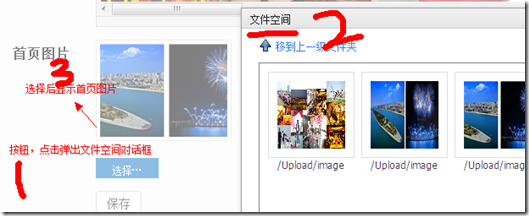
            // 首頁圖片選擇器
            var editor2 = K.editor({
                fileManagerJson: '@Url.Action("FileManagerJson", "Attachment")'
            });
            K('#btnPicSelect').click(function () {
                editor2.loadPlugin('filemanager', function () {
                    editor2.plugin.filemanagerDialog({
                        viewType: 'VIEW', dirName: 'image',
                        clickFn: function (url, title) {
                            $.ajax({
                                type: "POST",
                                url: '@Url.Action("CreateThumbnail", "Attachment")',
                                data: { originalPicture: url },
                                async: false,
                                success: function (data) {
                                    if (data) {
                                        K('#CommonModel_DefaultPicUrl').val(data);
                                        K('#imgPreview').attr("src", data);
                                    } else alert("縮圖生成失敗");
                                    editor2.hideDialog();
                                }
                            });
                        }
                    });
                });
            });
        });
    </script>
}
@model Ninesky.Models.Article

@using (Html.BeginForm())
{
    @Html.AntiForgeryToken()
    <div class="form-horizontal">
        <h4>發布文章</h4> <hr />
        @Html.ValidationSummary(true)

        <div class="form-group">
            @Html.LabelFor(m => m.CommonModel.CategoryID, new { @class = "control-label col-sm-2" })
            <div class="col-sm-10">
                <input id="CommonModel_CategoryID" name="CommonModel.CategoryID"
                       data-options="url:'@Url.Action("JsonTree", "Category", new { model="Article" })'"
                       class="easyui-combotree" style="height:34px;width:280px;" />
                @Html.ValidationMessageFor(m => m.CommonModel.CategoryID)
            </div>
        </div>

        @* Title, Author, Source, Intro 欄位 *@

        <div class="form-group">
            @Html.LabelFor(m => m.Content, new { @class = "control-label col-sm-2" })
            <div class="col-sm-10">
                @Html.TextAreaFor(m => m.Content, new { @class = "form-control", id = "Content", rows = 20 })
                @Html.ValidationMessageFor(m => m.Content)
            </div>
        </div>

        <div class="form-group">
            @Html.LabelFor(m => m.CommonModel.DefaultPicUrl, new { @class = "control-label col-sm-2" })
            <div class="col-sm-10">
                <img id="imgPreview" class="thumbnail" src="" style="max-width:160px;" />
                @Html.HiddenFor(m => m.CommonModel.DefaultPicUrl)
                <a id="btnPicSelect" class="easyui-linkbutton">選擇首頁圖片…</a>
            </div>
        </div>

        <div class="form-group">
            <div class="col-sm-offset-2 col-sm-10">
                <input type="submit" value="發布" class="btn btn-primary" />
            </div>
        </div>
    </div>
}
public class AttachmentController : Controller
{
    private readonly IAttachmentService _attachmentService = new AttachmentService();

    // 上傳端點:供 KindEditor 呼叫
    public ActionResult Upload()
    {
        var config = WebConfigurationManager.OpenWebConfiguration("~")
            .GetSection("UploadConfig") as UploadConfig;

        HttpPostedFileBase file = Request.Files["imgFile"];
        if (file == null) return Json(new { error = 1, message = "請選擇檔案" });

        // 驗證副檔名、大小...
        string ext = Path.GetExtension(file.FileName).ToLower();
        string dir = Request.QueryString["dir"] ?? "image";
        string saveDir = Server.MapPath($"~/{config.Path}/{dir}/{DateTime.Now:yyyy-MM}/");
        Directory.CreateDirectory(saveDir);

        string fileName = $"{DateTime.Now:yyyyMMdd_HHmmss}{ext}";
        string savePath = Path.Combine(saveDir, fileName);
        string virtualPath = $"~/{config.Path}/{dir}/{DateTime.Now:yyyy-MM}/{fileName}";

        file.SaveAs(savePath);

        // 寫入資料庫
        _attachmentService.Add(new Attachment
        {
            FilePath = virtualPath,
            Extension = ext.TrimStart('.'),
            Owner = User.Identity.Name,
            UploadDate = DateTime.Now,
            Type = dir
        });

        return Json(new { error = 0, url = Url.Content(virtualPath) });
    }

    // 檔案管理列表:供 KindEditor fileManagerJson 呼叫
    public ActionResult FileManagerJson(int? id, string dir)
    {
        IQueryable query = _attachmentService.FindList(id, User.Identity.Name, dir, id == null);
        var list = query.Select(a => new AttachmentManagerViewModel
        {
            is_dir = false,
            has_file = false,
            filesize = new FileInfo(Server.MapPath(a.FilePath)).Length,
            is_photo = a.Type == "image",
            filetype = a.Extension,
            filename = Url.Content(a.FilePath),
            datetime = a.UploadDate.ToString("yyyy-MM-dd HH:mm:ss")
        }).ToList();

        return Json(new
        {
            moveup_dir_path = "",
            current_dir_path = "",
            current_url = "",
            total_count = list.Count,
            file_list = list
        }, JsonRequestBehavior.AllowGet);
    }

    // 縮圖生成
    public ActionResult CreateThumbnail(string originalPicture)
    {
        if (originalPicture.Contains("_s")) return Json(originalPicture); // 已是縮圖

        string thumbPath = originalPicture.Insert(originalPicture.LastIndexOf('.'), "_s");
        if (PictureHelper.CreateThumbnail(Server.MapPath(originalPicture), Server.MapPath(thumbPath), 160, 120))
        {
            // 縮圖也記錄到資料庫
            _attachmentService.Add(new Attachment
            {
                FilePath = "~" + thumbPath,
                Extension = Path.GetExtension(thumbPath).TrimStart('.'),
                Owner = User.Identity.Name,
                Type = "image",
                UploadDate = DateTime.Now
            });
            return Json(thumbPath);
        }
        return Json((string)null);
    }
}
public static class PictureHelper
{
    public static bool CreateThumbnail(string sourcePath, string destPath, int width, int height)
    {
        using (Image src = Image.FromFile(sourcePath))
        {
            // 計算裁切區域(居中裁切填滿)
            double srcRatio = (double)src.Width / src.Height;
            double destRatio = (double)width / height;
            RectangleF srcRect;

            if (srcRatio > destRatio) // 來源較寬
            {
                float h = src.Height;
                float w = h * destRatio;
                srcRect = new RectangleF((src.Width - w) / 2, 0, w, h);
            }
            else // 來源較高
            {
                float w = src.Width;
                float h = w / destRatio;
                srcRect = new RectangleF(0, (src.Height - h) / 2, w, h);
            }

            using (Bitmap bmp = new Bitmap(width, height))
            using (Graphics g = Graphics.FromImage(bmp))
            {
                g.InterpolationMode = InterpolationMode.HighQualityBicubic;
                g.SmoothingMode = SmoothingMode.HighQuality;
                g.Clear(Color.Transparent);
                g.DrawImage(src, new RectangleF(0, 0, width, height), srcRect, GraphicsUnit.Pixel);
                bmp.Save(destPath, ImageFormat.Jpeg);
            }
        }
        return true;
    }
}
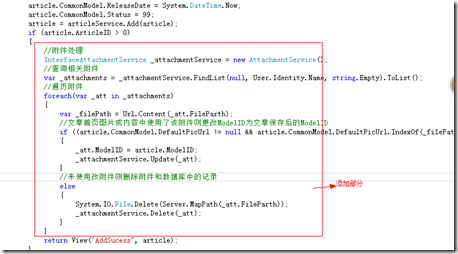
[HttpPost]
[ValidateInput(false)]       // 允許 HTML 內容
[ValidateAntiForgeryToken]
public ActionResult Add(Article article)
{
    if (ModelState.IsValid)
    {
        // 固定欄位
        article.CommonModel.Hits = 0;
        article.CommonModel.Inputer = User.Identity.Name;
        article.CommonModel.Model = "Article";
        article.CommonModel.ReleaseDate = DateTime.Now;
        article.CommonModel.Status = 99; // 已發布

        article = _articleService.Add(article);

        if (article.ArticleID > 0)
        {
            // 附件歸屬與清理
            var attService = new AttachmentService();
            var uploads = attService.FindList(null, User.Identity.Name, string.Empty).ToList();

            foreach (var att in uploads)
            {
                string fileUrl = Url.Content(att.FilePath);
                bool used = (article.CommonModel.DefaultPicUrl?.Contains(fileUrl) ?? false)
                         || article.Content.Contains(fileUrl);

                if (used)
                {
                    att.ModelID = article.ModelID; // 歸屬
                    attService.Update(att);
                }
                else
                {
                    // 刪除實體檔與資料庫記錄
                    System.IO.File.Delete(Server.MapPath(att.FilePath));
                    attService.Delete(att);
                }
            }
            return View("AddSuccess", article);
        }
    }
    return View(article);
}
| 子系統 | 關鍵技術 | 解決問題 |
|---|---|---|
| 富文本編輯 | KindEditor + uploadJson/fileManagerJson | 圖片/檔案上傳、線上管理、插入編輯器 |
| 附件上傳 | HttpPostedFileBase + 配置驗證 + 資料庫記錄 | 型別/大小限制、歸屬追蹤、防惡意上傳 |
| 縮圖生成 | Graphics.DrawImage + 居中裁切 + 高品質插值 | 固定尺寸、不變形、自動聚焦主體 |
| 生命週期 | 文章儲存時掃描 ModelID=null 附件,比對 URL 歸屬/清理 | 避免孤兒檔案佔用空間、資料庫垃圾資料 |
IFileStorage 介面本篇將文章發布所需的編輯、上傳、縮圖、清理串聯成完整鏈路。核心在於 ModelID=null 作為「暫存態」標記,文章儲存時統一歸屬與清理,確保資料一致性與儲存空間效率。KindEditor 雖屬經典專案,但其 uploadJson/fileManagerJson 協議設計清晰,易於對接自建後端。