掌握 Web Pages 專案的資料夾組織原則、路徑解析機制與三大核心工具 (~ 運算子、Server.MapPath、Href),解決跨環境部署路徑問題。
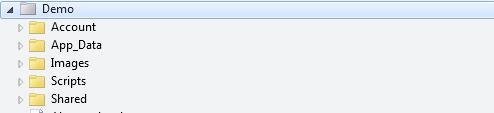
| 資料夾 | 用途 | 範例內容 |
|---|---|---|
| Account | 登入、註冊、密碼管理、驗證相關頁面 | Login.cshtml, Register.cshtml, ChangePassword.cshtml |
| App_Data | 資料庫檔案 (.sdf, .mdf)、XML/JSON 資料、上傳檔案儲存 | Database.sdf, config.xml, uploads/ |
| Images / Content/Images | 靜態圖片資源 (Logo、Banner、產品圖) | logo.png, hero-banner.jpg, products/ |
| Scripts / Content/Scripts | JavaScript 檔案 (jQuery、Bootstrap、自訂腳本) | jquery-3.6.0.min.js, site.js, components/ |
| Styles / Content/Styles | CSS 樣式表 (Bootstrap、自訂樣式、Less/Sass 編譯輸出) | bootstrap.min.css, site.css, themes/ |
| Shared | 共用版面、部頁、編輯器範本、顯示範本 | _Layout.cshtml, _Header.cshtml, EditorTemplates/ |
| bin | 編譯輸出組件 (.dll)、NuGet 套件組件 | System.Web.Helpers.dll, EntityFramework.dll |
| 類型 | 格式範例 | 用途 | 備註 |
|---|---|---|---|
| 實體路徑 | C:\WebSites\MyApp\Images\photo.jpg | 伺服器檔案系統存取 (File.IO、Server.MapPath) | 機器相依、部署變動 |
| 虛擬路徑 | ~/Images/photo.jpg 或 /Images/photo.jpg | 應用程式內部路徑參考、~ 運算子、Href() | 應用程式相對、跨環境穩定 |
| URL | https://example.com/Images/photo.jpg | 瀏覽器存取、HTTP 要求、SEO、書籤 | 公開可見、含域名協定 |
關鍵對應:
URL:           https://example.com/html/html-tutorial.html
Server:        example.com
Virtual Path:  /html/html-tutorial.html
Physical Path: C:\WebSites\example\html\html-tutorial.html@{
// 程式碼中使用 ~ 參考應用程式根目錄
var imagesFolder = "~/Images";
var styleSheet = "~/Styles/site.css";
var dataFile = "~/App_Data/config.json";
}優勢: 應用程式移至子目錄 (如 /MyApp) 時,~ 自動解析為正確根路徑,**程式碼零修改**。
@{
 var virtualPath = "~/App_Data/products.csv";
 var physicalPath = Server.MapPath(virtualPath);
// 結果: C:\WebSites\MyApp\App_Data\products.csv

 // 僅實體路徑可用於 File IO 操作
 var lines = File.ReadAllLines(physicalPath);
}
使用時機: File.Read/Write、StreamReader/Writer、XmlDocument.Load、XDocument.Load 等檔案系統 API。
@{
 var styleSheet = "~/Styles/site.css";
 var imageUrl = "~/Images/logo.png";
}
<!-- 錯誤:瀏覽器不認識 ~ -->
<link href="~/Styles/site.css" rel="stylesheet" />

<!-- 正確:Href() 轉換 -->
<link href="@Href(styleSheet)" rel="stylesheet" />
<!-- 輸出: /Styles/site.css (或 /MyApp/Styles/site.css 子應用程式) -->

<img src="@Href(imageUrl)" alt="Logo" />
使用場景: HTML 標籤屬性:href (a/link)、src (img/script/iframe/video/audio)、action (form)、data-* 自訂屬性。
| 情境 | 正確做法 | 錯誤做法 |
|---|---|---|
| Razor 程式碼中參考資料夾 | @"~/Images" | @"C:\WebSites\MyApp\Images" |
| HTML img src | @Href("~/Images/photo.jpg") | ~/Images/photo.jpg |
| HTML a href | @Href("~/Products/Detail/123") | ~/Products/Detail/123 |
| CSS background-image | url('@Href("~/Images/bg.jpg")') | url('~/Images/bg.jpg') |
| JavaScript AJAX URL | @Href("~/Api/Products") | ~/Api/Products |
| File.ReadAllLines | Server.MapPath("~/App_Data/file.txt") | "~/App_Data/file.txt" |
| Response.Redirect | Response.Redirect("~/Login") | Href("~/Login") (亦可但語意不同) |
若網站部署為 IIS 子應用程式 (如 https://example.com/MyApp/):
~ 解析為 /MyApp/Href("~/Images/logo.png") 產生 /MyApp/Images/logo.pngServer.MapPath("~/App_Data/db.sdf") 正確對應實體路徑Request.ApplicationPath 回傳 /MyApp**所有路徑工具自動處理子應用程式路徑前綴**,這是使用虛擬路徑而非硬編碼絕對路徑的核心優勢。
@functions {
 public static string ResolveSafePath(string virtualPath, string allowedRoot = "~/") {
 var fullVirtual = VirtualPathUtility.Combine(VirtualPathUtility.ToAbsolute(allowedRoot), virtualPath);
 var physical = Server.MapPath(fullVirtual);
 var allowedPhysical = Server.MapPath(allowedRoot);

 if (!physical.StartsWith(allowedPhysical, StringComparison.OrdinalIgnoreCase)) {
 throw new SecurityException("Path traversal attempt detected");
 }
 return physical;
 }
}
防止使用者輸入 ../../../windows/system32 等路徑遍歷攻擊。