深入理解 MVC 控制器架構:URL 路由對應原理、Action 方法設計、ActionResult 類型與視圖渲染流程。
HomeController.cs    // 首頁、關於頁
AccountController.cs // 登入、註冊、帳號管理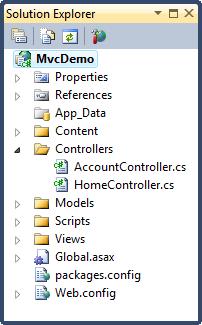
| 架構 | URL 對應方式 | 範例 |
|---|---|---|
| 傳統 Web | URL 直接對應實體檔案 | /index.php → 根目錄 index.php |
| MVC | URL 對應到 Controller Action 方法 | /Home/About → HomeController.About() |
routes.MapRoute(
    name: "Default",
    url: "{controller}/{action}/{id}",
    defaults: new { controller = "Home", action = "Index", id = UrlParameter.Optional }
);| URL | Controller | Action | id 參數 |
|---|---|---|---|
| / | Home | Index | (預設) |
| /Home/About | Home | About | (預設) |
| /Movies/Edit/5 | Movies | Edit | 5 |
| /Account/LogOn | Account | LogOn | (預設) |
using System;
using System.Collections.Generic;
using System.Linq;
using System.Web;
using System.Web.Mvc;

namespace MvcDemo.Controllers
{
    public class HomeController : Controller
    {
        // GET: /Home/
        public ActionResult Index()
        {
            return View();
        }

        // GET: /Home/About
        public ActionResult About()
        {
            return View();
        }
    }
}Controller 基類別ActionResult(或衍生類型)return View() 依慣例尋找 Views/ControllerName/ActionName.cshtml| 結果類型 | 用途 | Helper 方法 |
|---|---|---|
| ViewResult | 渲染視圖 | View() |
| PartialViewResult | 渲染部分視圖 | PartialView() |
| RedirectResult | 重導向至 URL | Redirect() |
| RedirectToRouteResult | 重導向至路由 | RedirectToAction() |
| JsonResult | 回傳 JSON 資料 | Json() |
| ContentResult | 回傳純文字/HTML | Content() |
| FileResult | 回傳檔案下載 | File() |
| EmptyResult | 無回傳內容 | new EmptyResult() |
| HttpStatusCodeResult | 指定 HTTP 狀態碼 | new HttpStatusCodeResult(404) |
Views 資料夾結構:
Views/
└── Home/
    ├── Index.cshtml   ← 對應 HomeController.Index()
└── About.cshtml ← 對應 HomeController.About()Views/ControllerName/ActionName.cshtmlViews/ControllerName/ActionName.vbhtmlViews/Shared/ActionName.cshtmlViews/Shared/ActionName.vbhtmlpublic ActionResult Details(int id)
{
var movie = db.Movies.Find(id);
if (movie == null) return HttpNotFound();
// 強型別模型
return View(movie);
// 或使用 ViewBag/ViewData
ViewBag.Message = "電影詳情";
return View(movie);
}// 簡單類型自動繫結
public ActionResult Edit(int id, string title)
// 複雜類型自動繫結表單欄位
[HttpPost]
public ActionResult Edit(MovieDB model)
{
if (ModelState.IsValid) { ... }
return View(model);
}[Authorize] // 需驗證
[HttpPost] // 僅接受 POST
[ValidateAntiForgeryToken] // CSRF 防護
[OutputCache(Duration=60)] // 輸出快取
public ActionResult SecureAction() { ... }async Task<ActionResult>HandleErrorAttribute 或自訂例外過濾器