資料繫結是 ASP.NET Web Forms 核心機制,將資料來源(資料庫、XML、集合、自訂物件)與伺服器控制項連結,分離資料邏輯與呈現邏輯。本文系統整理支援繫結的控制項分類、資料來源類型、繫結運算式語法、DataBind 執行流程與最佳實務。
RadioButtonList - 單選按鈕群組CheckBoxList - 多選核取方塊群組DropDownList - 下拉式選單ListBox - 清單方塊(支援多選)BulletedList - 項目符號清單共同特性:DataTextField、DataValueField、DataSource、DataBind()
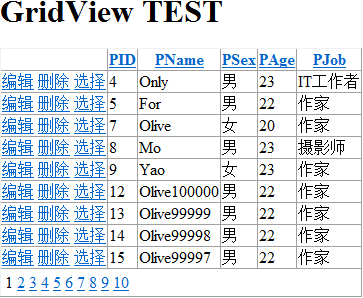
Repeater - 輕量模板控制項,無預設 HTMLDataList - 表格導向、豐富樣式屬性、支援編輯GridView - 功能最完整(分頁、排序、編輯、刪除、選取)DetailsView - 單筆記錄詳細檢視/編輯FormView - 模板化單筆記錄檢視/編輯ListView - .NET 3.5+,功能介於 DataList/GridView,支援群組、分頁DataPager - ListView 專用分頁控制項TreeView - 樹狀結構導航Menu - 選單導航SiteMapPath - 麵包屑路徑| 類型 | 範例 | 適用場景 | 備註 |
|---|---|---|---|
| 資料庫物件 | SqlDataReader, OleDbDataReader, DataTable, DataSet, DataView | 關聯式資料查詢結果 | DataReader 唯讀順向、效能最佳 |
| 集合類別 | ArrayList, List<T>, Hashtable, SortedList, Dictionary<TKey,TValue> | 記憶體內資料集合 | 泛型集合優先 |
| XML 資料 | DataSet.ReadXml, XmlDataSource, XPathDocument | 靜態選單、設定檔、資料交換 | 大檔案用 XmlReader |
| 自訂物件 | IEnumerable<T>, IList<T>, 實作 ITypedList 的集合 | 領域模型、DTO、ViewModel | 屬性公開、預設建構子 |
| 陣列 | string[], int[], CustomType[] | 固定大小序列 | 實作 IEnumerable |
| LINQ 查詢結果 | IQueryable<T>, IEnumerable<T> | 記憶體/LINQ to SQL/Entity Framework | 延遲執行特性注意 |
| 資料來源控制項 | SqlDataSource, ObjectDataSource, XmlDataSource, LinqDataSource, EntityDataSource | 宣告式資料存取、零程式碼繫結 | ObjectDataSource 適合分層架構 |
<%# Eval("FieldName") %>                    <-- 標準單向繫結
<%# Eval("FieldName", "{0:C}") %>           <-- 格式化(貨幣)
<%# Eval("DateField", "{0:yyyy/MM/dd}") %>  <-- 日期格式化
<%# Bind("FieldName") %>                    <-- 雙向繫結(GridView 編輯模式需用)
<%# Container.DataItem %>                   <-- 整個資料項(適用簡單型別集合)
<%# ((MyType)Container.DataItem).Property %> <-- 強型別存取
<%# Container.ItemIndex %>          <-- 項目索引(0-based)
<%# Container.ItemType %>           <-- ListItemType: Item/AlternatingItem/EditItem...
<%# Container.DataItemIndex %>      <-- 資料來源索引(分頁時不同於 ItemIndex)
control.DataSource = dataSource;control.DataBind(); 或頁面層級 Page.DataBind();DataBinding 事件<%# ... %> 運算式,設定子控制項屬性Repeater.ItemDataBound、GridView.RowDataBound 等Render 階段產生 HTML| 事件 | 時機 | 常見用途 |
|---|---|---|
| DataBinding | DataBind() 開始前 | 動態修改 DataSource、設定參數 |
| ItemCreated | 模板實例化後、繫結前 | 動態建立控制項、設定靜態屬性 |
| ItemDataBound | 繫結運算式評估後 | 依資料值動態調整樣式、隱藏控制項、計算衍生欄位 |
| DataBound | 所有項目繫結完成 | 統計總筆數、設定分頁資訊 |
<asp:SqlDataSource ID="sdsProducts" runat="server"
    ConnectionString="<%$ ConnectionStrings:Northwind %>"
    SelectCommand="SELECT ProductID, ProductName, UnitPrice FROM Products"
    ProviderName="System.Data.SqlClient" />

<asp:GridView ID="gvProducts" runat="server" DataSourceID="sdsProducts" />
<asp:ObjectDataSource ID="odsProducts" runat="server"
    TypeName="MyApp.BLL.ProductService"
    SelectMethod="GetAllProducts"
    InsertMethod="AddProduct"
    UpdateMethod="UpdateProduct"
    DeleteMethod="DeleteProduct" />
void Page_Load() {
    if (!IsPostBack) {
        var products = ProductService.GetAllProducts(); // 呼叫 BLL
        gvProducts.DataSource = products;
        gvProducts.DataBind();
    }
}
EnableViewState="false" 針對唯讀繫結控制項List<T>,搭配 Eval("Property")try-catch 包裹 DataBind(),友善顯示錯誤訊息| 錯誤訊息 | 可能原因 | 解決方案 |
|---|---|---|
| DataBinding: 'System.Data.DataRowView' does not contain a property named 'XXX' | 欄位名稱拼寫錯誤、大小寫不符、資料來源無此欄位 | 檢查 SQL 查詢欄位、DataTable.Columns、Eval 參數 |
| Data source is an invalid type | DataSource 指派非 IEnumerable 物件 | 確認資料來源實作 IEnumerable/IList/IDataSource |
| Cannot bind to property or column XXX | 雙向繫結 Bind() 用於唯讀屬性/欄位 | 改用 Eval() 或確保屬性可寫入 |
| ItemDataBound 事件未觸發 | DataBind() 未呼叫、控制項 ID 錯誤 | 確認 DataBind() 呼叫、AutoEventWireup=true |
| 重複資料/舊資料不更新 | PostBack 時未重新繫結、ViewState 干擾 | !IsPostBack 判斷、關閉 ViewState、明確重新繫結 |
掌握資料繫結架構是 ASP.NET Web Forms 開發核心竅門,選對控制項、資料來源與繫結方式,能事半功倍建構資料驅動 Web 應用。下一節將介紹 Button 控制項事件處理與表單提交機制。